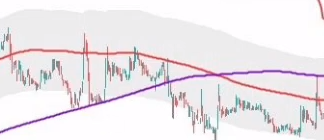
ZONE GRISE AUTOUR DE LA SMA200

Viewing 15 posts - 1 through 15 (of 65 total)
  • Author
    Posts
  • #201289 quote
    Roland57800Roland57800
    Participant
    Veteran

    Bonjour,

    dans la continuité du codage que je cherche à faire

    sur la photo il y a la sma 200 qui est entourée d’une zone grise

    j’ai comme information 5 x averagetruerange 200

    SMA200  = average [200] + 5 * averagetruerange [200]
    
    
    RETURN SMA200

    ce que j’ai codé ne donne rien

    merci de m’indiquer ce qui ne va pas

    Cordialement

    Capture1.png Capture1.png
    #201291 quote
    fifi743fifi743
    Participant
    Master

    bonjour,

    en utilisant high et low pour determiné le haut et bas de la bande

    bande base  average[200](low)

    #201292 quote
    Roland57800Roland57800
    Participant
    Veteran

    merci pour la réponse

    oui en effet j’y ai pas pensé

    je vais essayer

    #201293 quote
    Roland57800Roland57800
    Participant
    Veteran

    non, je n’y arrive pas

    je cherche

    #201298 quote
    fifi743fifi743
    Participant
    Master

    c’est pas ce que tu cherche


    hh =average[200](high)
    ll=average[200](low)
    
    return hh,ll
    #201303 quote
    JC_BywanJC_Bywan
    Moderator
    Master

    Peut-être que ton 5 fois averagetruerange[200] est la demi-bande ? Alors on pourrait essayer avec:

    bandesup = average[200](close) + 5*averagetruerange[200](close)

    bandeinf = average[200](close) – 5*averagetruerange[200](close)

    Puis colorer en gris clair entre bandesup et bandeinf


    Ou bien, si ça parait trop large, peut-être que ton 5 fois est la largeur de bande totale, auquel cas essayer avec +/- 2.5 fois :

    bandesup = average[200](close) + 2.5*averagetruerange[200](close)

    bandeinf = average[200](close) – 2.5*averagetruerange[200](close)

    #201312 quote
    Roland57800Roland57800
    Participant
    Veteran

    merci pour vos réponses

    je regarde ça demain et je vous direz


    bonne soirée

    Cordialement

    #201335 quote
    Roland57800Roland57800
    Participant
    Veteran

    Voilà, le code après diverses modifications en intégrant la sma200 et la sma400


    defparam drawonlastbaronly = true
    
    SMA400 = average [400]
    SMA200 = average [200]
    
    
    hh = average[200](high) + 5 * averagetruerange [200] (close)
    ll = average[200](low) - 5 * averagetruerange [200] (close)
     
    
    SMA200 =  Average[200](close)
    
    
    if SMA200 and SMA200sup then
    S200a    = Average[200](close)
    drawtext("                                      ----------- SMA 200",barindex,S200a,Dialog,Bold,14 ) coloured (RS30a,GS30a,BS30a)
    ENDIF
    
    if close > S200a then
    RS30a = 0                    // 102
    GS30a = 0                    // 102
    BS30a = 255                  // 102
    
    elsif close < S200a then
    RS30a = 255                  //   0
    GS30a = 0                    // 128
    BS30a = 0
    
    ENDIF
    
    if close crosses over SMA200 and DRAWsup then
    DRAWARROWUP (barindex, SMA200 -0.3 ) coloured(0,0,255)
    ENDIF
    
    
    if SMA400 and SMA400sup then
    S400a    = Average[400](close)
    drawtext("                                      ----------- SMA 400",barindex,S400a,Dialog,Bold,14 ) coloured (RS30a,GS30a,BS30a)
    ENDIF
    
    if close > S400a then
    RS30a = 0                    // 102
    GS30a = 0                    // 102
    BS30a = 255                  // 102
    
    elsif close < S400a then
    RS30a = 255                  //   0
    GS30a = 0                    // 128
    BS30a = 0
    
    ENDIF
    
    if close crosses over SMA400 and DRAWsup then
    DRAWARROWUP (barindex, SMA400 -0.3 ) coloured(0,0,255)
    ENDIF
    
    RETURN hh,ll,sma200,sma400
    #201406 quote
    supertitisupertiti
    Participant
    Master

    Bonjour,
    le dernier code me renvoie l’erreur de définir : Drawsup,SMA200sup,SMA400sup ?

    C’est moi ou c’est le code qui n’est pas réveillé ?

    merci de me dire
    bonne journée

    #201408 quote
    jacquesgermainjacquesgermain
    Participant
    Veteran

    Bonjour

    ce sont 3 variables booléenes donc à saisir en variable …

    Bonne journée

    #201420 quote
    supertitisupertiti
    Participant
    Master

    Bonjour Jacques,

    Le BOLéen n’est pas ma tasse de thé !

    Pourrait-on avoir une idée des 3 variables à apporter comme base de départ

    merci

    #201422 quote
    NicolasNicolas
    Keymaster
    Legend

    En informatique, un booléen est une variable à deux états (souvent appelés vrai ou faux). Donc 1 ou 0 en ProBuilder.

    #201423 quote
    supertitisupertiti
    Participant
    Master

    0 ou 1 = vrai ou faux

    merci
    Bonne journée

    #201427 quote
    supertitisupertiti
    Participant
    Master

    merci Nicolas

    Il y a des jours comme ça ou on ne comprend rien

    bonne journée

    #201478 quote
    MickaelM3333MickaelM3333
    Participant
    New

    Bonjour,

    même message d’erreur que supertiti

    le dernier code me renvoie l’erreur de définir : Drawsup,SMA200sup,SMA400sup ?

    Pouvez-vous svp les définir dans le code pour que l’import fonctionne?

    Merci par avance

Viewing 15 posts - 1 through 15 (of 65 total)
  • You must be logged in to reply to this topic.
ProRealAI ProRealAI New

Stuck on this ProBuilder code?

Describe what this topic is trying to build, in plain English, and ProRealAI writes the ProRealTime™ indicator, screener or system for you.

Available in 7 languages
Try ProRealAI

ZONE GRISE AUTOUR DE LA SMA200


ProBuilder : Indicateurs & Outils Personnalisés

New Reply
Author
Summary

This topic contains 64 replies,
has 12 voices, and was last updated by supertitisupertiti

3 years, 10 months ago.

Topic Details
Forum: ProBuilder : Indicateurs & Outils Personnalisés
Language: French
Started: 09/24/2022
Status: Active
Attachments: 17 files
ProRealCode ProRealCode
Loading...