Your trading system was stopped because of minimum distance required by broker

Viewing 14 posts - 1 through 14 (of 14 total)

  • Author
    Posts
  • #216242 quote
    arimasuyo3
    Participant
    New

    nice to meet you
    I am accessing from Japan

    When I executed the strategy with proorder, it was displayed as failed, and when I checked the details, I was able to confirm the following message. Please tell me the meaning and workaround for this message.

    ”Your trading system was stopped because it tried to place a stop order below the minimum distance required by your broker.”

    By the way, the program is
    “SELLSHORT 0.1 CONTRACT AT 10 STOP”
    “SET STOP TRAILING 5”

    Thank you

    #216244 quote
    GraHal
    Participant
    Master

    place a stop order below the minimum distance required by your broker.”

    Find out the minimum distance for the Instrument you are trading (you don’t mention it) and adjust your code so that you are not placing Pending Orders withing that minimum distance.

    So if minimum distance is 6 then that is why “SET STOP TRAILING 5” (5 from price this means) is getting rejected.

    arimasuyo3 thanked this post
    #216246 quote
    Nicolas
    Keymaster
    Master

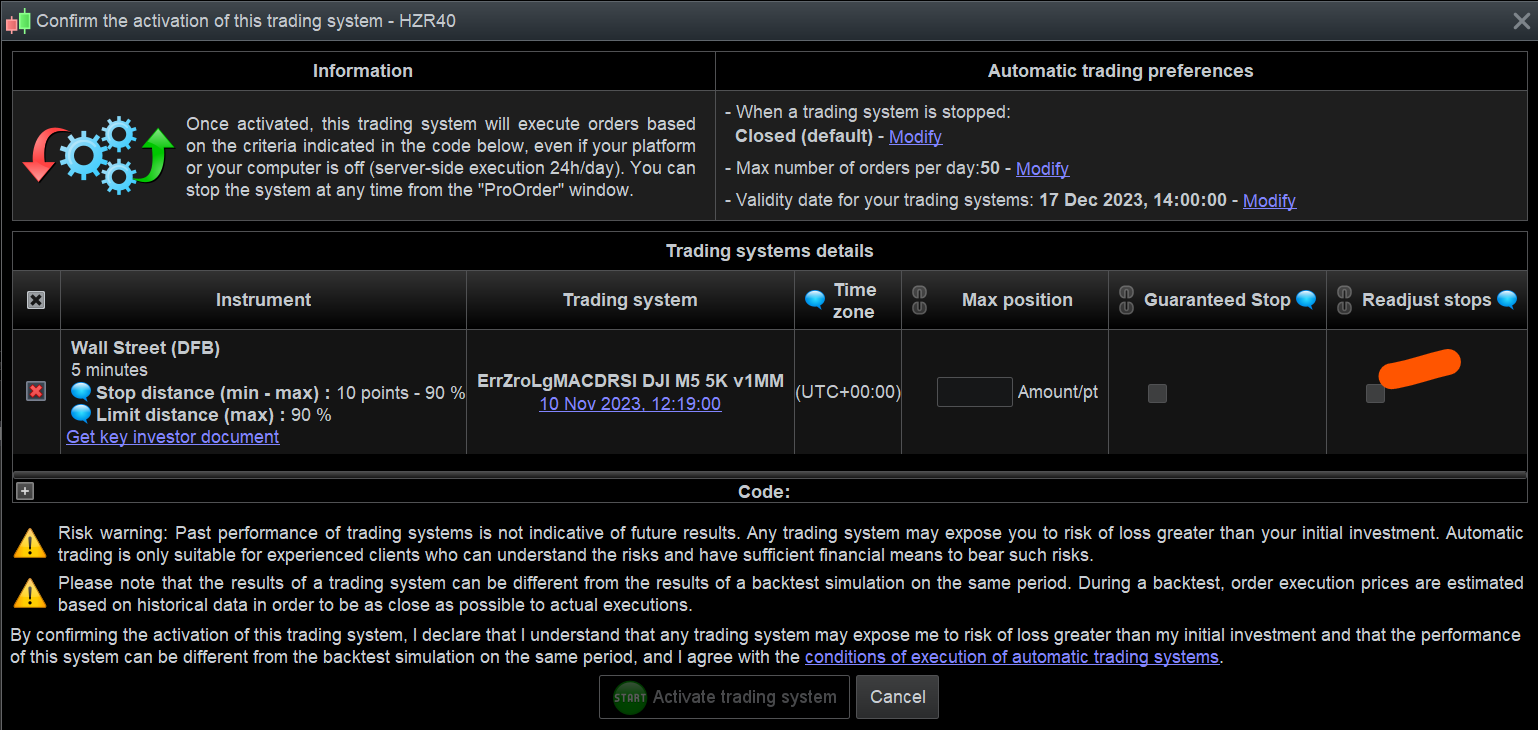
    Or check the checkbox that allow the broker to modify the stop according to their rules upon launching the strategy in ProOrder.

    arimasuyo3 thanked this post
    #216254 quote
    PeterSt
    Participant
    Master

    Or check the checkbox

    You could be correct, but that doesn’t feel right to me. At least I don’t see it working like that in practice. I mean :
    That checkbox is for correction when circumstances depict that you set a coincidental Pending Stop (not even a Trailing Stop as far as I can tell) too close to the price. Coincidental : By the time the Stop is set in the next bar, the price could have dropped to a value that the distance has become too close. The helptext to the checkbox (for me) clearly shows what you see happening in practice. This is the part about “PRT will try to set your original distance when possible”. This correction is attempted during on estimate 1 second or so. During that period you see the Stop label move along with the price.
    Setting it too close on purpose (like 4 when 5 is the minimum) would lead to anomalies and for sure not what your strategy intends (which would be 4 and which would never be met).

    I stand corrected where needed. 🙂

    #216257 quote
    arimasuyo3
    Participant
    New

    Thank you for your answer
    I don’t have a perfect understanding
    We will check the content of your response.
    thank you

    #216260 quote
    GraHal
    Participant
    Master

    arimasuyo3 while you are thinking, try below to see if it solves the Order Rejection …

    SELLSHORT 1 CONTRACT AT Low - 10 STOP
    SET STOP pTRAILING 50
    #216397 quote
    arimasuyo3
    Participant
    New

    thank you for your answer
    I understand a little
    As a reason that I can not fully understand the content of your answer
    I myself feel the need to study the basic knowledge of trading more.

    #216398 quote
    arimasuyo3
    Participant
    New

    Thank you for your detailed answer
    I understood most of it
    I will try it now
    thank you

    #223803 quote
    pointofbrew
    Participant
    New

    Where is this checkbox located at?

    #223804 quote
    GraHal
    Participant
    Master

    See attached

    pointofbrew thanked this post
    Screenshot-2023-11-16-110026.png Screenshot-2023-11-16-110026.png
    #223995 quote
    pointofbrew
    Participant
    New

    See attached

    Looks like my IG version 11.1 don’t have those settings

    #224010 quote
    GraHal
    Participant
    Master

    Post a screenshot of the same screen that you see.

    #224091 quote
    TempusFugit
    Participant
    Veteran

    Hi all,

    As  PeterSt commented that checkbox doesn´t work for that kind of error, at least it didn´t for me in the past. I have tried several times and never seem to be any difference

    #224696 quote
    pointofbrew
    Participant
    New

    Post a screenshot of the same screen that you see.

    Sorry. Didn’t realize the checkbox is at the last step

    GraHal thanked this post
Viewing 14 posts - 1 through 14 (of 14 total)

  • You must be logged in to reply to this topic.

Your trading system was stopped because of minimum distance required by broker


ProOrder: Automated Strategies & Backtesting

New Reply
Author
author-avatar
arimasuyo3 @arimasuyo3 Participant
Summary

This topic contains 13 replies,
has 6 voices, and was last updated by pointofbrew

2 years, 2 months ago.

Topic Details
Forum: ProOrder: Automated Strategies & Backtesting
Language: English
Started: 06/15/2023
Status: Active
Attachments: 1 files
Logo Logo
Loading...