


Utilisation fonction : background

Viewing 2 posts - 1 through 2 (of 2 total)

  • Author
    Posts
  • #29584 quote
    gharyghary
    Participant
    Veteran

    Bonjour j’aimerai utilisé la fonction : background  avec plus de 2 conditions,

    Si condition 1 réalisé couleur de fond en vert si condition non réalisé pas de couleur

    Si condition 2 réalisé couleur de fond en Rouge si condition non réalisé pas de couleur

    Si condition 3 réalisé couleur de fond en bleu si condition non réalisé pas de couleur.

    Voila l’idée mais je n’ai pas réussi …

    #29655 quote
    NicolasNicolas
    Keymaster
    Legend

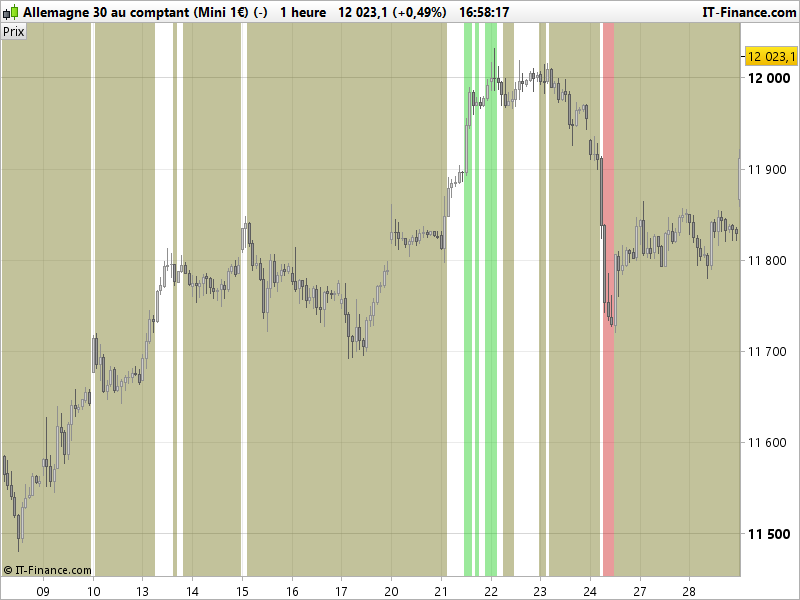
    Voici ci-dessous un exemple de code tout simple pour colorier le background d’un graphique selon 3 conditions différentes, si aucune d’entre elles n’est valide alors le background ne sera pas peint. Ici 3 conditions simples basées sur la valeur d’un RSI période 14:

    r = rsi[14]
    
    c1 = r>80
    c2 = r<20
    c3 = r<70 and r>30
    
    if c1 then
     backgroundcolor(0,200,0,100)
    elsif c2 then 
     backgroundcolor(200,0,0,100)
    elsif c3 then 
     backgroundcolor(100,100,0,100)
    endif
    
    return

    Bon amusement 🙂

    backgroundcolor-prorealtime-conditions.png backgroundcolor-prorealtime-conditions.png
Viewing 2 posts - 1 through 2 (of 2 total)
  • You must be logged in to reply to this topic.

ProRealAI ProRealAI New

Stuck on this ProBuilder code?

Describe what this topic is trying to build, in plain English, and ProRealAI writes the ProRealTime™ indicator, screener or system for you.

Available in 7 languages
Try ProRealAI

Utilisation fonction : background


ProBuilder : Indicateurs & Outils Personnalisés

New Reply
Author
author-avatar
ghary @ghary Participant
Summary

This topic contains 1 reply,
has 2 voices, and was last updated by NicolasNicolas

9 years, 6 months ago.

Topic Details
Forum: ProBuilder : Indicateurs & Outils Personnalisés
Language: French
Started: 03/23/2017
Status: Active
Attachments: 2 files
ProRealCode ProRealCode
Loading...

