tracer segment de 17H30 a 8h

Viewing 8 posts - 1 through 8 (of 8 total)
  • Author
    Posts
  • #223820 quote
    teshmi9z
    Participant
    New

    bonjour je souhaite tracer un segment de la cloture de 17h30 jusqu’a ouverture du lendemain 8h ( pour le globex)

    je n’arrive pas a configurer les points de mon segment ! j’arrive juste a tracer un ligne actuellement

    savez vous comment je peux faire?

    par la suite je souhaite codé des flèche durant la nuit Si macd croise au dessus/dessous de la ligne tracé

    mais pas que l’indicateur confonde les journées:      si on est “today” il prendra donc la veille de 17h30  jusqu’à minuit et le  matin (00h01 à 08h00)

    voila ma version actuel

    globex = glo + glo2
    glo= time<070000
    glo2=time>220000
    if globex then
    backgroundcolor(174, 214, 241)
    endif
    
    if time=173000  then
    x1=barindex
    drawhline(close) coloured(100,100,69)
    endif
    
    return
    
    #223847 quote
    teshmi9z
    Participant
    New

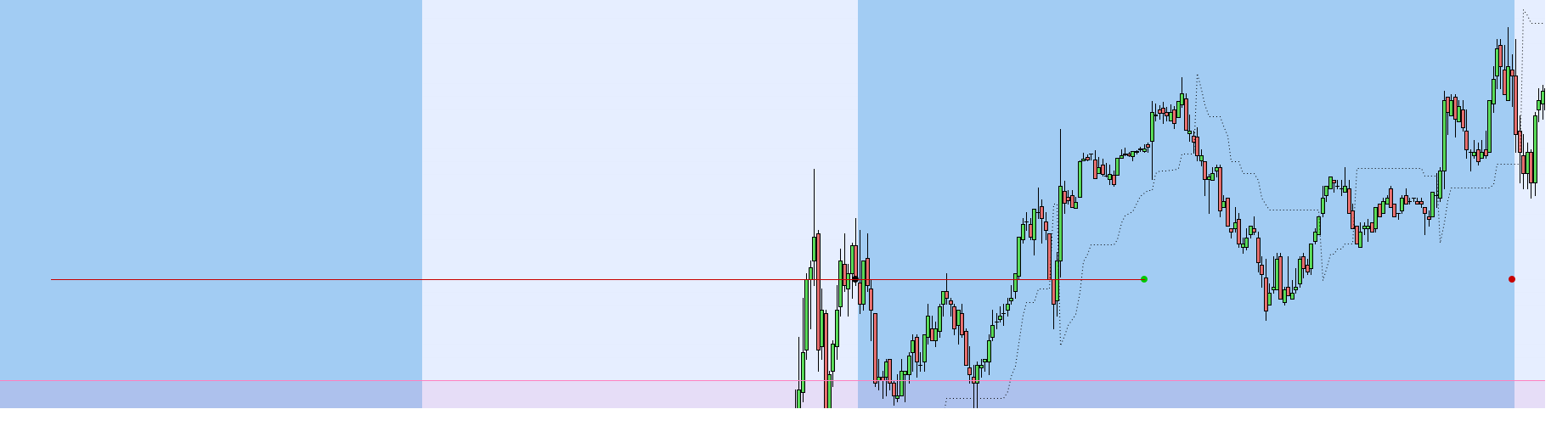
    j’ai un peu avancé sur le code mais j’ai des soucis a arrêter le segment, je veux juste le tracer entre:

    • le point de 17h35 (close//point noir)
    • et  de 23h55( close(17h35)//point vert)

      pourquoi il continue le traçage jusqu’au début de journée ?

    j’ai également essayé de tracer entre le point NOIR du jour et le point Vert de la veille mais impossible d’avoir un segment droit

    voici mon code et un screen
    si vous avez une solution je suis preneur, j’ai passé déjà des heures mais la je bloque. merci


    //defparam drawonlastbaronly = true
    
    globex = glo + glo2
    glo= time<080000
    glo2=time>173000
    if globex then
    backgroundcolor(174, 214, 241)
    endif
    
    p1=time=173500
    p2=time=235500
    p3=time=080000
    // --- settings
    DaysBefore = 3
    // --- end of settings
    
    idate=date
    //plot Open/close
    if today-idate<=DaysBefore then
    if  p1 then
    DRAWPOINT(barindex, close, 2) COLOURED(0,0,0)  ///NOIR
    x1=barindex
    y1=close
    //drawhline(close) coloured(100,100,69)
    
    endif
    if p2 then
    DRAWPOINT(barindex, y1, 2) COLOURED(0,200,0) //VERT
    x2=barindex
    
     endif
    if p3 then
    DRAWPOINT(barindex, y1, 2)COLOURED(200,0,0) //ROUGE
    x3=barindex
    y3=y1[1]
    endif
    DRAWSEGMENT (x1, y1, x2, y1) coloured(200,0,0) //ROUGE
    //DRAWSEGMENT(x2[1],y2[1],x3,y3) 
    //DRAWLINE(x1, y1, X2, y1)
    endif
    return
    
    point-globex.png point-globex.png
    #223881 quote
    Bernard13
    Participant
    Average

    Bonjour,

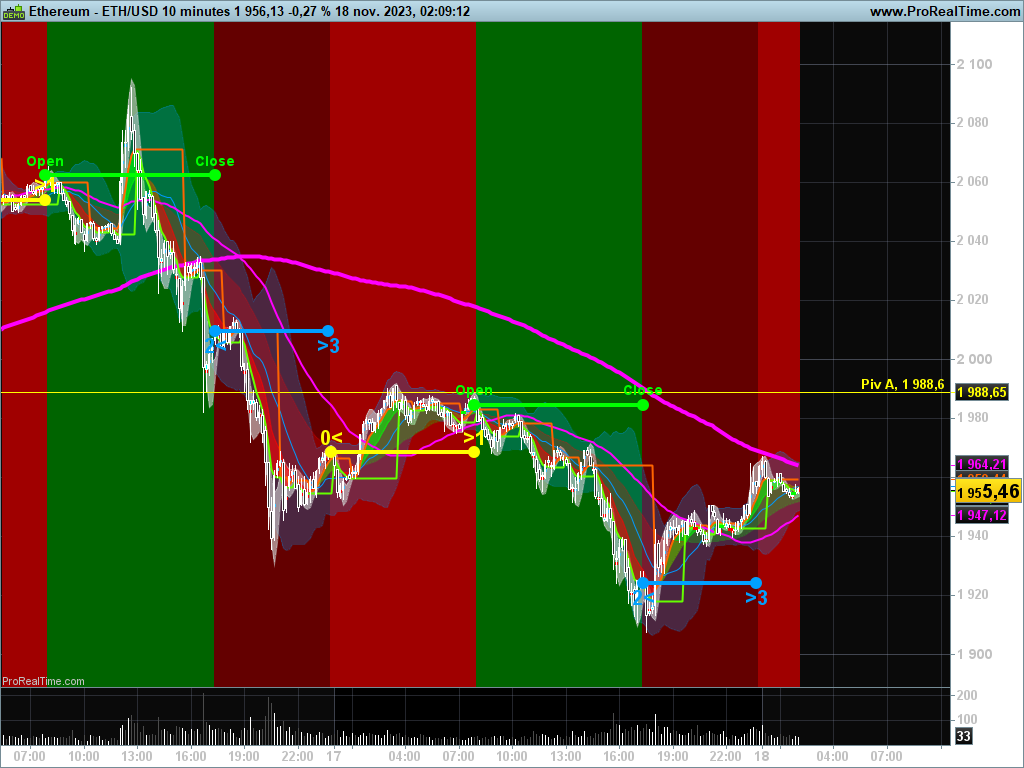
    Je n’avais encore jamais utilisé la fonction Time.  Le code ci-dessous peut-il t’aider ? A adapter bien évidemment car j’ai placé un maximum d’éléments pédagogiques visuels.

    Cordialement.

    //---- Code testé sur ETHUSD 10 mn
    //
    
    //----- Horloge
    T= Time
    T0= 000000
    T1= 080000
    T2= 173000
    T3= 235000
    
    //----- Positions horloge
    IF Time= T0 THEN
    xT0= BarIndex
    yM= Close // Matin fermé
    ELSIF Time= T1 THEN
    xT1= BarIndex
    yOpen= Close // Ouvert
    ELSIF Time= T2 THEN
    xT2= BarIndex
    yS= Close // Soir fermé
    ELSIF Time = T3 THEN
    xT3= BarIndex
    ENDIF
    
    //----- Process 1: Fond: Trading ouvert
    IF Time >= T1 AND Time <= T2 THEN
    //T1 et T2 balaye la plage horaire
    BackGroundColor(0,100,0)
    ENDIF
    
    IF Time >= T1 AND Time = T2 THEN
    //T1 amorce et Time croit
    //T2 stoppe
    DrawPoint(xT1,yOpen,3) Coloured(0,255,0)
    DrawText("Open", xT1, yOpen+5, Dialog, Bold, 14) Coloured(0,255,0)
    DrawPoint(xT2,yOpen,3) Coloured(0,255,0)
    DrawText("Close", xT2, yOpen+5, Dialog, Bold, 14) Coloured(0,255,0)
    DrawSegment(xT1, yOpen, xT2, yOpen) Coloured(0,255,0) Style(Line,4)
    ENDIF
    //----- Process 2: Trading fermé
    //----- Matin
    IF Time >= T0 AND Time <= T1 THEN
    //T0 amorce et Time croit
    //T1 balaye la plage horaire matinale et stoppe l'horloge
    BackGroundColor(160,0,0)
    ENDIF
    
    IF Time >= T0 AND Time = T1 THEN
    //T0 amorce et Time croit
    //T1 stoppe l'horloge matinale
    DrawPoint(xT0,yM,3) Coloured(255,255,0)
    DrawText("0<", xT0, yM+5, Dialog, Bold, 20) Coloured(255,255,0)
    DrawPoint(xT1,yM,3) Coloured(255,255,0)
    DrawText(">1", xT1, yM+5, Dialog, Bold, 20) Coloured(255,255,0)
    DrawSegment(xT0, yM, xT1, yM) Coloured(255,255,0) Style(Line,4)
    ENDIF
    
    //----- Soir
    IF Time >= T2 AND Time <= T3 THEN
    BackGroundColor(100,0,0)
    ENDIF
    
    IF Time >= T2 AND Time = T3 THEN
    DrawPoint(xT2,yS,3) Coloured(0,160,255)
    DrawText("2<", xT2, yS-5, Dialog, Bold, 20) Coloured(0,160,255)
    DrawPoint(xT3,yS,3) Coloured(0,160,255)
    DrawText(">3", xT3, yS-5, Dialog, Bold, 20) Coloured(0,160,255)
    DrawSegment(xT2, yS, xT3, yS) Coloured(0,160,255) Style(Line,4)
    ENDIF
    
    RETURN
    
    ETHUSD-10-minutes.png ETHUSD-10-minutes.png
    #223883 quote
    Bernard13
    Participant
    Average

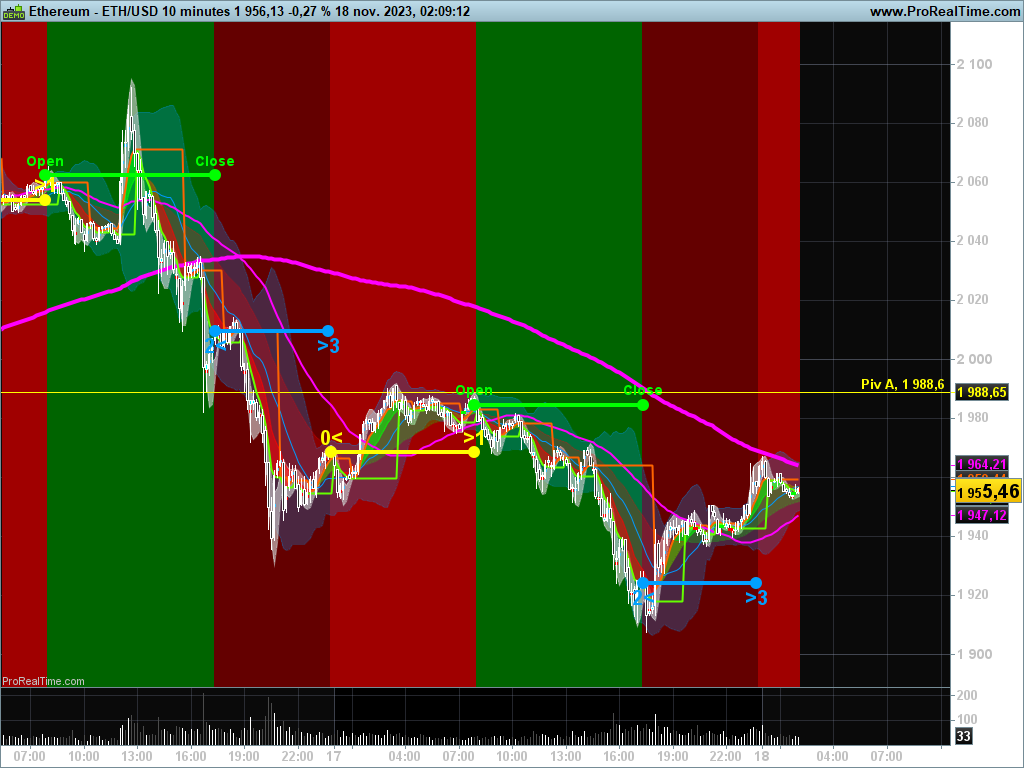
    PS: J’ai omis d’effacer la ligne 5 (T n’est plus utilisé)

    ETHUSD-10-minutes-1.png ETHUSD-10-minutes-1.png
    #223922 quote
    Bernard13
    Participant
    Average

    Bonjour,

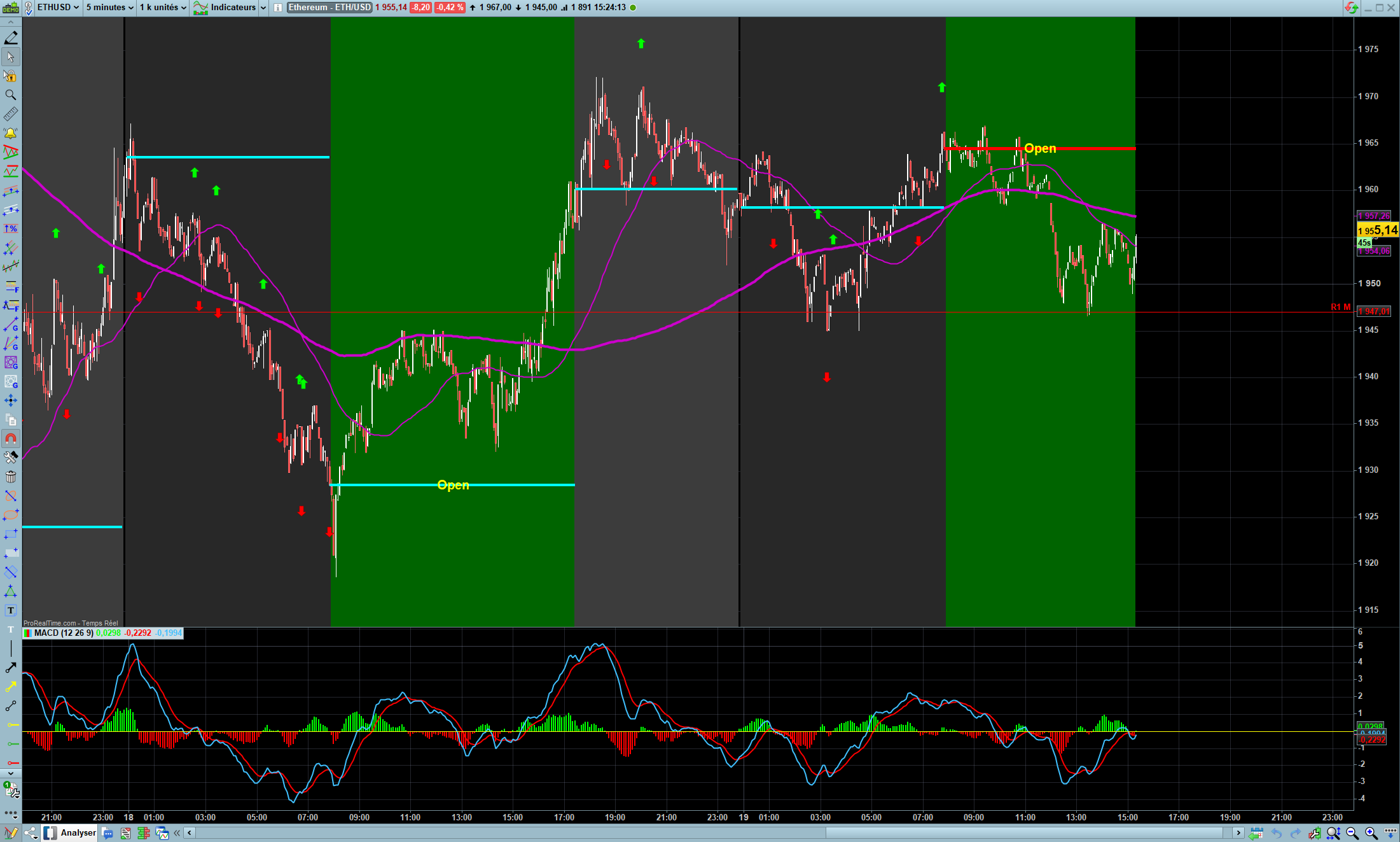
    Finalement, voici une tentative de réponse complète, qu’en penses-tu ?

    J’ai calé l’horloge pour que la bougie ferme à l’heure souhaitée.

    🙂

    //---- Code testé sur ETHUSD 5 mn
    //----- Horloge
    T0= 000000
    T1= 075500
    T2= 173000 // Pour une fermeture du chandelier à 17h35 
    T3= 235000 // Pour une fermeture du chandelier à 23h55
    
    //----- Positions horloge
    IF Time= T0 THEN
    xT0= BarIndex
    yM= Close // Matin fermé
    ELSIF Time= T1 THEN
    xT1= BarIndex
    yOpen= Close // Ouvert
    ELSIF Time= T2 THEN
    xT2= BarIndex
    yS= Close // Soir fermé
    ELSIF Time = T3 THEN
    xT3= BarIndex
    ENDIF
    
    cFM= Time >= T0 AND Time <= T1 // Condition Fermé Matin
    cOpen= Time >= T1 AND Time <= T2 // Condition marché ouvert
    cFS= Time >= T2 AND Time <= T3 // Condition Fermé Soir
    
    IF IsLastBarUpdate THEN // Plage horaire en cours: Segment rouge
    
    IF cOpen THEN
    DrawSegment(xT1, yOpen, BarIndex, yOpen) Coloured(255,0,0) Style(Line,5)
    DrawText("Open", (BarIndex+xT1)/2, yOpen, Dialog, Bold, 20) Coloured(255,255,0)
    ELSIF cFM THEN
    DrawSegment(xT0, yM, BarIndex, yM) Coloured(255,0,0) Style(Line,5)
    ELSIF cFS THEN
    DrawSegment(xT2, yS, BarIndex, yS) Coloured(255,0,0) Style(Line,5)
    ENDIF
    
    ELSE // Plages horaires du passé
    
    //----- Process 1: Fond: Trading ouvert
    IF cOpen THEN
    BackGroundColor(0,100,0)
    ENDIF
    IF Time >= T1 AND Time = T2 THEN
    DrawSegment(xT1, yOpen, xT2, yOpen) Coloured(0,255,255) Style(Line,4)
    DrawText("Open", (BarIndex+xT1)/2, yOpen, Dialog, Bold, 20) Coloured(255,255,0)
    ENDIF
    
    //----- Process 2: Trading fermé
    //----- Matin
    IF cFM THEN
    BackGroundColor(40,40,40)
    ENDIF
    IF Time >= T0 AND Time = T1 THEN
    DrawSegment(xT0, yM, xT1, yM) Coloured(0,255,255) Style(Line,4)
    ENDIF
    
    //----- Soir
    IF cFS THEN
    BackGroundColor(60,60,60)
    ENDIF
    IF Time >= T2 AND Time = T3 THEN
    DrawSegment(xT2, yS, xT3, yS) Coloured(0,255,255) Style(Line,4)
    ENDIF
    
    ENDIF
    
    //----- MACD
    iMACD= MACD[12,26,9](close)
    
    //----- Synchronisation nocturne Segment Horloge / MACD
    IF (Time >= T0 AND Time <= T1) OR (Time >= T2 AND Time <= T3) THEN
    IF iMACD CROSSES OVER 0 THEN
    DrawArrowUp(BarIndex, High+5) Coloured(0,255,0)
    ELSIF iMACD CROSSES UNDER 0 THEN
    DrawArrowDown(BarIndex, Low-5) Coloured(255,0,0)
    ENDIF
    ENDIF
    
    RETURN
    
    Teshmi9z2-Capture-decran-2023-11-19-152429.png Teshmi9z2-Capture-decran-2023-11-19-152429.png
    #224020 quote
    teshmi9z
    Participant
    New

    jai essayé ton code mais je n’est pas les segment qui apparaissent comme toi

    #224074 quote
    Bernard13
    Participant
    Average

    Je découvre cette fonction  Time  et j’ignore pourquoi le code dépend beaucoup des paramétrages et des marchés en continue.

    Le code fonctionne sur le Spot EURUSD en 1mn 5 mn 10 mn sur 1K unités

    Aussi sur BTCUSD ou Etherum en 1 mn  5mn. Ce code commence à dérailler sur 10mn.

    Ne fonctionne pas sur Euronext.

    La recherche continue. 🙂

    #236532 quote
    teshmi9z
    Participant
    New

    Du coup de deter

    //---- Code testé sur ETHUSD 5 mn
    //----- Horloge
    T0= 000000
    //T1= 065500
    //T2= 173000 // Pour une fermeture du chandelier à 17h35
    T3= 235000 // Pour une fermeture du chandelier à 23h55
    
    //----- Positions horloge
    IF Time= T0 THEN
    xT0= BarIndex
    yM= Close // Matin fermé
    ELSIF Time= T1 THEN
    xT1= BarIndex
    yOpen= Close // Ouvert
    ELSIF Time= T2 THEN
    xT2= BarIndex
    yS= Close // Soir fermé
    ELSIF Time = T3 THEN
    xT3= BarIndex
    ENDIF
    
    cFM= Time >= T0 AND Time <= T1 // Condition Fermé Matin
    cOpen= Time >= T1 AND Time <= T2 // Condition marché ouvert
    cFS= Time >= T2 AND Time <= T3 // Condition Fermé Soir
    
    IF IsLastBarUpdate THEN // Plage horaire en cours: Segment rouge
    
    IF cOpen THEN
    DrawSegment(xT1, yOpen, BarIndex, yOpen) Coloured(255,0,0) Style(Line,4)
    ELSIF cFM THEN
    DrawSegment(xT0, yM, BarIndex, yM) Coloured(255,0,0) Style(Line,4)
    ELSIF cFS THEN
    DrawSegment(xT2, yS, BarIndex, yS) Coloured(255,0,0) Style(Line,4)
    ENDIF
    
    ELSE // Plages horaires du passé
    
    //----- Process 1: Fond: Trading ouvert
    IF Time >= T1 AND Time = T2 THEN
    DrawSegment(xT1, yOpen, xT2, yOpen) Coloured(0,255,255) Style(Line,4)
    ENDIF
    
    //----- Process 2: Trading fermé
    //----- Matin
    IF Time >= T0 AND Time = T1 THEN
    DrawSegment(xT0, yS[1], xT1, ys[1]) Coloured(0,5,255) Style(Line,4)
    ENDIF
    
    //----- Soir
    IF Time >= T2 AND Time = T3 THEN
    DrawSegment(xT2, yS, xT3, yS) Coloured(0,2,255) Style(Line,4)
    ENDIF
    
    ENDIF
    return


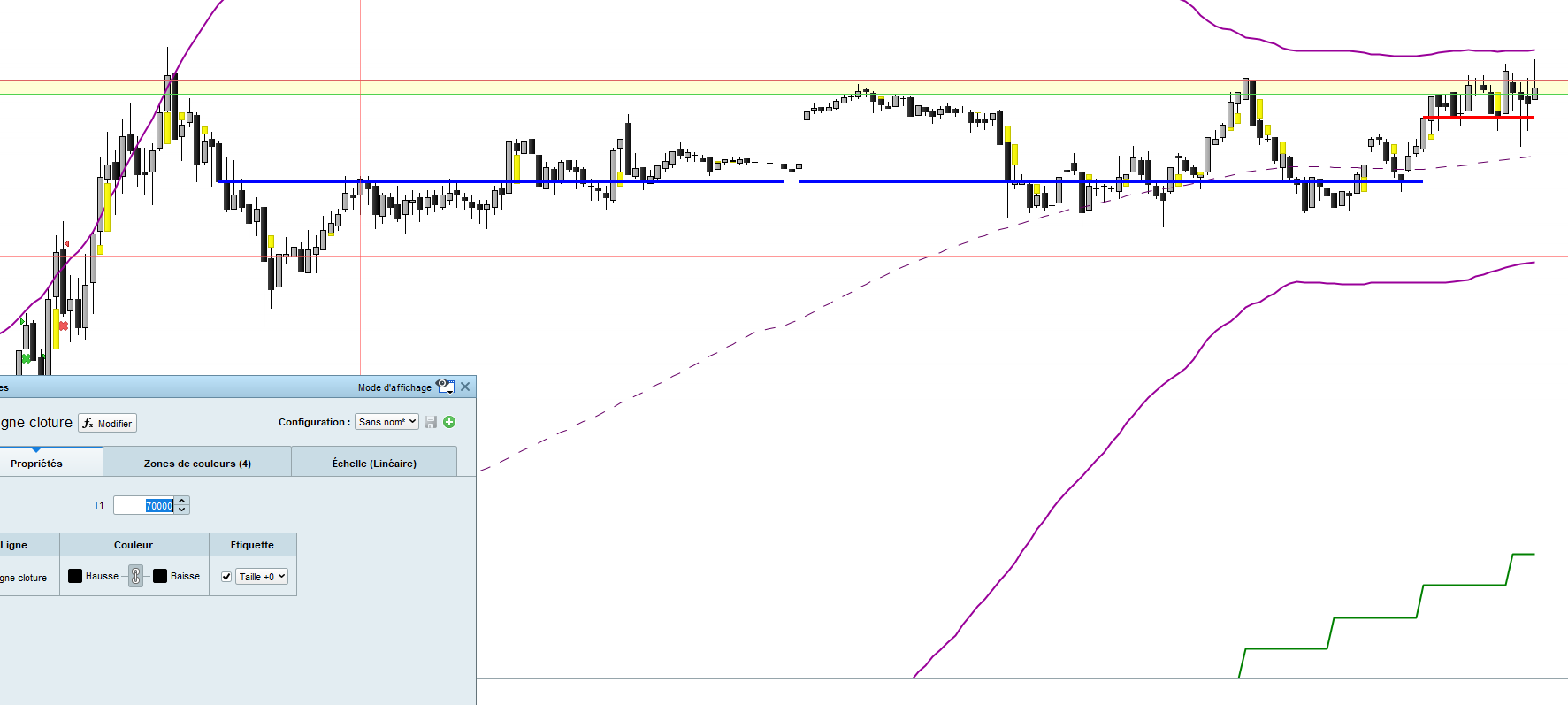
    re un peu mon post j’ai effectué quelque modif sur le code, pas de back ground et pas de MACD pour un simple affichage

    Capture-decran-2024-08-20-081333.png Capture-decran-2024-08-20-081333.png
Viewing 8 posts - 1 through 8 (of 8 total)
  • You must be logged in to reply to this topic.

tracer segment de 17H30 a 8h


ProBuilder : Indicateurs & Outils Personnalisés

New Reply
Author
author-avatar
teshmi9z @teshmi9z Participant
Summary

This topic contains 7 replies,
has 2 voices, and was last updated by teshmi9z

1 year, 6 months ago.

Topic Details
Forum: ProBuilder : Indicateurs & Outils Personnalisés
Language: French
Started: 11/16/2023
Status: Active
Attachments: 5 files
Logo Logo
Loading...