Time Sessions – Asia/London/New York

Viewing 1 post (of 1 total)
  • Author
    Posts
  • #262460 quote
    SnowblindTrades
    Participant
    New

    Hi all, forgive me for using LLMs to create this but as mentioned in my first post I am not a programmer nor do I have any real programming skills to speak of.

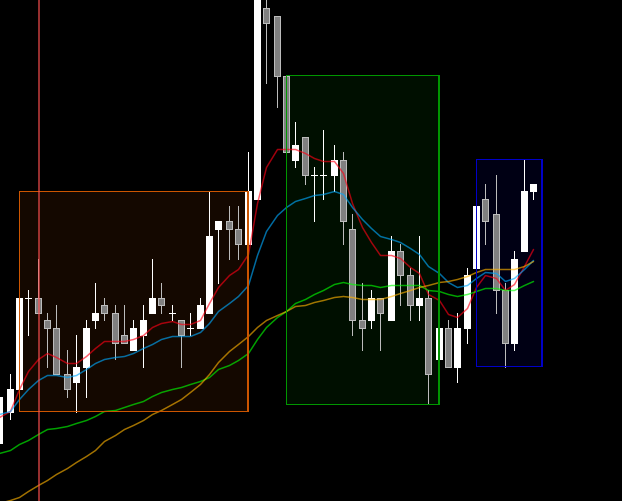
    I did however want to share this session box indicator I vibe coded that imitates the one on the Bloomberg Terminal (by memory, its been a very long time since I used it).

    I did look around the forum and the other ones didn’t quite match this one. If it is too iterative to an existing indicator someone else has posted I am more than happy to take this down.

    The default time zones are configured assuming you are using New York as the baseline – feel free to edit the code to match your desired or local time zone.

    DEFPARAM DrawOnLastBarOnly = True
    
    
    //------------------- SESSION TIMES (New York time - assumes platform base timezone is set to NY) -------------------
    
    
    ONCE AsianStart   = 200000   // Asia: 8:00pm NY
    ONCE AsianEnd     = 020000   // Asia: 2:00am NY (next day - wraps midnight)
    
    
    ONCE LondonStart  = 030000   // London: 3:00am NY
    ONCE LondonEnd    = 070000   // London: 7:00am NY
    
    
    ONCE NewYorkStart = 080000   // New York: 8:00am NY
    ONCE NewYorkEnd   = 120000   // New York: 12:00pm NY
    
    
    //------------------- STATE -------------------
    ONCE AsianActive    = 0
    ONCE AsianStartBar  = 0
    ONCE AsianEndBar    = 0
    ONCE AsianHH        = 0
    ONCE AsianLL        = 999999
    
    
    ONCE LondonActive   = 0
    ONCE LondonStartBar = 0
    ONCE LondonEndBar   = 0
    ONCE LondonHH       = 0
    ONCE LondonLL       = 999999
    
    
    ONCE NYActive    = 0
    ONCE NYStartBar  = 0
    ONCE NYEndBar    = 0
    ONCE NYHH        = 0
    ONCE NYLL        = 999999
    
    
    //=================== ASIAN SESSION (Burnt Orange) - wraps midnight ===================
    IF (time > AsianStart) OR (time <= AsianEnd) THEN
       IF AsianActive = 0 THEN
          AsianActive   = 1
          AsianStartBar = BarIndex
          AsianHH       = high
          AsianLL       = low
       ELSE
          AsianHH = max(AsianHH,high)
          AsianLL = min(AsianLL,low)
       ENDIF
       AsianEndBar = BarIndex + 1
    ELSE
       AsianActive = 0
    ENDIF
    
    
    IF AsianStartBar > 0 THEN
       DRAWRECTANGLE(AsianStartBar, AsianHH, AsianEndBar, AsianLL) coloured(204,85,0,255) FILLCOLOR(204,85,0,25)
    ENDIF
    
    
    //=================== LONDON SESSION (Green) ===================
    IF (time > LondonStart) AND (time <= LondonEnd) THEN
       IF LondonActive = 0 THEN
          LondonActive   = 1
          LondonStartBar = BarIndex
          LondonHH       = high
          LondonLL       = low
       ELSE
          LondonHH = max(LondonHH,high)
          LondonLL = min(LondonLL,low)
       ENDIF
       LondonEndBar = BarIndex + 1
    ELSE
       LondonActive = 0
    ENDIF
    
    
    IF LondonStartBar > 0 THEN
       DRAWRECTANGLE(LondonStartBar, LondonHH, LondonEndBar, LondonLL) coloured(0,150,0,255) FILLCOLOR(0,150,0,25)
    ENDIF
    
    
    //=================== NEW YORK SESSION (Blue) ===================
    IF (time > NewYorkStart) AND (time <= NewYorkEnd) THEN
       IF NYActive = 0 THEN
          NYActive   = 1
          NYStartBar = BarIndex
          NYHH       = high
          NYLL       = low
       ELSE
          NYHH = max(NYHH,high)
          NYLL = min(NYLL,low)
       ENDIF
       NYEndBar = BarIndex + 1
    ELSE
       NYActive = 0
    ENDIF
    
    
    IF NYStartBar > 0 THEN
       DRAWRECTANGLE(NYStartBar, NYHH, NYEndBar, NYLL) coloured(0,0,200,255) FILLCOLOR(0,0,200,25)
    ENDIF
    
    
    RETURN
    
    Iván González and robertogozzi thanked this post
    image.webp image.webp
Viewing 1 post (of 1 total)
  • You must be logged in to reply to this topic.

Time Sessions – Asia/London/New York


ProBuilder: Indicators & Custom Tools

New Reply
Author
Summary

This topic contains 1 voice and has 0 replies.

Topic Details
Forum: ProBuilder: Indicators & Custom Tools
Language: English
Started: 07/10/2026
Status: Active
Attachments: 1 files
Logo Logo
Loading...