Taskbar layout

Viewing 2 posts - 1 through 2 (of 2 total)
  • Author
    Posts
  • #156019 quote
    CapnCrunch77CapnCrunch77
    Participant
    Junior

    Hello Folks,

    This is probably a silly question…but does anyone know how you can change the taskbar layout from Horizontal to Vertical?  It’s quite annoying when sat at top of screen and I want to change this so that it’s along the edge of the screen vertically instead.

    Thanks in advance!

    #156045 quote
    PeterStPeterSt
    Participant
    Master

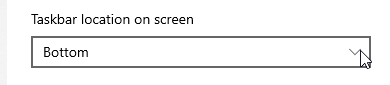
    Rightclick on the Taskbar – Settings.
    For the remainder, see the attachment.

    This is for Windows 10, later versions.
    For earlier versions, find an empty place on the Taskbar, and drag it up (assumed you have it at the bottom, which is not really what you said ;-).
    For Mac – ditch it. Haha.

    CapnCrunch77 thanked this post
    image_2021-01-03_091535.png image_2021-01-03_091535.png
Viewing 2 posts - 1 through 2 (of 2 total)
  • You must be logged in to reply to this topic.

ProRealAI ProRealAI New

From idea to ProBuilder code in seconds.

Your coding copilot for ProRealTime™. Ask in plain English — get clean, ready-to-paste indicators, screeners and systems.

Available in 7 languages
Try ProRealAI

Taskbar layout


General Trading: Market Analysis & Manual Trading

New Reply
Author
Summary

This topic contains 1 reply,
has 2 voices, and was last updated by PeterStPeterSt

5 years, 9 months ago.

Topic Details
Forum: General Trading: Market Analysis & Manual Trading
Language: English
Started: 01/02/2021
Status: Active
Attachments: 1 files
ProRealCode ProRealCode
Loading...