


Summary of prices popup

Viewing 2 posts - 1 through 2 (of 2 total)

  • Author
    Posts
  • #235582 quote
    sgrechsgrech
    Participant
    Junior

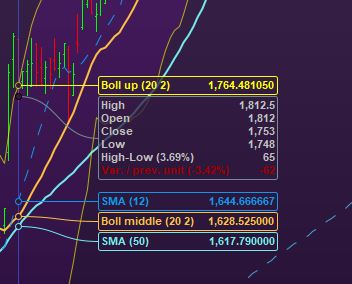
    Hello is someone able to explain how i can removed the caption in the attached screenshot please as it is not obvious to me!

    Capture1.jpg Capture1.jpg
    #235584 quote
    PeterStPeterSt
    Participant
    Master

    This will be in Setup “Show Cursor Details”. Just search for “cursor” in settings and you will run into it.
    That is, if I understood you well ?

    sgrech, George_Lager and Iván González thanked this post
Viewing 2 posts - 1 through 2 (of 2 total)
  • You must be logged in to reply to this topic.

ProRealAI ProRealAI New

From idea to ProBuilder code in seconds.

Your coding copilot for ProRealTime™. Ask in plain English — get clean, ready-to-paste indicators, screeners and systems.

Available in 7 languages
Try ProRealAI

Summary of prices popup


Platform Support: Charts, Data & Broker Setup

New Reply
Author
author-avatar
sgrech @sgrech Participant
Summary

This topic contains 1 reply,
has 2 voices, and was last updated by PeterStPeterSt

2 years, 2 months ago.

Topic Details
Forum: Platform Support: Charts, Data & Broker Setup
Language: English
Started: 07/21/2024
Status: Active
Attachments: 1 files
ProRealCode ProRealCode
Loading...

