


Stop Loss Distance – Too Close!?

Viewing 8 posts - 1 through 8 (of 8 total)
  • Author
    Posts
  • #102400 quote
    GraHalGraHal
    Participant
    Master

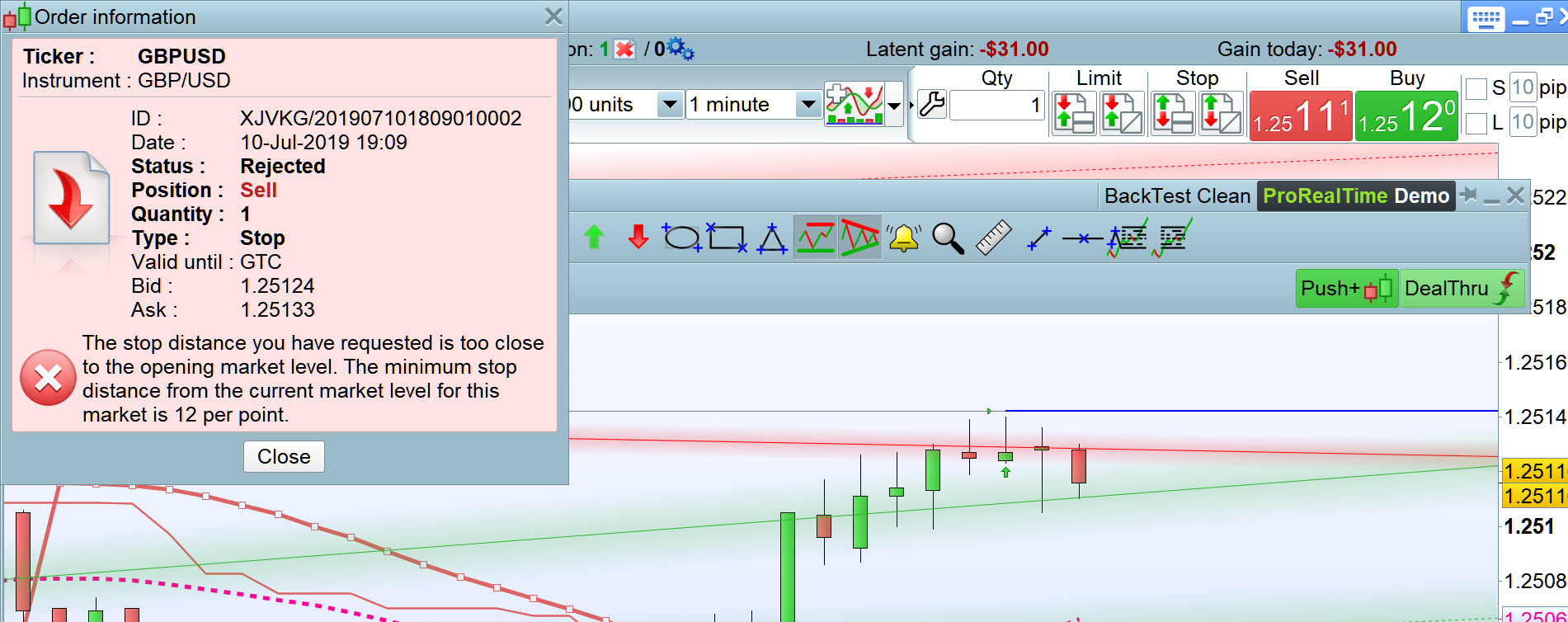
    How does anybody interpret this message which I have been getting a lot lately.

    On a 1 x Lot Long entry … I have tried setting an SL at > 12, > 24, > 48 points below a Long entry and each time I get the message attached.

    Also … wtf does the per point mean??

    #102408 quote
    robertogozzirobertogozzi
    Moderator
    Legend

    Have you deleted the attachment?

    #102410 quote
    GraHalGraHal
    Participant
    Master

    No and it was there!?

    Here it is again

    Stop-Loss-1.jpg Stop-Loss-1.jpg
    #102412 quote
    robertogozzirobertogozzi
    Moderator
    Legend

    I don’t know what perpoint means.

    If you use SET STOP LOSS/pLOSS you should not mind about that.

    I usually use an IF condition to check I’m not too close when I use a trailing stop code.

    #102413 quote
    GraHalGraHal
    Participant
    Master

    Thank you Roberto, you are so good always being ready to help any / all of us.

    My fault for confusion … I get the message during manual trades.

    #102431 quote
    NicolasNicolas
    Keymaster
    Legend

    Distance of your stoploss is 0.0012 or 0.00012?

    0.0012 is actually 12 pips/points.

    #102441 quote
    GraHalGraHal
    Participant
    Master

    I tried > 12 pips and > 24 pis and even 140 odd pips and each time I got the same error message.

    I’ll try and analyse a bit more next time what is going on and report back.

    #102671 quote
    Maria PRTMaria PRT
    Moderator
    Average

    Hello,

    As this message is sent by IG, do not hesitate to contact them in order to get further information.

    Best regards,


    Maria

    GraHal thanked this post
Viewing 8 posts - 1 through 8 (of 8 total)
  • You must be logged in to reply to this topic.

ProRealAI ProRealAI New

Stuck on this ProBuilder code?

Describe what this topic is trying to build, in plain English, and ProRealAI writes the ProRealTime™ indicator, screener or system for you.

Available in 7 languages
Try ProRealAI

Stop Loss Distance – Too Close!?


Platform Support: Charts, Data & Broker Setup

New Reply
Author
Summary

This topic contains 7 replies,
has 4 voices, and was last updated by Maria PRTMaria PRT
7 years, 2 months ago.

Topic Details
Forum: Platform Support: Charts, Data & Broker Setup
Language: English
Started: 07/10/2019
Status: Active
Attachments: 1 files
ProRealCode ProRealCode
Loading...



