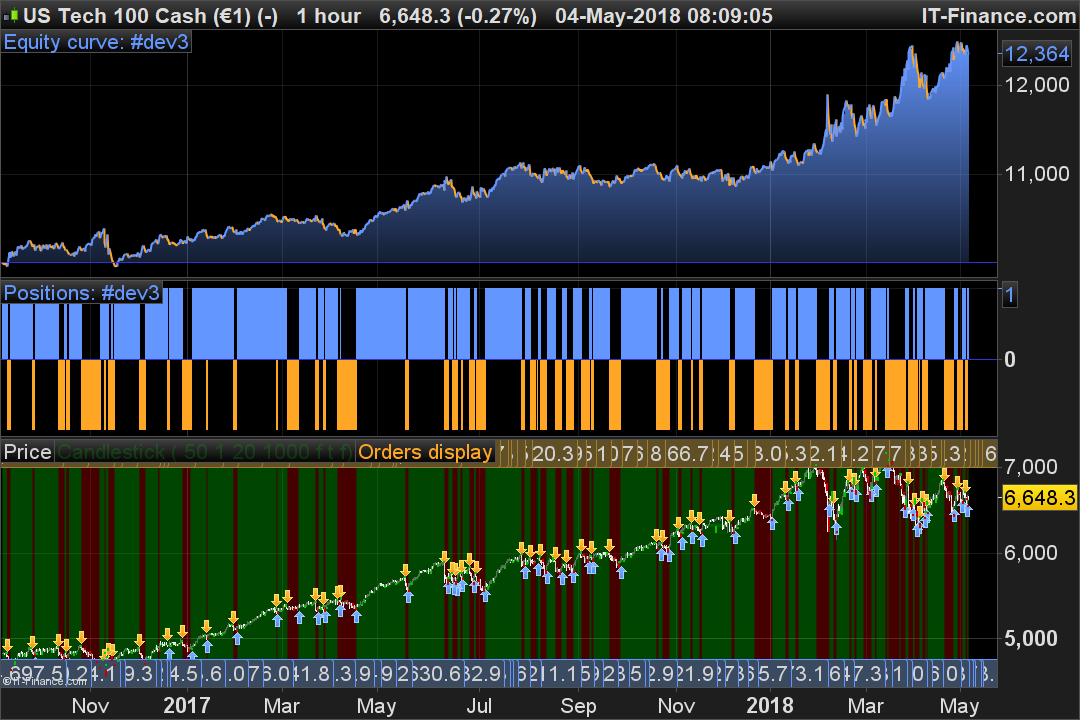
Sistema con PRC_Renko Bricks Volumes

Viewing 2 posts - 1 through 2 (of 2 total)

  • Author
    Posts
  • #69742 quote
    Fr7Fr7
    Participant
    Master
    Hola Nicolas,
    Es posible realizar un sistema automático a partir del indicador:PRC_Renko Bricks Volumes | indicator
    Lo he intentado pero no me fuciona…….
    Puede hacer que el sistema compre cuando la vela renko cambia a verde y venta cuando la vela renko cambia rojo como en la imagen?
    //Sharing ProRealTime knowledge
    // https://www.prorealcode.com/topic/new-renko-system/
     
    //---settings
    transparency=50 //brick colours alpha
    wicksize=1 //width of wicks
    boxsize=20 //renko bricks size in points/pips
    volumesize=1000 //volume size setting to allow new brick
    showBG=1 //background color (true/false)
    autoRenko=1 //automatic renko brick size based on 2 time ATR periods
    autoVolume=0 //automatic volume size to allow new brick or not (override the "volumesize" setting) based on average of volume instead of fixed value
    //---end of settings
     
     
    if autoRenko=1 then
    size=averagetruerange[14]*2
    else
    once size=boxsize*pointsize
    endif
    if autoVolume then
    volumesize=average[1000](volume)*10
    endif
     
    once upbox = close
    once downbox = close - (boxsize*pointsize)
    once lowwick = close*100
     
    volumesum = volumesum+volume
     
    IF close > upbox + size and volumesum-lastvolume>=volumesize THEN
    lastvolume= volumesum
    upbox= upbox + size
    downbox= downbox + size
    r=0
    g=200
    begin=barindex
    highwick=close
    wickbar=barindex-round((barindex-begin[1])/2)
     
    ELSIF close < downbox - size  and volumesum-lastvolume>=volumesize THEN
    lastvolume= volumesum
    upbox= upbox - size
    downbox= downbox - size
    r=200
    g=0
    begin=barindex
    wickbar=barindex-round((barindex-begin[1])/2)
     
    ENDIF
     
    //saving current high/low
    highwick=max(high,highwick)
    lowwick=min(low,lowwick)
     
    //compute wicks at each new contrarian brick
    if r>0 and r[1]=0 then
    //new red brick
    drawrectangle(wickbar,highwick,wickbar+wicksize,upbox[1]) coloured(r[1],g[1],0)
    lowwick=low*100
    highwick=0
    endif
    if r=0 and r[1]>0 then
    //new green brick
    drawrectangle(wickbar,lowwick,wickbar+wicksize,downbox[1]) coloured(r[1],g[1],0)
    lowwick=low*100
    highwick=0
    endif
    //compute wicks at each new same brick
    if r>0 and r[1]>0 and lastdrawn<>wickbar then
    //new red brick
    if highwick>upbox[1] then
      drawrectangle(wickbar,highwick,wickbar+wicksize,upbox[1]) coloured(r[1],g[1],0)
     
    endif
    lastdrawn=wickbar
    lowwick=low*100
    highwick=0
    endif
    if r=0 and r[1]=0 and lastdrawn<>wickbar then
    //new green brick
    if lowwick<downbox[1] then
      drawrectangle(wickbar,lowwick,wickbar+wicksize,downbox[1]) coloured(r[1],g[1],0)
     
    endif
    lastdrawn=wickbar
    lowwick=low*100
    highwick=0
    endif
     
    //draw renko candlesticks
    drawcandle(upbox,upbox,downbox,downbox)coloured(r,g,0,min(transparency,255))
    if showBG then
    backgroundcolor(r,g,0,min(transparency,255))
    endif
    IF   showBG  THEN
    BUY 1 CONTRACTS AT MARKET
    ENDIF
    //exit positions
    IF not showBG THEN
    SELL AT MARKET
    ENDIF


    renko.png renko.png
    #69764 quote
    NicolasNicolas
    Keymaster
    Legend

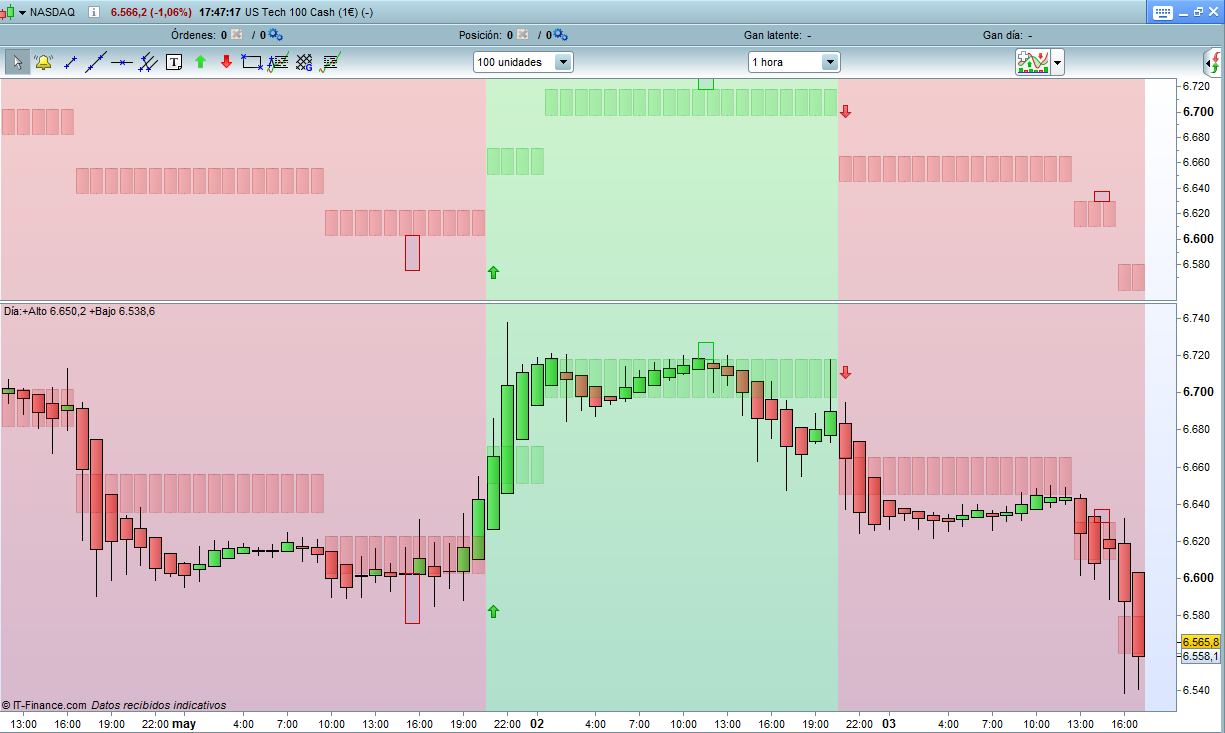
    ha mezclado completamente los códigos de indicador al querer hacer una estrategia de negociación automática 🙂
    ¡El código es realmente simple y no necesita todos los elementos necesarios para mostrar los ladrillos renko del indicador!

    defparam cumulateorders=false
    
    //---settings
    boxsize=20 //renko bricks size in points/pips
    volumesize=1000 //volume size setting to allow new brick
    autoRenko=1 //automatic renko brick size based on 2 time ATR periods
    autoVolume=0 //automatic volume size to allow new brick or not (override the "volumesize" setting) based on average of volume instead of fixed value
    //---end of settings
    
    if autoRenko=1 then
    size=averagetruerange[14]*2
    else
    once size=boxsize*pointsize
    endif
    if autoVolume then
    volumesize=average[1000](volume)*10
    endif
    once upbox = close
    once downbox = close - (boxsize*pointsize)
    
    volumesum = volumesum+volume
    
    IF close > upbox + size and volumesum-lastvolume>=volumesize THEN
    lastvolume= volumesum
    upbox= upbox + size
    downbox= downbox + size
    buy 1 contract at market 
    
    ELSIF close < downbox - size and volumesum-lastvolume>=volumesize THEN
    lastvolume= volumesum
    upbox= upbox - size
    downbox= downbox - size
    sellshort 1 contract at market 
    
    ENDIF
    Fr7 thanked this post
    renko-bricks-volumes-automatic-trading.png renko-bricks-volumes-automatic-trading.png
Viewing 2 posts - 1 through 2 (of 2 total)
  • You must be logged in to reply to this topic.

ProRealAI ProRealAI New

Stuck on this ProBuilder code?

Describe what this topic is trying to build, in plain English, and ProRealAI writes the ProRealTime™ indicator, screener or system for you.

Available in 7 languages
Try ProRealAI

Sistema con PRC_Renko Bricks Volumes


ProOrder: Trading Automático y Backtesting

New Reply
Author
author-avatar
Fr7 @fr7 Participant
Summary

This topic contains 1 reply,
has 2 voices, and was last updated by NicolasNicolas

8 years, 5 months ago.

Topic Details
Forum: ProOrder: Trading Automático y Backtesting
Language: Spanish
Started: 05/03/2018
Status: Active
Attachments: 2 files
ProRealCode ProRealCode
Loading...