


Signaux contradictoires dashboard et histo

Viewing 4 posts - 1 through 4 (of 4 total)

  • Author
    Posts
  • #91905 quote
    Phil4910Phil4910
    Participant
    Average

    Bonjour Nicolas,

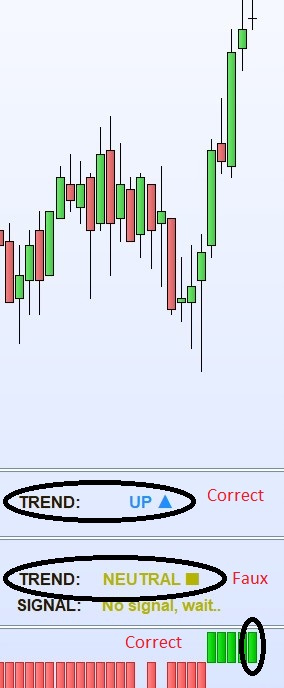
    Lorsque je mets un signal de trend en histogramme et en dashboard seul, les signaux correspondent.

    Si je mets exactement le même code dans un dashboard avec un autre code de signal, le signal de trend n’est plus correct.

    Comment est-ce possible?

    Je joins en attaché une image pour mieux comprendre et le code du trend.

    Merci de ton aide.

    Phil4910

    defparam drawonlastbaronly=true
    Xoffset = 20
    // --- settings Tendance
    z1=Average[20](close)
    
    if close>z1 and open<>z1 and z1>z1[1] then
    r=1
    elsif close<z1 and open<>z1 and z1<z1[1] then
    r=-1
    else
    r=0
    endif
    // --- end of settings
    //label
    DRAWTEXT("TREND:",barindex-Xoffset,0.1,SansSerif,Bold,16)coloured(230,230,250)
    
    If r=1 then
    drawtext("UP ▲",barindex-10,0.1,SansSerif,Bold,16)coloured(30,144,255)
    Elsif r=-1 then
    drawtext("DOWN ▼",barindex-10,0.1,SansSerif,Bold,16)coloured(255,48,48)
    Elsif r=0 then
    drawtext("NEUTRAL ■",barindex-10,0.1,SansSerif,Bold,16)coloured(180,180,0)
    endif
    
    Annotation-2019-02-21-100049.jpg Annotation-2019-02-21-100049.jpg
    #91921 quote
    NicolasNicolas
    Keymaster
    Legend

    Le code ne semble pas être complet, difficile de comprendre ce que tu veux dire 😉 Peux-tu préciser les 2 codes en questions, cela doit être un problème de variables non correctement renseignées ou réinitialisées..

    #91937 quote
    Phil4910Phil4910
    Participant
    Average

    Voici le dashboard avec les 2 codes ensemble dans lequel le signal est correct mais pas le trend

    defparam drawonlastbaronly=true
    Xoffset = 20
    // --- settings Tendance
    z1=Average[20](close)
    
    if close>z1 and open<>z1 and z1>z1[1] then
    r=1
    elsif close<z1 and open<>z1 and z1<z1[1] then
    r=-1
    else
    r=0
    endif
    // --- end of settings
    //label
    DRAWTEXT("TREND:",barindex-Xoffset,0.1,SansSerif,Bold,16)coloured(230,230,250)
    
    If r=1 then
    drawtext("UP ▲",barindex-5,0.1,SansSerif,Bold,16)coloured(30,144,255)
    Elsif r=-1 then
    drawtext("DOWN ▼",barindex-5,0.1,SansSerif,Bold,16)coloured(255,48,48)
    Elsif r=0 then
    drawtext("NEUTRAL ■",barindex-5,0.1,SansSerif,Bold,16)coloured(180,180,0)
    endif
    
    
    // --- settings Signal
    z1=ExponentialAverage[8](close)
    z2 =Average[20](close)
    e= z1 - z2
    If z1<z2 and z1>z1[1] and e>=e[1] and close>open then
    r=1
    elsif z1<z2 and z1<z1[1]and e<=e[1]and close<open then
    r=-2
    elsif z1>z2 and z1>z1[1]and e>=e[1]and close>open then
    r=2
    elsif z1>z2 and z1<z1[1] and e<=e[1]and close<open then
    r=-1
    else
    r=0
    endif
    // --- end of settings
    //label
    DRAWTEXT("SIGNAL:",barindex-Xoffset,-0.5,SansSerif,Bold,16)coloured(230,230,250)
    
    If r=1  then
    drawtext("LIGHT BUY ▲",barindex-5,-0.5,SansSerif,Bold,16)coloured(30,144,255)
    
    Elsif r=2 then
    drawtext("BUY ▲▲",barindex-6,-0.5,SansSerif,Bold,16)coloured(30,144,255)
    Elsif r=-1  then
    drawtext("LIGHT SELL ▼",barindex-5,-0.5,SansSerif,Bold,16)coloured(255,48,48)
    Elsif r=-2 then
    drawtext("SELL ▼▼",barindex-6,-0.5,SansSerif,Bold,16)coloured(255,48,48)
    elsif r=0 then
    DRAWTEXT("No signal, wait..",barindex-3,-0.5,SansSerif,Bold,16)coloured(180,180,0)
    endif
    
    Return
    #92168 quote
    NicolasNicolas
    Keymaster
    Legend

    La variable nommée “r” étant utilisé pour les 2 indications “trend” et “signal”, je te suggère d’en utiliser une autre pour bien séparer les conditions. Sans aller plus loin dans les vérifications exhaustives de tes conditions, je pense que cette solution devrait régler le problème 🙂

    swapping and Phil4910 thanked this post
Viewing 4 posts - 1 through 4 (of 4 total)
  • You must be logged in to reply to this topic.

ProRealAI ProRealAI New

Stuck on this ProBuilder code?

Describe what this topic is trying to build, in plain English, and ProRealAI writes the ProRealTime™ indicator, screener or system for you.

Available in 7 languages
Try ProRealAI

Signaux contradictoires dashboard et histo


ProBuilder : Indicateurs & Outils Personnalisés

New Reply
Author
author-avatar
Phil4910 @phil4910 Participant
Summary

This topic contains 3 replies,
has 2 voices, and was last updated by NicolasNicolas

7 years, 6 months ago.

Topic Details
Forum: ProBuilder : Indicateurs & Outils Personnalisés
Language: French
Started: 02/21/2019
Status: Active
Attachments: 1 files
ProRealCode ProRealCode
Loading...

