Retrieve lost code

Viewing 3 posts - 1 through 3 (of 3 total)

  • Author
    Posts
  • #8706 quote
    algotraderalgotrader
    Participant
    Average

    Hello All

    I am a running a strategy and in an awkward moment
    I have lost the strategy,
    I mean, Its not on my “Backtesting & Automatic Trading” Window.
    It’s gone!
    🙁

    The funny thing is that the strategy is running now as we speak..

    My question: Is there a way to retrieve the strategy code?
    After all, its running, so the code is clearly stored somewhere..

    Please advise.

    Thank you,
    A.

    #8709 quote
    NicolasNicolas
    Keymaster
    Legend

    Hi,

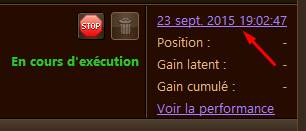
    If your strategy is actually running in ProOrder, you can have access to its code by clicking on its date version (like the picture attached).

    Let me know if its good for you.

    Adolfo thanked this post
    prorealtime-code-version.jpg prorealtime-code-version.jpg
    #8714 quote
    algotraderalgotrader
    Participant
    Average

    Hi Nicolas.
    That works!
    Problem solved.

    Thank you.
    A.

Viewing 3 posts - 1 through 3 (of 3 total)
  • You must be logged in to reply to this topic.

ProRealAI ProRealAI New

Stuck on this ProBuilder code?

Describe what this topic is trying to build, in plain English, and ProRealAI writes the ProRealTime™ indicator, screener or system for you.

Available in 7 languages
Try ProRealAI

Retrieve lost code


General Trading: Market Analysis & Manual Trading

New Reply
Author
author-avatar
algotrader @algotrader Participant
Summary

This topic contains 2 replies,
has 2 voices, and was last updated by algotraderalgotrader
10 years, 3 months ago.

Topic Details
Forum: General Trading: Market Analysis & Manual Trading
Language: English
Started: 06/03/2016
Status: Active
Attachments: No files
ProRealCode ProRealCode
Loading...