


PRT v.12 – List of used variables when typing

Viewing 3 posts - 1 through 3 (of 3 total)

  • Author
    Posts
  • #224331 quote
    pKienpKien
    Participant
    Junior

    Hi everybody.

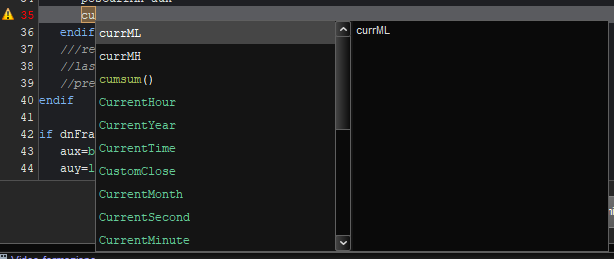
    Getting familiar with PRT v.12. I have discovered that, when programming an indicator, it pops up the list of used variables and other key words (see attached image about what i mean). Too fast. It is annoying. Is it possible to disable that? Or modify the idle time after that the list pops up (like main professional IDE)? Thank you.

    list_of_used_variables.png list_of_used_variables.png
    #224342 quote
    JSJS
    Participant
    Master
    Hi

    You can turn the “light bulb” at the top of the screen on or off…

    (Light bulb on = code suggestions)

    #224343 quote
    JSJS
    Participant
    Master
Viewing 3 posts - 1 through 3 (of 3 total)
  • You must be logged in to reply to this topic.

ProRealAI ProRealAI New

Stuck on this ProBuilder code?

Describe what this topic is trying to build, in plain English, and ProRealAI writes the ProRealTime™ indicator, screener or system for you.

Available in 7 languages
Try ProRealAI

PRT v.12 – List of used variables when typing


ProBuilder: Indicators & Custom Tools

New Reply
Author
author-avatar
pKien @pkien Participant
Summary

This topic contains 2 replies,
has 2 voices, and was last updated by JSJS

2 years, 9 months ago.

Topic Details
Forum: ProBuilder: Indicators & Custom Tools
Language: English
Started: 11/26/2023
Status: Active
Attachments: 2 files
ProRealCode ProRealCode
Loading...

