Prova di trading automatico

Viewing 2 posts - 16 through 17 (of 17 total)
  • Author
    Posts
  • #112209 quote
    Stefano FazionStefano Fazion
    Participant
    Junior

    Ciao!

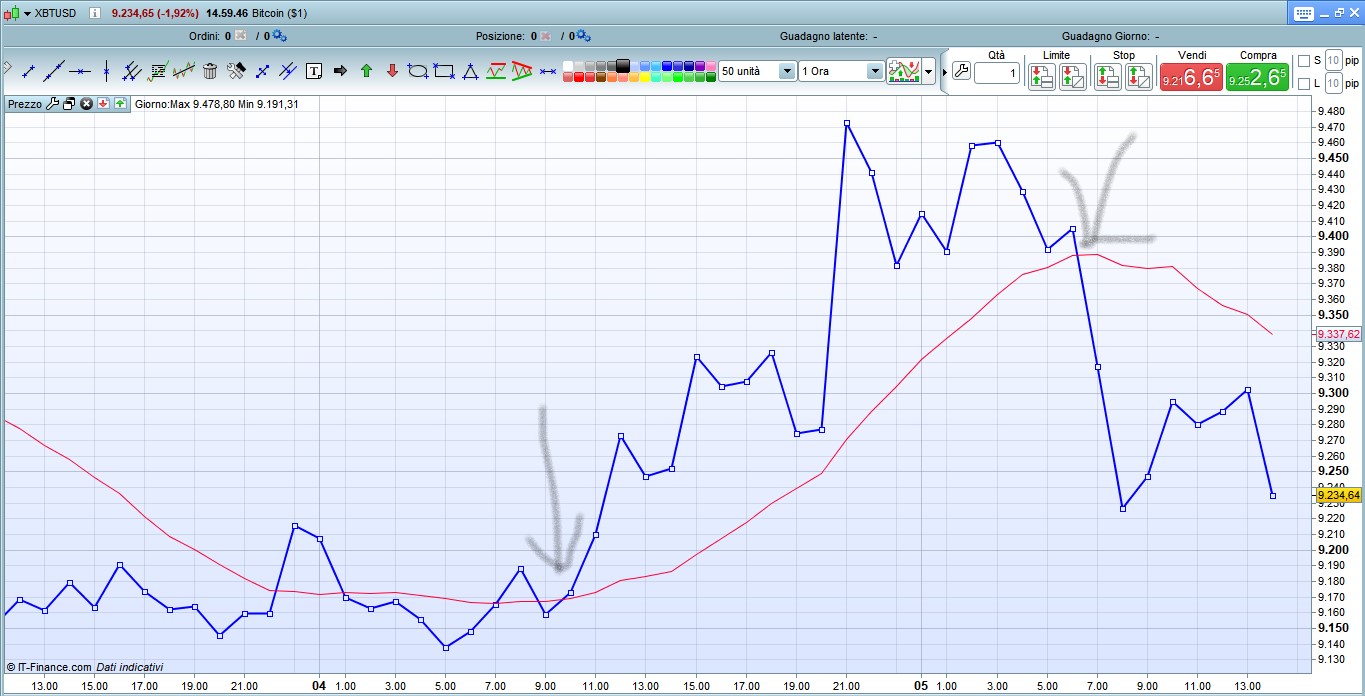
    Non lo so non riesco a capire. Allora facciamo una cosa, metto un grafico con il prezzo in blu (chiusura) e la media mobile a 14 giorni in rosso (chiusura).

    Indico sul grafico dove vorrei acquistare e dove vorrei vendere, e metto lo screenshot.

    Cosa dovrei scrivere nel codice?

    Annotazione-2019-11-05-150116.jpg Annotazione-2019-11-05-150116.jpg
    #112212 quote
    robertogozzirobertogozzi
    Moderator
    Legend

    Nella tua prima freccia, quella più a sinistra, l’incrocio è avvenuto alla chiusura delle ore 10:00, quindi se entri a mercato la freccia LONG dell’entrata apparirà sotto la candela delle ore 11.

    Nella seconda freccia, quella a destra, l’incrocio SHORT è avvenuto alla chiusura della candela delle ore 06:00, quindi l’entrata verrà segnalata con la freccia sopra la candela delle 07:00.

Viewing 2 posts - 16 through 17 (of 17 total)
  • You must be logged in to reply to this topic.

ProRealAI ProRealAI New

Stuck on this ProBuilder code?

Describe what this topic is trying to build, in plain English, and ProRealAI writes the ProRealTime™ indicator, screener or system for you.

Available in 7 languages
Try ProRealAI

Prova di trading automatico


ProOrder: Trading Automatico & Backtesting

New Reply
Author
author-avatar
Stefano Fazion @faxuno Participant
Summary

This topic contains 16 replies,
has 2 voices, and was last updated by robertogozzirobertogozzi
6 years, 11 months ago.

Topic Details
Forum: ProOrder: Trading Automatico & Backtesting
Language: Italian
Started: 10/31/2019
Status: Active
Attachments: 15 files
ProRealCode ProRealCode
Loading...