ProRealAI — Tips and Tricks: get more out of it, and burn fewer credits

Viewing 14 posts - 1 through 14 (of 14 total)
  • Author
    Posts
  • #264496 quote
    NicolasNicolas
    Keymaster
    Legend

    How to actually use ProRealAI (and make your credits last 3× longer)

    ProRealAI is a coding assistant trained specifically on ProBuilder and ProRealTime. Most people use it like a search box — one long chat, everything thrown in, question after question. It works, but it’s the most expensive and the least accurate way to use it. Here’s how to use it properly: first how the credits actually work, then a list of things you can ask it that most users don’t even realise are possible.

    Part 1 — Understand what costs credits

    There’s one thing to understand, and everything else follows from it:
    Every time you send a message, the assistant re-reads the recent conversation before answering.
    That’s how it stays coherent — it remembers the code it wrote you three messages ago. But it also means the longer a chat gets, the more each new message costs. Message #1 in a fresh chat is cheap. Message #20 in a thread stuffed with three different strategies, two pasted backtests and a debugging session can easily cost ten times more — for the exact same question. Credits are consumed by actual usage, not per message. A short question with a short answer costs very little. A long conversation with long code blocks costs a lot. You control that.

    Rule #1 — One chat = one subject

    This is the single biggest saving available to you.
    • New indicator? New chat.
    • Debugging a completely different system? New chat.
    • Just wondering how TIMEFRAME works? New chat, ask, done.
    Don’t ask about your breakout screener inside the thread where you spent 30 messages building a MACD system. Everything in that thread gets re-read to answer your one-line question. Do this: keep 3–4 chats open in parallel for the day — one per project. Jump between them. Each stays small, focused, and cheap. The sidebar keeps them all, they’re never lost.

    Rule #2 — Close the loop, then start fresh

    When a piece of code works and you’re happy with it: copy it out, start a new chat. If you need to extend it later, paste the final version into the new chat. You carry over 40 lines of working code instead of 30 messages of trial and error — and the assistant is more accurate too, because it isn’t re-reading five abandoned versions of your code.

    Rule #3 — Ask complete questions

    Each back-and-forth re-reads the thread. Three questions in one message costs roughly one round-trip. The same three questions spread over three messages costs three — each one bigger than the last. Weak:
    make me a RSI strategy
    Then 6 messages of “which timeframe?”, “which instrument?”, “long only?”, “what stop?”… Strong:
    Trading system for DAX, 15-min, long only. Entry: RSI(14) crosses above 30 and price is above the 200-period MA. Exit: RSI crosses below 70, or a 1.5% stop loss. One position at a time, market orders. Add DEFPARAM for the position size.
    One message, one answer, working code. Roughly a fifth of the cost of the same thing dragged out over ten messages.

    Rule #4 — Long answers cost more than long questions

    Generated text is the expensive part. When you’re iterating on the same code and you already understand it, just say so:
    Code only, no explanation. Just give me the modified lines, not the full listing.
    When you’re learning, ask for explanations — that’s what they’re for. When you’re on your fourth iteration of the same trailing stop, don’t pay to be re-taught what a trailing stop is.

    Rule #5 — Don’t re-paste your code every time

    Once your code is in a chat, it’s in there. Say “in the code above, change the exit to…” — don’t paste the 80 lines again. Re-pasting the same block five times means paying for it five times.

    Rule #6 — Follow up while the thread is warm

    Rapid follow-ups on the same chat are cheaper than reopening a conversation you left this morning. If you know you’ll have three questions, do them in one sitting.

    Rule #7 — Your free credits don’t stack

    You get topped up to 150 free credits every 30 days — it’s a top-up, not an addition. If you’re sitting at 140 unused credits when the cycle turns, you receive 10. Sitting at 0, you receive 150. So there’s no point hoarding them. Use them.

    Quick sanity check

    Ask yourself before hitting Enter: “Does the assistant need everything above to answer this?” If the answer is no, you’re in the wrong chat. Open a new one.

    GraHal thanked this post
    #264500 quote
    NicolasNicolas
    Keymaster
    Legend

    Part 2 — Things you can ask it (that most people never try)

    1. Build a complete strategy from scratch

    You don’t need to know a single line of ProBuilder. Describe the idea the way you’d explain it to a trading buddy, and be specific about the boring parts — instrument, timeframe, direction, stops, exits.
    Build me a complete trading system for the Nasdaq, 1-hour chart. Idea: buy pullbacks in an uptrend. Uptrend = price above the 200 EMA. Pullback = RSI(14) below 40, then turning back up. Exit on a 2 ATR target or a 1 ATR stop. Max one position. Add DEFPARAM so I can optimize the RSI level and the ATR multiples.
    You get compiling code you can paste straight into ProBuilder and backtest. Then iterate: “Add a filter to skip trades between 12:00 and 14:00”, “Make the stop a trailing stop that moves to breakeven at 1 ATR”.

    2. Debug code that won’t compile

    The one everyone needs. Paste the code and the exact error message ProRealTime gave you:
    This screener doesn’t compile. ProRealTime says “Syntax error line 12”. Here’s the code: [paste]
    You get the fix, and an explanation of what was actually wrong — reserved words, a missing ENDIF, a function that doesn’t take that many arguments, a variable used before it’s assigned.

    3. Debug code that compiles but behaves wrong

    Harder, and more valuable. Explain what you expected versus what you got:
    This system compiles but it never takes a short trade. It should short when the conditions are mirrored. What’s wrong? [paste code] My indicator plots a flat line after the first 200 bars. [paste code] My backtest shows 3000 trades on 6 months of 1-min data — I think it’s re-entering on every bar. How do I make it enter once per signal?

    4. Improve something you already have

    Bring your working code and level it up:
    Add a proper trailing stop to this system, with a breakeven move at +1R. Add money management: risk 1% of capital per trade based on the stop distance. This only trades long. Add the symmetrical short side. Add a session filter so it only trades the European session. Make this work on any timeframe instead of being hardcoded for 5-min.

    5. Turn an indicator into a screener (or vice versa)

    Massively underused:
    Here’s my custom indicator. Turn it into a screener that scans my watchlist for the bars where it triggers. [paste] Here’s my screener condition. Turn it into an indicator so I can see historically where it would have fired on the chart.

    6. Translate an idea from anywhere into ProBuilder

    Read something in a book, on a blog, in a YouTube video, or a description of a Pine Script indicator? Describe it and get a ProBuilder version:
    I read about a “3 bar reversal” pattern: bar 1 makes a new 20-bar low, bar 2 closes below bar 1’s low, bar 3 closes above bar 2’s high. Code me a screener for it.

    7. Audit code before you trust it with real money

    Somebody posted a system on the forum and you’re tempted. Paste it and ask:
    Explain what this code does, step by step. Is there anything in it that would repaint, look ahead, or behave differently in live trading than in backtest? [paste]
    That question alone can save you a lot more than the credits it costs.

    8. Ask about the platform itself, not just code

    It’s not only a code generator. It knows ProRealTime:
    What’s the difference between ONMARKETONLY and NOTONMARKETONLY? How does DEFPARAM CumulateOrders actually work? Why does my backtest give different results than my live results on the same system? What’s the difference between running a system on close versus tick by tick, and which should I use for a breakout strategy? How do I handle spread and commission properly in a backtest so the results aren’t fantasy?

    9. Get your optimization right

    Where most retail systems quietly die:
    I want to optimize this system. Which parameters should I actually expose, and which should I leave fixed to avoid over-fitting? Restructure this code so I can run a walk-forward test on it properly. My optimizer found a set of parameters with a 92% win rate. How do I check whether that’s real or curve-fitted?

    10. Just talk trading

    No code required:
    Explain position sizing based on ATR, with a concrete example on the DAX with a 10,000€ account. My strategy worked for two years and stopped in January. What are the usual causes, and how do I test which one it is? What’s a realistic expectation for a trend-following system on the DAX — win rate, drawdown, profit factor?

    11. Learn ProBuilder, don’t just get code

    Explain this code to me line by line, as if I’ve never coded before. [paste] Teach me how loops work in ProBuilder, with a small concrete example. Show me three ways to write the same condition, from beginner to compact, and explain the trade-offs.

    Part 3 — Prompt habits that get better answers

    Say what you want built. “Indicator”, “screener”, or “trading system” — they’re different objects in ProRealTime and the code is structured differently. Give the context. Instrument, timeframe, long/short, one position or several. Without it the assistant makes reasonable assumptions, and you spend messages correcting them. Paste the exact error. “It doesn’t work” costs you a round-trip. Syntax error line 12 gets you the answer immediately. Iterate in small steps. “Now add the trailing stop” beats “rewrite everything with these 6 new features” — smaller changes, less to review, and you can spot exactly where a regression came from. Ask why. “Why did you use summation instead of a loop?” — this is where the tool becomes a teacher instead of a vending machine.
    GraHal thanked this post
    #264502 quote
    GraHalGraHal
    Participant
    Master
    when the cycle turns

    When does the cycle turn?

    1st of the month, so same for everybody?

    Or some other cycle turning date / point?

    #264503 quote
    NicolasNicolas
    Keymaster
    Legend

    How the free monthly credits work

    Every account gets 150 free credits every 30 days. A few details that come up often:

    It’s a rolling 30 days, not the 1st of the month. The clock starts from your last refill, so each account has its own cycle. If your credits came in on the 12th, the next ones are due around the 11th of the following month — there’s no global reset date.

    It’s a top-up to 150, not +150. The refill brings your balance up to 150 rather than adding 150 on top. If you still have 120 credits left, you’ll receive 30. If you’re at 0, you get the full 150. Credits you’ve purchased count toward that balance, so if you’re already above 150 the free refill has nothing to add — your paid credits simply stay where they are.

    It lands when you come back. The top-up is applied the next time you open the app, not by a scheduled job at midnight. If you don’t log in for three months, you get one refill on your return, not three — the free credits don’t stack up while you’re away.

    GraHal and robertogozzi thanked this post
    #264626 quote
    JSJS
    Participant
    Master

    I get the message below when I ask the AI a question…

    There are still 22 credits on the balance sheet and the question was simple…?

    Scherm­afbeelding-2026-08-24-om-11.59.04.png Scherm­afbeelding-2026-08-24-om-11.59.04.png
    #264627 quote
    NicolasNicolas
    Keymaster
    Legend

    Hi JS, thank your for the report.

    Is the question was a new message in an ongoing discussion? or a fresh new one?

    #264628 quote
    JSJS
    Participant
    Master

    It was a new question in an ongoing discussion (only one question before…)

    #264629 quote
    NicolasNicolas
    Keymaster
    Legend

    Ok thank you.

    I think the reply needs to consume more of your available credits and therefore block the system from going further.

    I am planning an update this afternoon, I’ll see to add a fix for this situation to not happen again.

    #264630 quote
    JSJS
    Participant
    Master

    I asked the AI how the use of anchor works again…

    In the first response, it included the following comment:

    The validator does not recognize anchor as a built-in function, but the forum clearly confirms that it is a valid PRT v11 instruction (with extensive official documentation and working examples from the PRT developers themselves). The validator is therefore not up to date with this newer PRT v11 syntax…

    It therefore seems that the AI is trying to validate the code it cannot find against the forum… (consuming a lot of credits?)

    #264631 quote
    NicolasNicolas
    Keymaster
    Legend

    No, this is 2 different issue I will address this afternoon. I’ll keep you updated.

    #264636 quote
    NicolasNicolas
    Keymaster
    Legend

    The new version is online, it includes the related fixes, thank you for reporting them! 😉

    JS thanked this post
    #264660 quote
    NicolasNicolas
    Keymaster
    Legend

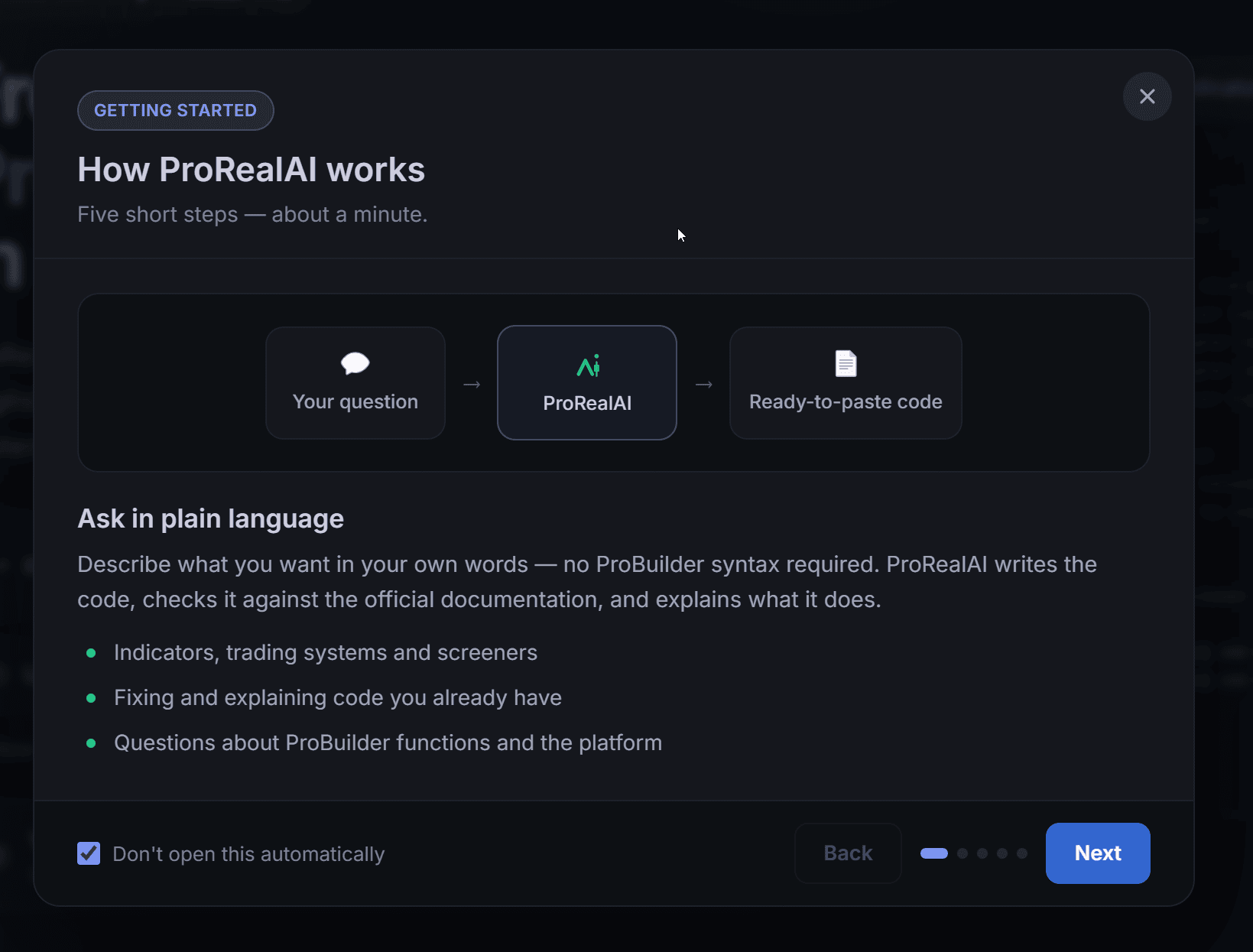
    A new short tutorial has been added in the app. Five easy steps to introduce the best way to use it and to get the most of it.

    dtSeARaIp6.png dtSeARaIp6.png
    #264723 quote
    NicolasNicolas
    Keymaster
    Legend

    Good morning,

    Many users have been able to take advantage of ProRealAI to improve their codes and design new ones, I am happy that it can be useful, after all this work.

    Thanks to feedback, many improvements have been made to the tool in the last two weeks, and I hope to do even better in the coming weeks, perhaps even adding technical analysis services? I’ve had some requests about that 🙂

    Feel free to provide feedback here or via the contact form, I am here to listen.

    See you soon.

    #264727 quote
    NicolasNicolas
    Keymaster
    Legend

    Oh, and some details about the free credits

    Every account gets 150 free credits every 30 days. A few details that come up often:

    • It’s a rolling 30 days, not the 1st of the month. The clock starts from your last refill, so each account has its own cycle. If your credits came in on the 12th, the next ones are due around the 11th of the following month — there’s no global reset date.
    • It’s a top-up to 150, not +150. The refill brings your balance up to 150 rather than adding 150 on top. If you still have 120 credits left, you’ll receive 30. If you’re at 0, you get the full 150. Credits you’ve purchased count toward that balance, so if you’re already above 150 the free refill has nothing to add — your paid credits simply stay where they are.
    • It lands when you come back. The top-up is applied the next time you open the app, not by a scheduled job at midnight. If you don’t log in for three months, you get one refill on your return, not three — the free credits don’t stack up while you’re away.
Viewing 14 posts - 1 through 14 (of 14 total)
  • You must be logged in to reply to this topic.
ProRealAI ProRealAI New

Stuck on this ProBuilder code?

Describe what this topic is trying to build, in plain English, and ProRealAI writes the ProRealTime™ indicator, screener or system for you.

Available in 7 languages
Try ProRealAI

ProRealAI — Your AI Coding Assistant for ProBuilder & ProRealTime

New Reply
Author
author-avatar
Nicolas @nicolas Keymaster
Summary

This topic contains 13 replies,
has 3 voices, and was last updated by NicolasNicolas
4 weeks, 1 day ago.

Topic Details
Forum: ProRealAI — Your AI Coding Assistant for ProBuilder & ProRealTime Forum
Started: 08/13/2026
Status: Active
Attachments: 2 files
ProRealCode ProRealCode
Loading...