ProRealAI: your codes now have a name (CODE-1, CODE-2…) and can be reused in any conversation
Until now a code only existed in the conversation where it was written. To modify it, ProRealAI rewrote the whole thing. To use it in another chat, you had to paste it again. Both cost credits.
This is now fixed. Every ProBuilder code that goes through ProRealAI gets a name, stays on your account, and can be called back by that name in any conversation.
WHAT YOU SEE
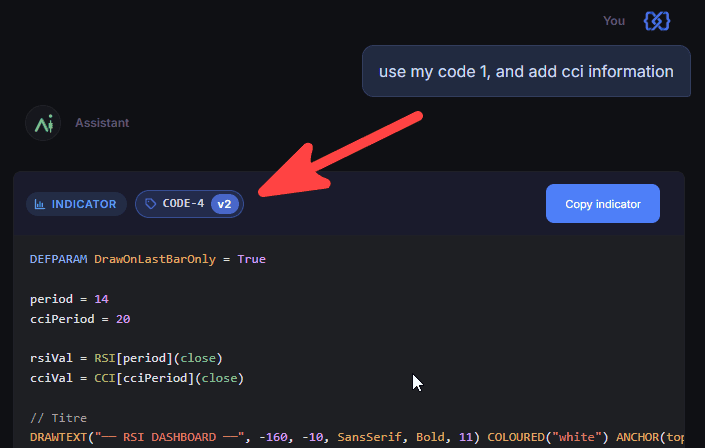
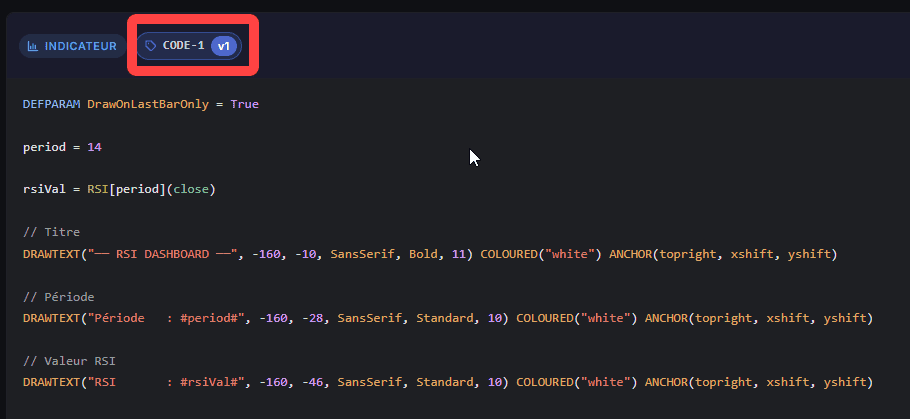
Look at the header of a code block in an answer. There is a small tag: CODE-3 · v1
CODE-3 is the code’s name. Each new code gets the next number. Each modification raises the version: v2, v3, etc.
Codes you paste get a name too.
WHAT YOU CAN DO
1. Name the code in your messages
“Add a trailing stop to CODE-3”
“In CODE-7, replace the RSI filter with a Stochastic”
“Which one is better for a 1-min chart, CODE-2 or CODE-5?”
2. Modifications are cheaper
When you ask for a change, ProRealAI edits the stored code instead of rewriting it, checks that the result compiles, and shows you the full updated code as v2. You always see the complete code. But a one-line change to a 300-line system no longer costs as much as writing the 300 lines.
3. Reuse a code in a new conversation, without pasting it
Open a new, empty chat and write:
“Take CODE-12 and add the short side”
ProRealAI fetches CODE-12 from your account and works on it. ProRealAI also knows your most recent codes from other chats, so “improve the screener from yesterday” usually works. Naming it is safer.
This makes the “one chat per subject” advice much easier to follow: build the code in one chat, note its name, close the chat. Next time, open a new one and just name the code. The trial and error stays behind.
4. Show a code again
“Show me CODE-4”
Displayed in full, no rewrite.
GOOD TO KNOW
– Names are per account. Your CODE-3 is not someone else’s CODE-3. On the forum, keep pasting the code.
– To find a name, look at the chip on the code block in the chat where it was made. All your chats are in the sidebar.
– A version never changes. CODE-3 v1 is always the same code. A change makes v2. ProRealAI works on the latest version unless you say otherwise.
– Keep saving your final code in ProRealTime as usual. This is meant to save credits and pasting, not to be your only copy.
Try it and tell us how it goes. If a name gets lost or a version does something unexpected, report it here.