Prix ronds améliorations possibles ?

Viewing 2 posts - 1 through 2 (of 2 total)
  • Author
    Posts
  • #200137 quote
    JERRYJERRY
    Participant
    Junior

    Quelqu’un pourrait-il améliorer ce super code qui trace automatiquement des lignes sur les prix ronds.

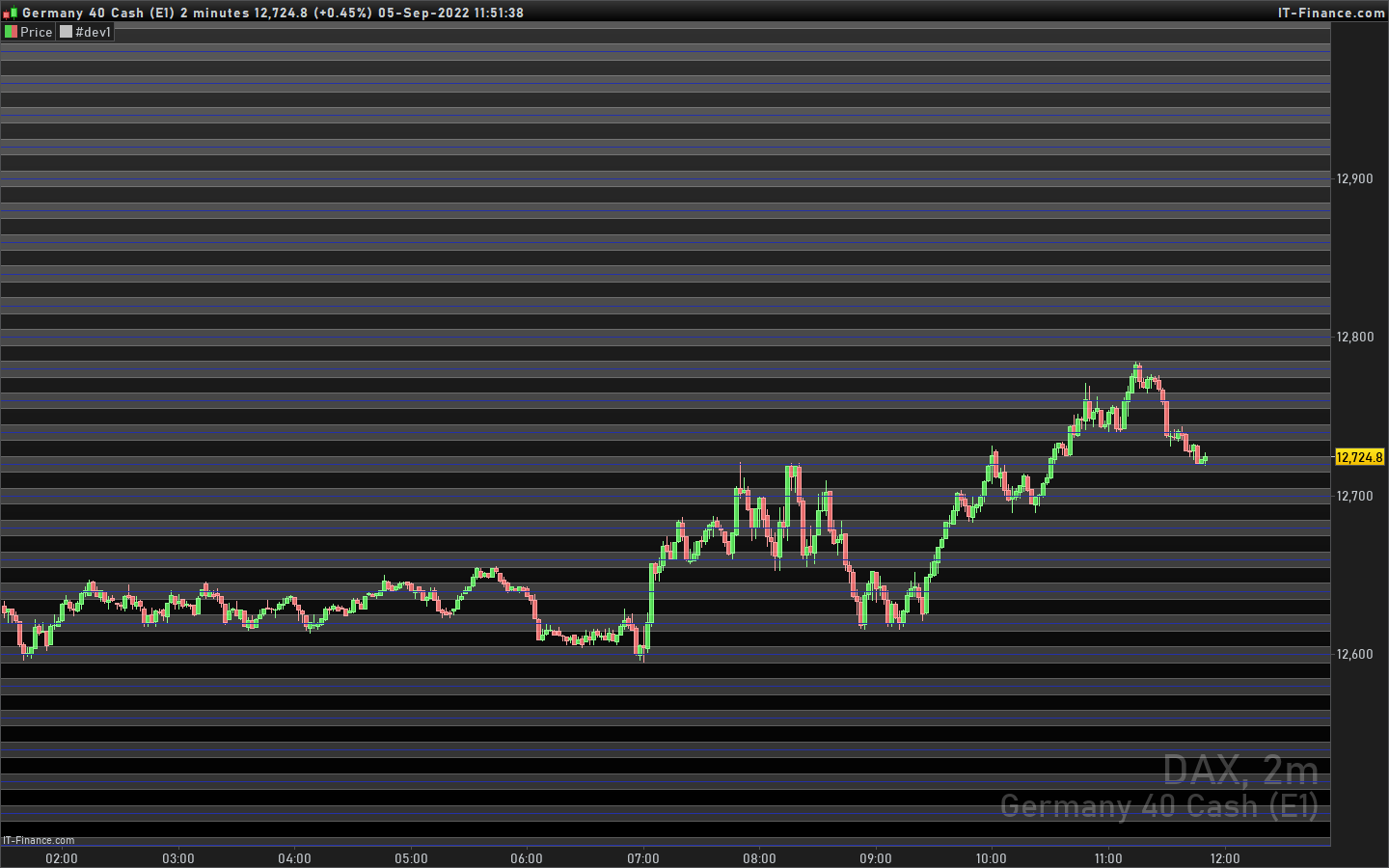
    Très utile car réactions fréquentes sur ces niveaux. Mais j’aimerais qu’il trace des rectangle (zones) de hauteur paramétrable (p. ex +5 et -5 du prix rond) et cerise sur le gateaux de couleur paramétrable (ça c’est moins important) .   Merci d’avance.

    //PRC_SweetSpots round number | indicator
    //04.12.2017
    //Nicolas @ www.prorealcode.com
    //Sharing ProRealTime knowledge
    
    // --- settings
    // NumLinesAboveBelow = 100
    // MainLevels = 100
    // SubLevels = 20
    // --- end of settings
    
    defparam drawonlastbaronly=true
    
    DecAr = MainLevels*pointsize
    DecArSub = SubLevels*pointsize
    
    myVarUp = close
    myVarDn = close
    myVarUpSub = close
    myVarDnSub = close
    
    if DecAr = 0 then
    InvDec = 1
    else
    InvDec = 1/DecAr
    endif
    if DecArSub = 0 then
    InvDecSub = 1
    else
    InvDecSub = 1/DecArSub
    endif
    //if DecAr>0 and DecArSub>0 and InvDec>0 then
    for i = 0 to NumLinesAboveBelow do
    
    
    Floor1 = round(InvDec*myVarDn-0.51)/InvDec
    Ceil1 = round(InvDec*myVarUp+0.51)/InvDec
    
    FloorSub = round(InvDecSub*myVarDnSub-0.51)/InvDecSub
    CeilSub = round(InvDecSub*myVarUpSub+0.51)/InvDecSub
    
    r=36
    g=49
    floorval=floorsub
    ceilval=ceilsub
    
    drawhline(floorval) coloured(r,g,168)
    drawhline(ceilval) coloured(r,g,168)
    drawrectangle(1,floor1,barindex,floor1) coloured(r,0,0)
    drawrectangle(1,ceil1,barindex,ceil1) coloured(r,0,0)
    
    myVarUp=Ceil1
    myVarDn=Floor1
    myVarUpSub=CeilSub
    myVarDnSub=FloorSub
    
    next
    
    return
    
    #200166 quote
    NicolasNicolas
    Keymaster
    Legend

    Ci-joint le code avec des rectangles, pour modifier la couleur voir les noms HTML disponibles ici: HTML Color Names

    //PRC_SweetSpots round number | indicator
    //04.12.2017
    //Nicolas @ www.prorealcode.com
    //Sharing ProRealTime knowledge
    defparam drawonlastbaronly=true
    // --- settings
    NumLinesAboveBelow = 100
    MainLevels = 100
    SubLevels = 20
    // --- end of settings
    
    if islastbarupdate then 
    DecAr = MainLevels*pointsize
    DecArSub = SubLevels*pointsize
    
    myVarUp = close
    myVarDn = close
    myVarUpSub = close
    myVarDnSub = close
    
    if DecAr = 0 then
    InvDec = 1
    else
    InvDec = 1/DecAr
    endif
    if DecArSub = 0 then
    InvDecSub = 1
    else
    InvDecSub = 1/DecArSub
    endif
    //if DecAr>0 and DecArSub>0 and InvDec>0 then
    for i = 0 to NumLinesAboveBelow do
    
    
    Floor1 = round(InvDec*myVarDn-0.51)/InvDec
    Ceil1 = round(InvDec*myVarUp+0.51)/InvDec
    
    FloorSub = round(InvDecSub*myVarDnSub-0.51)/InvDecSub
    CeilSub = round(InvDecSub*myVarUpSub+0.51)/InvDecSub
    
    r=36
    g=49
    floorval=floorsub
    ceilval=ceilsub
    
    drawhline(floorval) coloured(r,g,168)
    drawhline(ceilval) coloured(r,g,168)
    
    drawrectangle(0,floorval+5*pointsize,datetobarindex(20301231),floorval-5*pointsize) coloured("white",50) bordercolor("white",50)
    drawrectangle(0,ceilval+5*pointsize,datetobarindex(20301231),ceilval-5*pointsize) coloured("white",50) bordercolor("white",50)
    
    myVarUp=Ceil1
    myVarDn=Floor1
    myVarUpSub=CeilSub
    myVarDnSub=FloorSub
    
    next
    endif
    
    return
    JERRY thanked this post
    chiffres-ronds-dax.png chiffres-ronds-dax.png
Viewing 2 posts - 1 through 2 (of 2 total)
  • You must be logged in to reply to this topic.

ProRealAI ProRealAI New

Stuck on this ProBuilder code?

Describe what this topic is trying to build, in plain English, and ProRealAI writes the ProRealTime™ indicator, screener or system for you.

Available in 7 languages
Try ProRealAI

Prix ronds améliorations possibles ?


ProBuilder : Indicateurs & Outils Personnalisés

New Reply
Author
author-avatar
JERRY @flamentjerry Participant
Summary

This topic contains 1 reply,
has 2 voices, and was last updated by NicolasNicolas

4 years ago.

Topic Details
Forum: ProBuilder : Indicateurs & Outils Personnalisés
Language: French
Started: 09/05/2022
Status: Active
Attachments: 1 files
ProRealCode ProRealCode
Loading...