OMX30 My first automatic system

Viewing 15 posts - 1 through 15 (of 17 total)
  • Author
    Posts
  • #24042 quote
    BarneyBarney
    Participant
    Senior

    My first post here.

    This works i Sweden omx30 in PRT 10.3 in tick by tick mode.

    Have i missed something?


    // Definition of code parameters
    DEFPARAM CumulateOrders = False // Cumulating positions deactivated
    // The system will cancel all pending orders and close all positions at 0:00. No new ones will be allowed until after the "FLATBEFORE" time.
    DEFPARAM FLATBEFORE = 091800
    
    // Conditions to enter long positions
    indicator1 = BollingerDown[20](close)
    c1 = (close CROSSES UNDER indicator1)
    
    IF c1 THEN
    BUY 1 CONTRACT AT MARKET
    ENDIF
    
    // Conditions to exit long positions
    indicator2 = BollingerUp[20](close)
    c2 = (close CROSSES OVER indicator2)
    
    IF c2 THEN
    SELL AT MARKET
    ENDIF
    
    // Conditions to enter short positions
    indicator3 = BollingerUp[20](close)
    c3 = (close CROSSES OVER indicator3)
    
    IF c3 THEN
    SELLSHORT 1 CONTRACT AT MARKET
    ENDIF
    
    // Conditions to exit short positions
    indicator4 = BollingerDown[20](close)
    c4 = (close CROSSES UNDER indicator4)
    
    IF c4 THEN
    EXITSHORT AT MARKET
    ENDIF
    
    // Stops and targets
    SET STOP pLOSS 3
    SET TARGET pPROFIT 6
    #24045 quote
    JC_BywanJC_Bywan
    Moderator
    Master

    Hi, message above was edited to add PRT code style

    >> For clarity of messages on ProRealCode’s forums, please use the “insert PRT code” button to separate the text of the code part! Thank you! <<

    #24050 quote
    Joachim NilssonJoachim Nilsson
    Participant
    Average

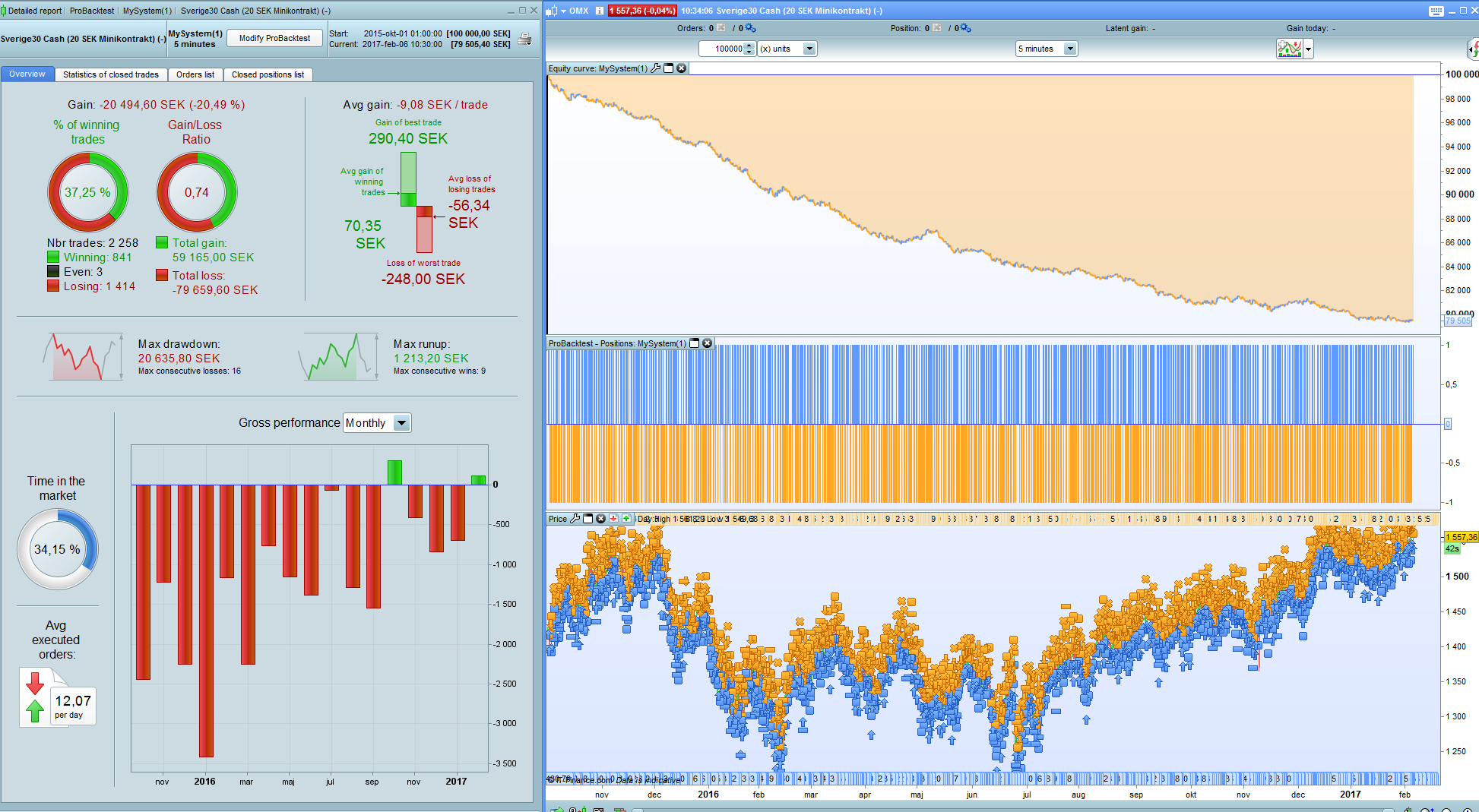
    I tried your code on all timeframes and I get the same result every time. -100%. Have you added spread? I use 2p spread when I work with OMX.

    Also, small stops and profits are rarely profitable even if we would like it to be that way…

    #24052 quote
    BarneyBarney
    Participant
    Senior

    Strange!?

    It works for me..

    But 2p spread don’t work at all…


    Shit!

    #24054 quote
    Joachim NilssonJoachim Nilsson
    Participant
    Average

    What timeframe are you running? If it´s a complete intradaysystem on the lower timeframes  you can probably test it with 0,5p spread but when you have susch a small stop i would be afraid for slippage and would not go under 1p spread. But that´s just me!

    #24055 quote
    BarneyBarney
    Participant
    Senior

    Its running i 5 min and it works for me.

    Perhaps i am doing something wrong when i post the code?

    #24056 quote
    BarneyBarney
    Participant
    Senior

    The system works likt this!

    By 1 contract if price crosses under Bollinger down.

    Sell if price crosses over Bollinger up.

    The other way around for short pos.

    #24058 quote
    Joachim NilssonJoachim Nilsson
    Participant
    Average

    This is my result with 0.5p spread – which I think is too little since it´s not an intraday system.

    Skärmbild-59.png Skärmbild-59.png
    #24061 quote
    BarneyBarney
    Participant
    Senior

    Yes it don’t work with spread at all.

    #24063 quote
    Joachim NilssonJoachim Nilsson
    Participant
    Average

    Then you have too keep on working with it! 🙂

    For OMX and  a intraday system (090000-173000) I would go with 1p spread and 2p spread if it shops in all hours.

    #24077 quote
    BarneyBarney
    Participant
    Senior

    Yes, nothing else to do……

    #24082 quote
    EricEric
    Participant
    Master

    1 point spread on omx is the same as 7 point spread on dax

    #24093 quote
    BarneyBarney
    Participant
    Senior

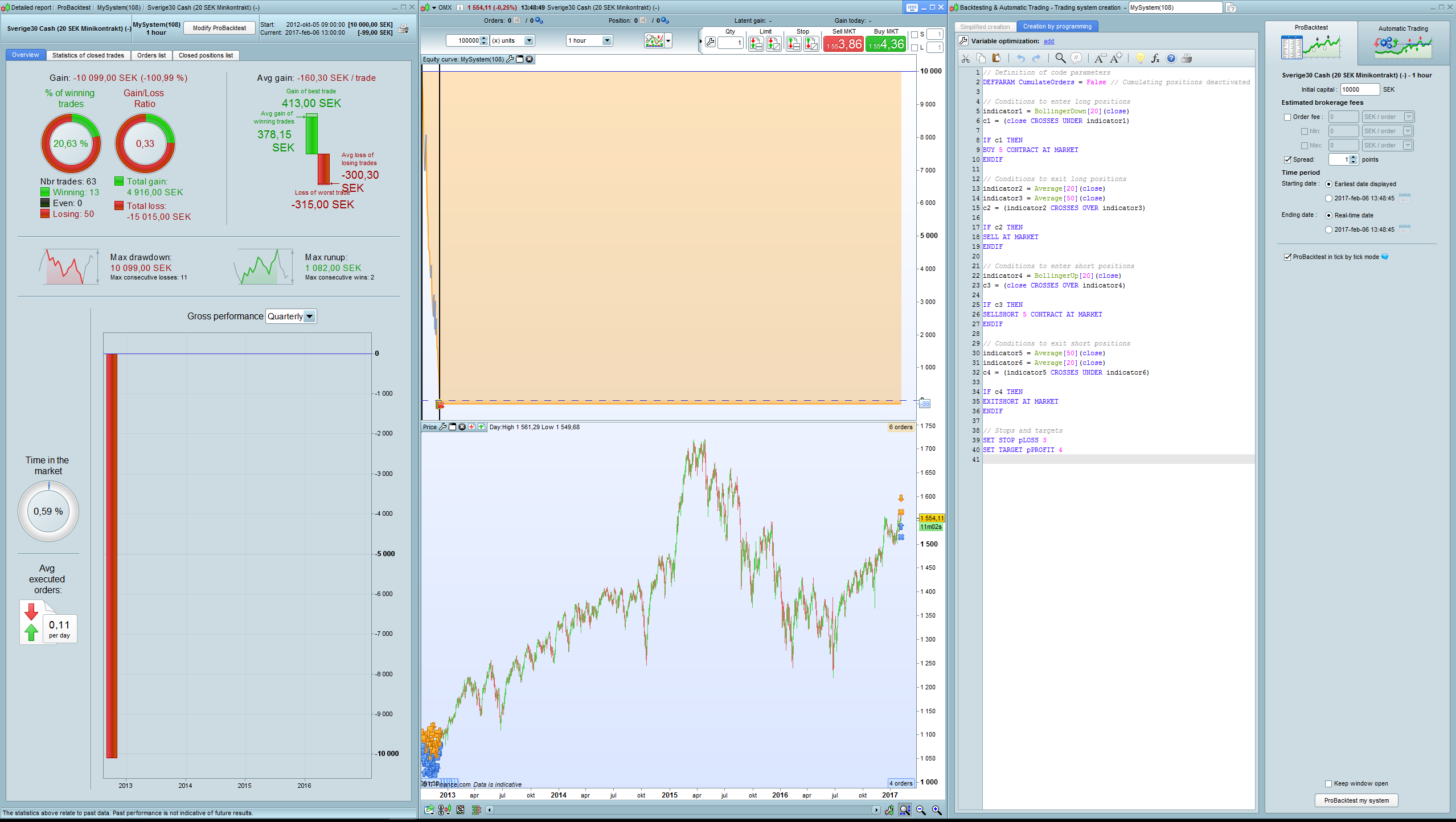
    Ok, what do you think about this system.
    I go with the”insert PRT code” button this time!

    1 Hour OMX30
    Spread 1 p


    // Definition of code parameters
    DEFPARAM CumulateOrders = False // Cumulating positions deactivated
    
    // Conditions to enter long positions
    indicator1 = BollingerDown[20](close)
    c1 = (close CROSSES UNDER indicator1)
    
    IF c1 THEN
    BUY 5 CONTRACT AT MARKET
    ENDIF
    
    // Conditions to exit long positions
    indicator2 = Average[20](close)
    indicator3 = Average[50](close)
    c2 = (indicator2 CROSSES OVER indicator3)
    
    IF c2 THEN
    SELL AT MARKET
    ENDIF
    
    // Conditions to enter short positions
    indicator4 = BollingerUp[20](close)
    c3 = (close CROSSES OVER indicator4)
    
    IF c3 THEN
    SELLSHORT 5 CONTRACT AT MARKET
    ENDIF
    
    // Conditions to exit short positions
    indicator5 = Average[50](close)
    indicator6 = Average[20](close)
    c4 = (indicator5 CROSSES UNDER indicator6)
    
    IF c4 THEN
    EXITSHORT AT MARKET
    ENDIF
    
    // Stops and targets
    SET STOP pLOSS 3
    SET TARGET pPROFIT 4
    #24099 quote
    Joachim NilssonJoachim Nilsson
    Participant
    Average

    Looks the same too me. And I still think your stops is too small on a 1hour timeframe.

    Skärmbild-61.png Skärmbild-61.png
    #24119 quote
    BarneyBarney
    Participant
    Senior

    Ahhh, the system does not work in 1 hour.

    Wrong by me.

    One day it´ll be, and the stop is small but i think i get the best results with 3 p.

Viewing 15 posts - 1 through 15 (of 17 total)
  • You must be logged in to reply to this topic.

ProRealAI ProRealAI New

Stuck on this ProBuilder code?

Describe what this topic is trying to build, in plain English, and ProRealAI writes the ProRealTime™ indicator, screener or system for you.

Available in 7 languages
Try ProRealAI

OMX30 My first automatic system


ProOrder: Automated Strategies & Backtesting

New Reply
Author
author-avatar
Barney @rickardktm Participant
Summary

This topic contains 16 replies,
has 4 voices, and was last updated by Joachim NilssonJoachim Nilsson

9 years, 7 months ago.

Topic Details
Forum: ProOrder: Automated Strategies & Backtesting
Language: English
Started: 02/06/2017
Status: Active
Attachments: No files
ProRealCode ProRealCode
Loading...