Nom du pivot central

Viewing 5 posts - 1 through 5 (of 5 total)
  • Author
    Posts
  • #261786 quote
    Nightster
    Participant
    Junior

    Bonjour

    J’utilse le code des points pivots horaires et journaliers que j’ai trouvé sur ce site, donc je suis très satisfait

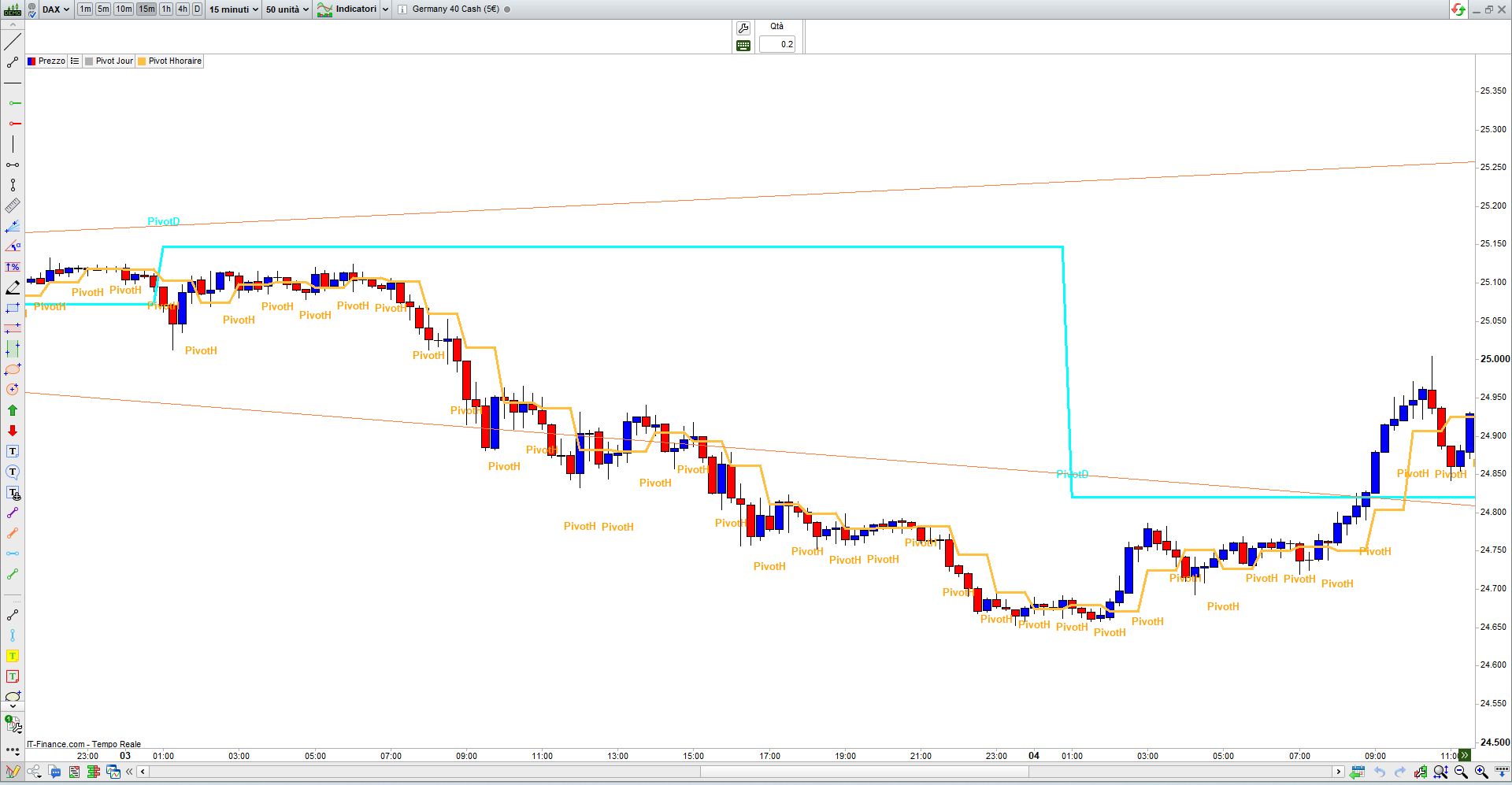
    à la fin de chaque pivot j’aimerais ajouter le texte qui correspond au pivot : PivotD et PivotH (comme sur les points pivots d’origine de PRT)

    Je n’utilise que le pivot central, pas les S/R

    Je n’arrive pas à utiliser Drawtext

    Qui peut m’aider ?

    mes codes


    Pivot jour

    // POINT PIVOT JOURNALIER

    IF dayofweek = 1 THEN

    dayhigh = DHigh(2)

    daylow = DLow(2)

    dayclose = DClose(2)

    ENDIF


    IF dayofweek >=2 and dayofweek < 6 THEN

    dayhigh = DHigh(1)

    daylow = DLow(1)

    dayclose = DClose(1)

    ENDIF


    PPDay = (dayhigh + daylow + dayclose) / 3

    RETURN PPDay COLOURED (“cyan”) as “Pivot Jour”


    Pivot horaire

    timeframe(1 hour)

    PivotH1 = (High[1] + Low[1] + Close[1] )/3

    return (PivotH1)


    Image-pivots.jpg Image-pivots.jpg
    #261795 quote
    robertogozzi
    Moderator
    Master

    Pivot Journalier:

    // POINT PIVOT JOURNALIER
    Timeframe(Daily)
    IF dayofweek = 1 THEN
    dayhigh = DHigh(2)
    daylow = DLow(2)
    dayclose = DClose(2)
    ENDIF
    IF dayofweek >=2 and dayofweek < 6 THEN
    dayhigh = DHigh(1)
    daylow = DLow(1)
    dayclose = DClose(1)
    ENDIF
    PPDay = (dayhigh + daylow + dayclose) / 3
    Timeframe(default)
    IF PPDay <> PPDay[1] THEN
    DrawText("PivotD",BarIndex,PPday + highest[5](range),dialog,bold,13) coloured("Cyan")
    ENDIF
    RETURN PPDay COLOURED ("cyan") as "Pivot Jour"


    Pivot Horaire:

    //Pivot horaire
    timeframe(1 hour)
    PivotH1 = (High[1] + Low[1] + Close[1] )/3
    Timeframe(default)
    IF PivotH1 <> PivotH1[1] THEN
    DrawText("PivotH",BarIndex,PivotH1 - highest[5](range),dialog,bold,13) coloured("Orange")
    ENDIF
    return PivotH1


    Nightster and Iván González thanked this post
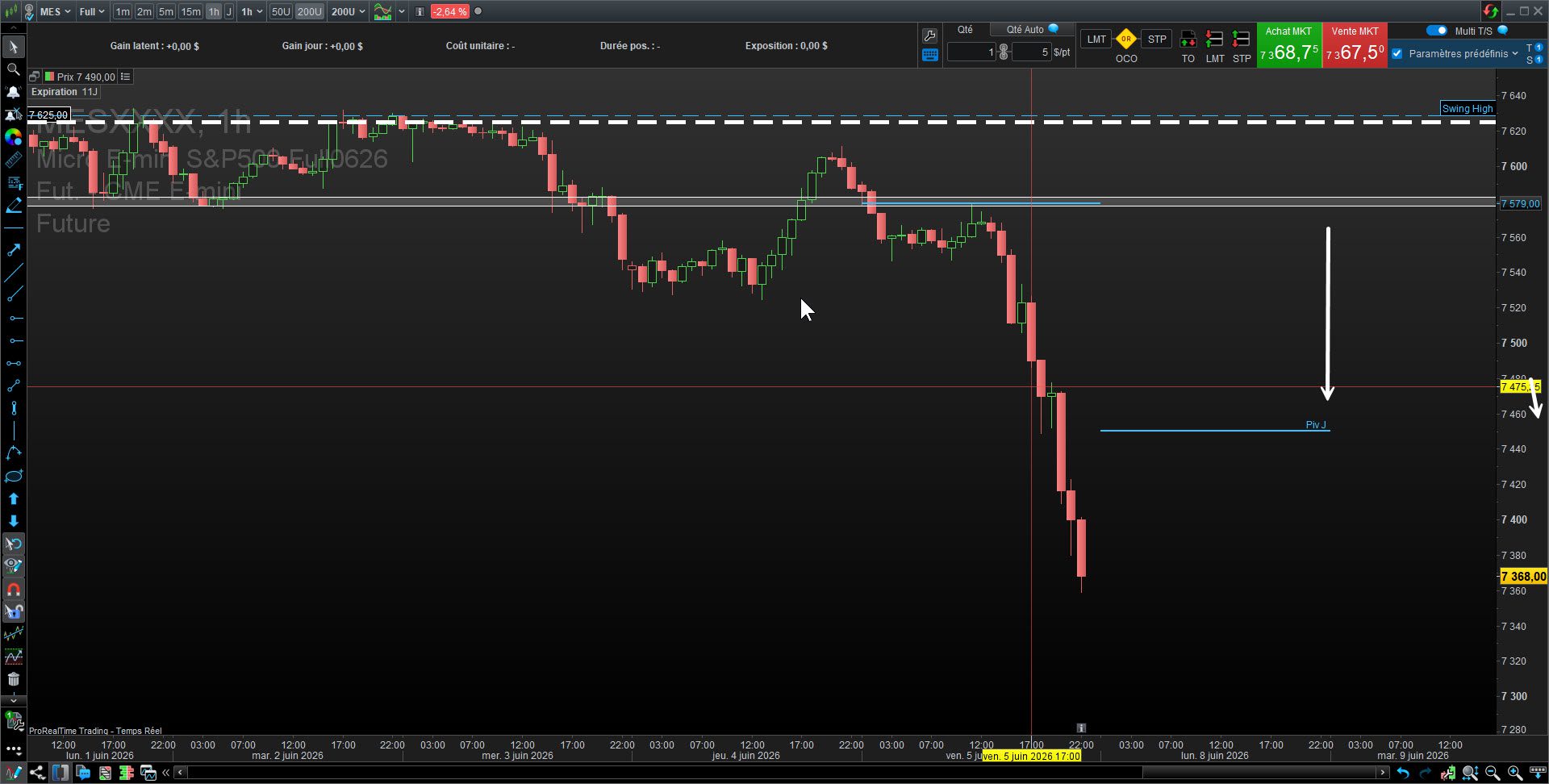
    x.jpg x.jpg
    #261801 quote
    Nightster
    Participant
    Junior

    Merci robertogozzi, c’est déjà super comme ça

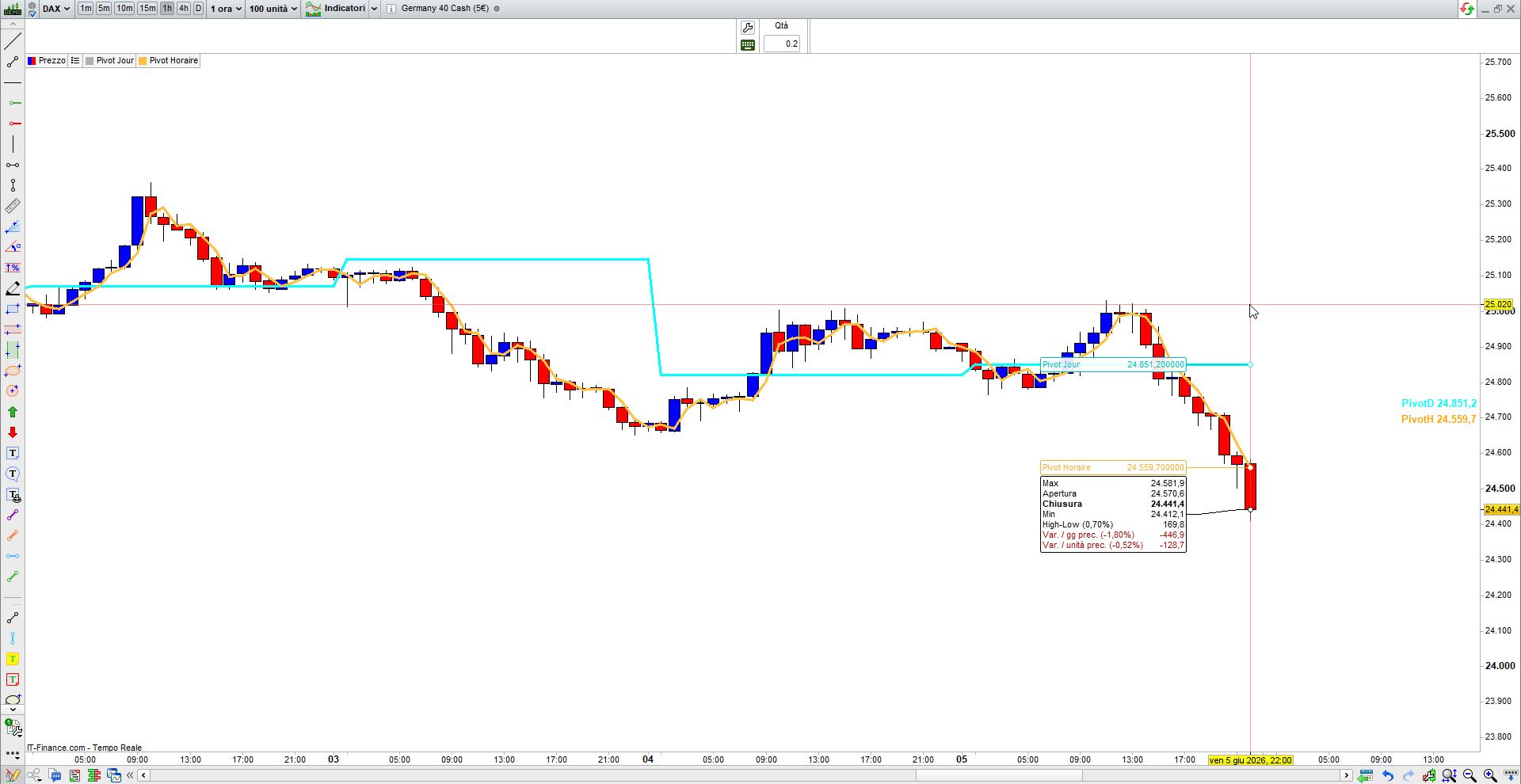
    est il possible d’avoir le mot PIvotD à la fin du graphique comme sur le pivot d’origine PRT ?

    Image-pivots-1.jpg Image-pivots-1.jpg
    #261806 quote
    robertogozzi
    Moderator
    Master

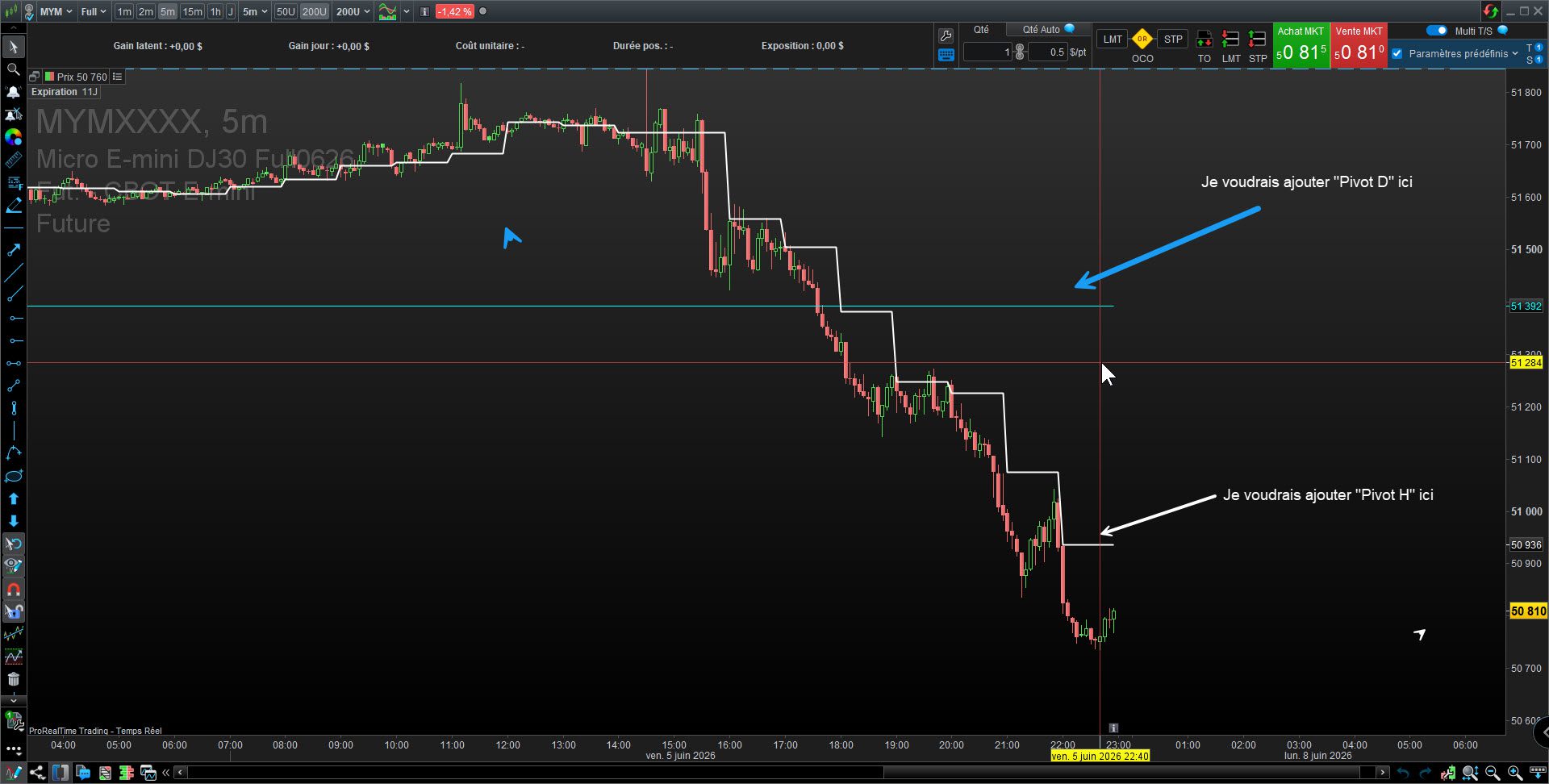
    Vous pouvez voir, à droite, les mentions « PivotH » et « PivotD » avec leurs valeurs numériques respectives. Cependant, elles ne correspondent pas au prix exact indiqué, mais plutôt à une position approximativement au milieu du graphique (à droite).

    De plus, seule la valeur numérique du dernier pivot s’affiche, et non celle des précédents.

    Pivot Horaire:

    //Pivot horaire
    //
    DEFPARAM DrawOnLastBarOnly = true
    timeframe(1 hour)
    PivotH1 = round((High[1] + Low[1] + Close[1] )/3,1)
    Timeframe(default)
    IF PivotH1 <> PivotH1[1] THEN
    //DrawText("PivotH",BarIndex,PivotH1 - highest[5](range),dialog,bold,13) coloured("Orange") anchor(right)
    ENDIF
    //DrawText("PivotH",BarIndex,PivotH1 - highest[5](range),dialog,bold,13) coloured("Orange") anchor(right)
    DrawText("PivotH #PivotH1#",-50,-20,dialog,bold,13) anchor(right) coloured("Orange")
    return PivotH1
    

    Pivot Journalier:

    // POINT PIVOT JOURNALIER
    //
    DEFPARAM DrawOnLastBarOnly = true
    Timeframe(Daily)
    IF dayofweek = 1 THEN
    dayhigh = DHigh(2)
    daylow = DLow(2)
    dayclose = DClose(2)
    ENDIF
    IF dayofweek >=2 and dayofweek < 6 THEN
    dayhigh = DHigh(1)
    daylow = DLow(1)
    dayclose = DClose(1)
    ENDIF
    PPDay = round((dayhigh + daylow + dayclose) / 3,1)
    Timeframe(default)
    IF PPDay <> PPDay[1] THEN
    //DrawText("PivotD",BarIndex,PPday + highest[5](range),dialog,bold,13) coloured("Cyan")
    ENDIF
    DrawText("PivotD #PPDay#",-50,0,dialog,bold,13) anchor(right) coloured("Cyan")
    RETURN PPDay COLOURED ("cyan") as "Pivot Jour"


    Nightster and Iván González thanked this post
    x-1.jpg x-1.jpg
    #261807 quote
    Nightster
    Participant
    Junior

    Merci beaucoup robertogozzi 🙂

Viewing 5 posts - 1 through 5 (of 5 total)
  • You must be logged in to reply to this topic.

Nom du pivot central


ProBuilder : Indicateurs & Outils Personnalisés

New Reply
Author
author-avatar
Nightster @nightster Participant
Summary

This topic contains 4 replies,
has 2 voices, and was last updated by Nightster
1 month, 2 weeks ago.

Topic Details
Forum: ProBuilder : Indicateurs & Outils Personnalisés
Language: French
Started: 06/06/2026
Status: Active
Attachments: 4 files
Logo Logo
Loading...