No OCO in order interface setting

Viewing 10 posts - 1 through 10 (of 10 total)
  • Author
    Posts
  • #96201 quote
    therookie
    Participant
    Junior

    Hi!

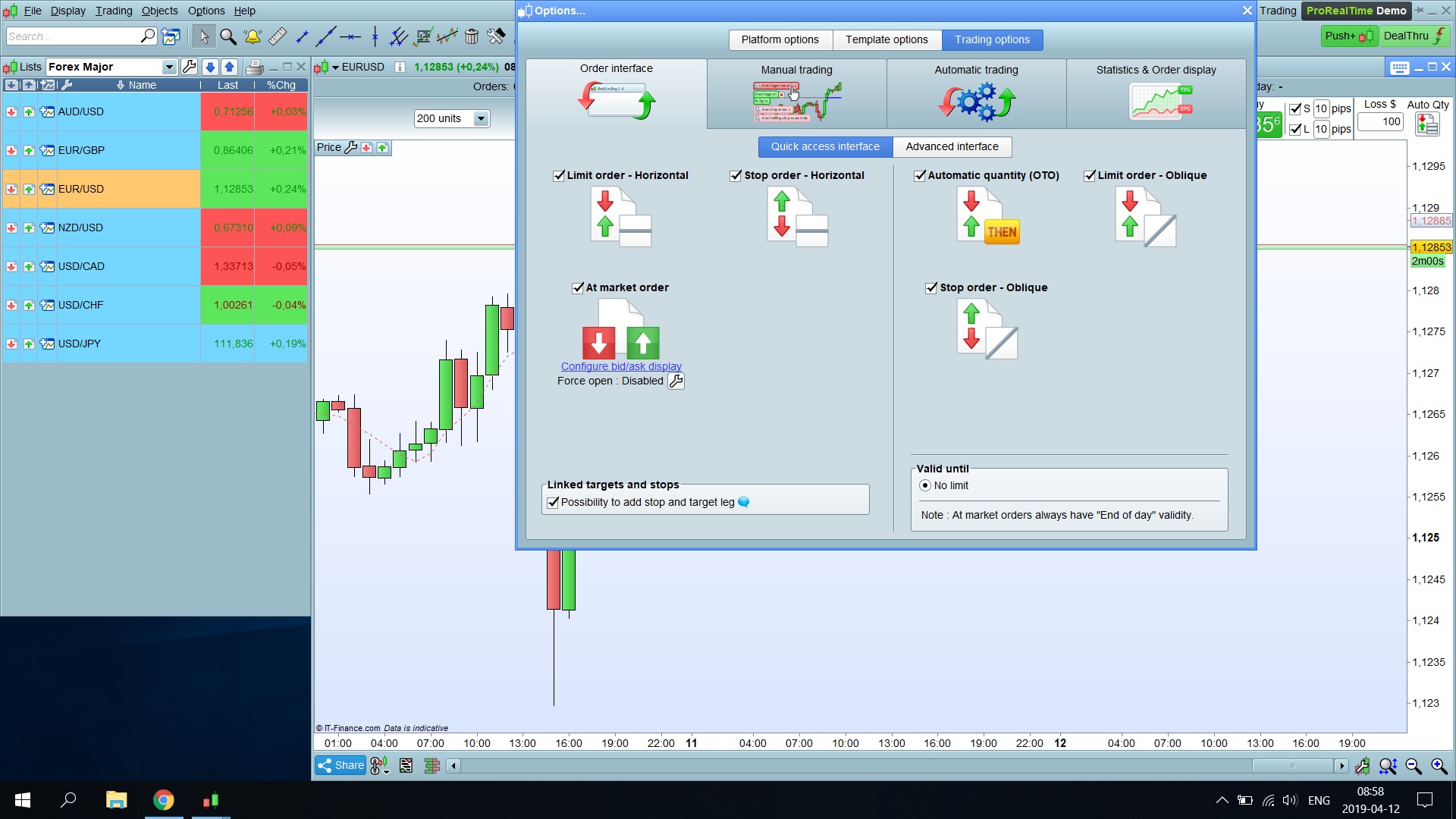
    So I want to experiment with One cancels the other orders (OCO-order). However I can’t find that option in my settings. In one of the video tutorials you can clearly see that that option exists but I simply can’t choose it in my options. The video I am referring to can be found at https://www.prorealtime.com/en/videos_tutorial/128_place_multiple_leg_orders_from_charts.

    To see how my order interface settings look like please see the attached print screen.

    Order-interface-settings.jpg Order-interface-settings.jpg
    #96204 quote
    Vonasi
    Moderator
    Master

    I believe that if you are on a limited risk account then this option might not be available to you.

    therookie thanked this post
    #96212 quote
    Jakub
    Participant
    Average

    Hi,

    The OCO-orders are not available for IG clients, only ProRealTime Software and ProRealTrading with IB.

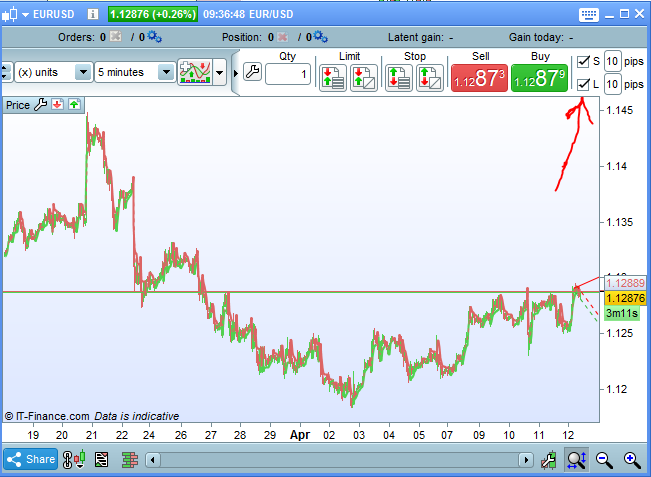
    When placing an order, you can use the following funcionality which is quite similar:

    [attachment file=96213]

    Regards,

    Jakub

    therookie thanked this post
    OCO.png OCO.png
    #96259 quote
    therookie
    Participant
    Junior

    Hmm I can’t figure out how to use this method if i want to place two opposite pending orders. So let’s say a buy stop order 10 pips above the high and and sell stop order 10 pips below the low. And if one of them is executed then the other should cancel.

    I guess what I want is only possible if I have ProRealtrading and not if I use IG right?

    #121922 quote
    Philstrading
    Participant
    Senior

    Prorealtime with IG, I’m not aware its different elsewhere, but if so then so be it, but for OCO order which are not available still, you can simply put 2 orders on the chart and when one kicks in the delete the other, it’s just a manual way of executing the OCO order, so obviously you need to be either watching the charts or setting alerts for you to respond, timeframe an dlevels dependants with volatility thresholds of course, but usually youcan have time to respoond, and whats the worst that can happen, you enter one way, if the other order is kicking in then the trades going the wring way and you are essentially pausing the trading with a hedge, just set the orders to force open, or of course you set to net off then it will act as a stop… depends how you trade I guess, some people like to trade themselves out, but no reason why you can’t do it manually as the other just acts as a stop if you put both to force open or net off, I’ve not tried a net off order opening a new trade mind, but I suspect it would just open normally..

    #121925 quote
    GraHal
    Participant
    Master

    There is no option called NetOff on PRT Platform (it is called NetOff on the IG Platform).

    So for NetOff read Disable (as in ForceOpen: Disable)

    I’ve done as  Philstrading  is suggesting during the NFP … good fun.

    Current volatility makes the NFP look like a kid’s party!? 🙂

    #121930 quote
    Philstrading
    Participant
    Senior

    Hi GraHal

    I don’t think there is an option available, but if you try it, an order on prorealtime automatically nets off – and forces open if you have a stop associated with it. The IG platform gives you the option to set either with an order, but Prorealtime I think just nets off unless you associate it with an order, having said that my demo period is out, but I seem to recall that being so. I’ve just checked with IG tech support to confirm as they can use a demo, they tried it out and yes it will net off with just anorder on, if you create a stop order it will force open, so it is possible in prorealtime through its default behaviour. Just a second order will net off, if the orders have stops associated with them theywill force open..

    Hope that helps.. this was also confirmed in practice with IG tech support just now..

    GraHal thanked this post
    #121934 quote
    GraHal
    Participant
    Master

    Yeah Thanks Phil, I will try again when things calm down.

    What you say re Stops etc kinda explains why I’ve have sometimes  got confused with the Enable, Disable, Force Open options on the PRT Platform … I’d think, Yeah I understand this now, but then the Trades would not execute as I expected, but then other times they would! 🙂

    #121935 quote
    Philstrading
    Participant
    Senior

    Hi GraHal

    Yes I’ve had the same issue,often longed for an OCO order function on prorealtime, I’ve placed orders expecting to net off only to find I’ve got 2 orders running and vice versa, which is why I remembered my query when it happened as to why. So when looking around the OCO issue it dawned on me that if netting off it doesnt matter which one kicks in really, or even if forced open with a stop associated order, but the only difference may be minor adjustment with the stop level, so once one has kicked in you may want to tweak the level of the stop, but normally  I would think they would be the same if trading technically.. So I think it resolves it for me as well…

    Glad it may have helped.. I’ll try it with my next consolidation area, was pondering over this on EURUSD just now on the 400 ticks level.. Alas the move and then I thought to take another look at OCOs.. glad I did.

    Happy trading!

    GraHal thanked this post
    #124893 quote
    David
    Participant
    Veteran

    Maybe this will satisfy your requirements for OCO?

    Just run it on the 1 second timeframe.

    DEFPARAM CumulateOrders = True
    
    startLongPrice = CLOSE+0.0001 // change to a specific price
    
    startShortPrice = CLOSE-0.0001 // change to a specific price
    
    IF NOT ONMARKET THEN
    BUY 1 CONTRACT AT startLongPrice STOP
    SELLSHORT 1 CONTRACT AT startShortPrice STOP
    ENDIF
    
    GraHal thanked this post
Viewing 10 posts - 1 through 10 (of 10 total)

  • You must be logged in to reply to this topic.

No OCO in order interface setting


Platform Support: Charts, Data & Broker Setup

New Reply
Author
author-avatar
therookie @prophet85 Participant
Summary

This topic contains 9 replies,
has 6 voices, and was last updated by David

5 years, 10 months ago.

Topic Details
Forum: Platform Support: Charts, Data & Broker Setup
Language: English
Started: 04/12/2019
Status: Active
Attachments: 2 files
Logo Logo
Loading...