Hi,
Apologies if this has been asked before, if I search for ” save ” then there’s many results about saving charts etc but nothing specifically about the Tick List.
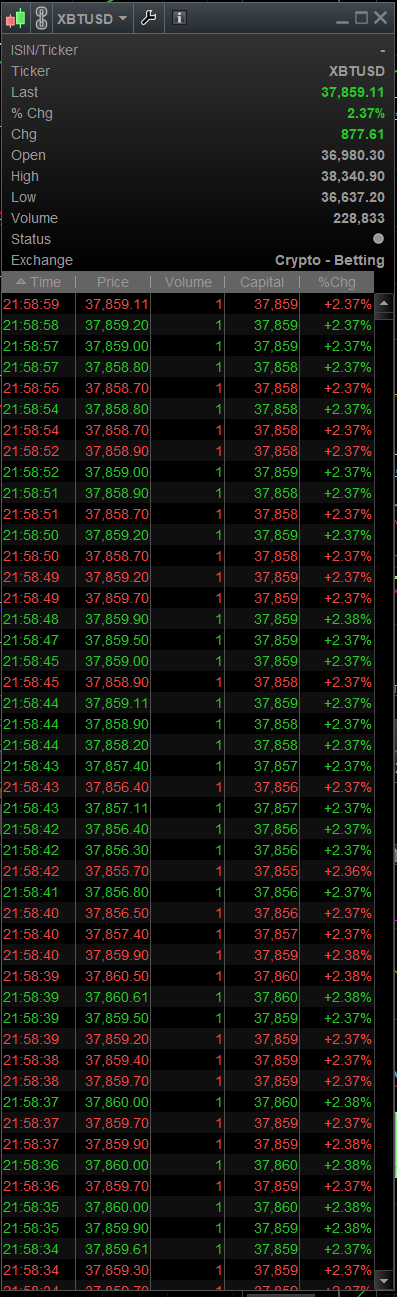
My question is: is it possible to save the contents of what’s feeding into the new Tick by Tick List :- reason for asking is because i used it usterday to try to identify why the “Volatility Index” was not moving while’st the S&P chart & the futures equivalent was, the tick lists for all but the VIX was moving quite nicely, but the VIX was updating/ticking over with a lot less updates than it was 10-ish mintes before that, so as an audit / investigation perspective, can I import the Tick List data into Excel and do some analysis? or save to a log file of some sort?
What do you mean by Tick by Tick List?
Can you post a screen shot?
Thanks for the quick reply:
if not by the TickbyTick List, then is there any other way to get any charting data saved to a text file that Excel can open up?
attached TickbyTick List
Have you tried dragging and dropping that list into excel?
Above used to work on v10.3.
You cannot get the ticks list outside of the platform.
as per usual, Thank you Nicolas for the quick response.
Is there any way to get any data out the system, text file , csv or any logging for any EOD closing prices from ProRealTime? i used to get my data from MT4 logging before switching over?
very interesting indeed. When i grow up : i want to make solutions just like Nicolas 🙂
I think this gives me an idea for something else equally as exciting
Thank you