Murrey Math Extremes Comparator

Viewing 7 posts - 1 through 7 (of 7 total)
  • Author
    Posts
  • #100717 quote
    Victor5Victor5
    Participant
    Senior

    Bonjour,

     Je n’y connais rien en programmation et je souhaiterai savoir si quelqu’un peut traduire cet indicateur de Tradingview sur prorealtime ?

    Je met le code de Tradingview….

    //@version=2
    
    //Created by morpheus747
    
    //code adapted from ucsgears user murrey math oscillator
    
    // HOW IT WORKS
    
    // Creates two murrey math oscillators (hidden) one with 256 length another with 32 length and compare each other.
    
    // WHAT GIVE ME THIS SCRIPT
    
    // The script can give you very valuable information:
    
    // – Main Trend
    
    // – Pullbacks detections
    
    // – Extreme overbought oversold prices alerts
    
    // – Divergences
    
    // REFERENCES OF USAGE
    
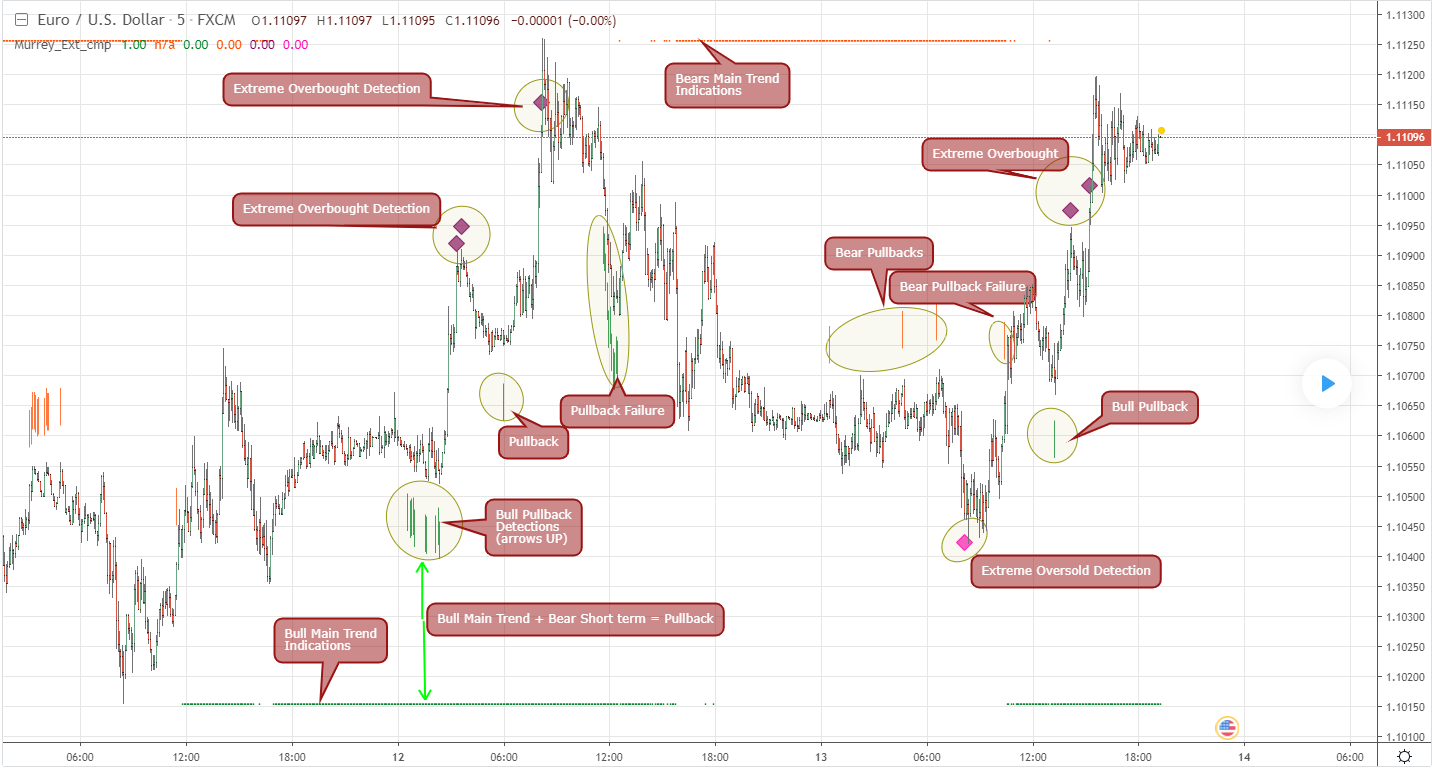
    // Main Trend Indications
    
    // ****The main trend is indicated with green(bull) or red(bears) small “triangles” on the bottom(bull) or the top(bears) of the chart.
    
    // *****To detect the Bull/Bear major trend the script use 256 murrey, if > 0 (green) we are uptrend in other cases we are downtrend
    
    // Pullback detection
    
    // ****The pullbacks are indicated with Green(bull) or red(bears) medium “Arrows”
    
    // *****To detect pullbacks the system compare the long term murrey with the short term murrey, if long term is Green(green triangles)
    
    // *****so we are in a main bull trend, if the short term murrey make an extreme low then the pullback is indicated
    
    // *****The same for the short pullback, if long term murrey is RED and we have an extreme green short term murrey we shot a red arrow
    
    // Extreme Overbught/Oversold
    
    // ****The extreme OO is indicated with fancy diamonds
    
    // *****To detect the Extremes price movements we combine the two murrey, if Long Term Murrey is overbought and short term murrey too
    
    // *****Then the diamond show on the screen obove or below based on the extreme if overbought or oversold
    
    // Resume
    
    // Triangles indicate Major Trend Up/Down
    
    // Arrows Indicate Continuation pullbacks
    
    // Diamonds Indicate Extreme Prices
    
    study(title=”Murrey Math Extremes Comparator”, shorttitle=”Murrey_Ext_cmp”, overlay=true, precision = 2)
    
    // Inputs
    
    length1 = input(256, minval = 10, title = “Look back Length 1 (suggested 256)”)
    
    length2 = input(32, minval = 10, title = “Look back Length 2 (suggested 32)”)
    
    mult = input(0.125, title = “Mutiplier; Only Supports 0.125 = 1/8”)
    
    // Donchanin Channel
    
    hi1 = highest(high, length1)
    
    hi2 = highest(high, length2)
    
    lo1 = lowest(low, length1)
    
    lo2 = lowest(low, length2)
    
    range1 = hi1 – lo1
    
    range2 = hi2 – lo2
    
    multiplier1 = (range1) * mult
    
    multiplier2 = (range2) * mult
    
    midline1 = lo1 + multiplier1 * 4
    
    midline2 = lo2 + multiplier2 * 4
    
    oscillator1 = (close – midline1)/(range1/2)
    
    oscillator2 = (close – midline2)/(range2/2)
    
    //Plot the Main Trend
    
    //trend up 256 murrey math (green)
    
    plotshape(oscillator1>0?true:na,style=shape.triangleup,location=location.bottom,color=green)
    
    //trend down 256 murrey math (red)
    
    plotshape(oscillator1<0?true:na,style=shape.triangledown,location=location.top,color=red)
    
    //Pullback detection system (divergence between 256 murrey and 32 murrey)
    
    //bulls pullback detection
    
    plotshape(oscillator1>0 and oscillator2<-0.75,style=shape.arrowup,color=green,location=location.belowbar,size=size.large)
    
    //bears pullback detection
    
    plotshape(oscillator1<0 and oscillator2>0.75,style=shape.arrowdown,color=red,location=location.abovebar,size=size.large)
    
    //DANGERS ALERTS!
    
    //this plots are alerts of hyper extremes prices!
    
    //Hyper bulls indication for imminent reverse to sell
    
    plotshape(oscillator1>0.90 and oscillator2>0.90,style=shape.diamond,color=purple,location=location.abovebar,size=size.small)
    
    //Hyper bears indication for imminent reverse to buy
    
    plotshape(oscillator1<-0.90 and oscillator2<-0.90,style=shape.diamond,color=fuchsia,location=location.belowbar,size=size.small)
     
    murrey-math-extreme-comparator.png murrey-math-extreme-comparator.png
    #100720 quote
    robertogozzirobertogozzi
    Moderator
    Legend
    S'il vous plaît, n'utilisez pas du texte en gras, à moins que ce ne soit un seul mot ou une phrase courte sur laquelle vous voulez mettre l'accent, il est difficile à lire et ennuyeux. Je vous remercie.
    #100722 quote
    Victor5Victor5
    Participant
    Senior
    C’est note désolé
    #100753 quote
    NicolasNicolas
    Keymaster
    Legend
    Merci d’ajouter une image et une description la prochaine fois, conformément aux règles pour la demande de traduction de code: Demande de conversion de code gratuite Cela aide énormément pour la programmation et ça nous évite de chercher un peu partout sur internet de quoi on parle exactement 🙂
    #100759 quote
    Victor5Victor5
    Participant
    Senior
    Ok Nicolas et désolé c’est le premier sujet que je poste😊
    #100851 quote
    NicolasNicolas
    Keymaster
    Legend
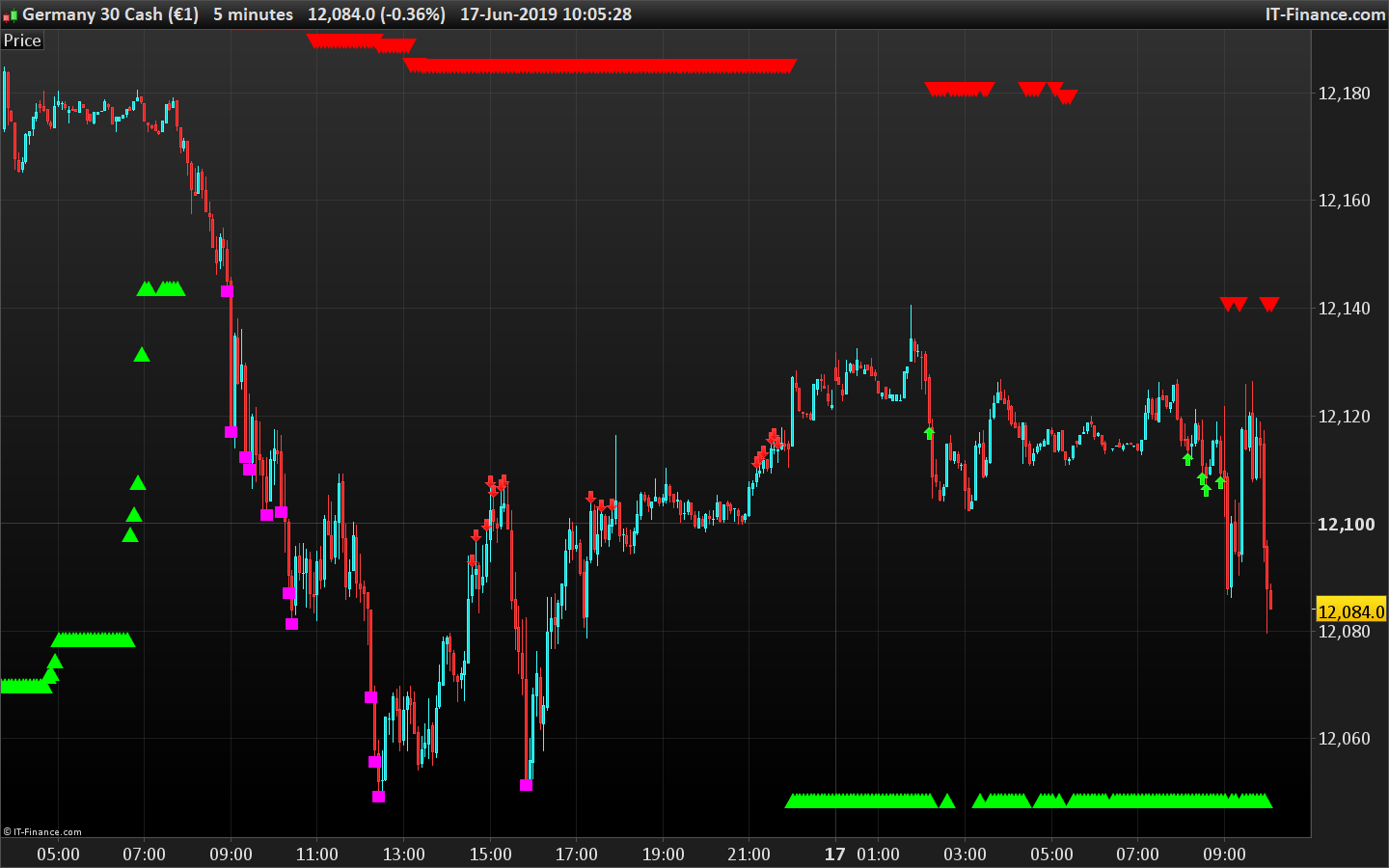
    Ci-joint le code du “Murray Math Extremes comparator” pour ProRealTime. J’ai modifié les losanges pour des carrés, je n’ai pas réussi à retrouver le symbole en ASCII 😳
    // Inputs
    
    length1 = 256 // "Look back Length 1 (suggested 256)")
    
    length2 = 32 // "Look back Length 2 (suggested 32)")
    
    mult = 0.125 // "Mutiplier; Only Supports 0.125 = 1/8")
    
    // Donchanin Channel
    
    hi1 = highest[length1](high)
    hi2 = highest[length2](high)
    lo1 = lowest[length1](low)
    lo2 = lowest[length2](low)
    
    range1 = hi1 - lo1
    range2 = hi2 - lo2
    
    multiplier1 = (range1) * mult
    multiplier2 = (range2) * mult
    
    midline1 = lo1 + multiplier1 * 4
    midline2 = lo2 + multiplier2 * 4
    
    oscillator1 = (close - midline1)/(range1/2)
    oscillator2 = (close - midline2)/(range2/2)
    
    //Plot the Main Trend
    //trend up 256 murrey math (green)
    if oscillator1>0 then 
    drawtext("▲",barindex,lo1,dialog,bold,20) coloured(0,255,0)
    endif
    //trend down 256 murrey math (red)
    if oscillator1<0 then
    drawtext("▼",barindex,hi1,dialog,bold,20) coloured(255,0,0)
    endif
    
    //Pullback detection system (divergence between 256 murrey and 32 murrey)
    //bulls pullback detection
    if oscillator1>0 and oscillator2<-0.75 then
    drawarrowup(barindex,low) coloured(0,255,0)
    endif
    //bears pullback detection
    if oscillator1<0 and oscillator2>0.75 then
    drawarrowdown(barindex,high) coloured(255,0,0)
    endif
    
    //DANGERS ALERTS!
    //this plots are alerts of hyper extremes prices!
    //Hyper bulls indication for imminent reverse to sell
    if oscillator1>0.90 and oscillator2>0.90 then 
    drawtext("■",barindex,high,dialog,bold,16) coloured(155,48,255)
    endif
    //Hyper bears indication for imminent reverse to buy
    if oscillator1<-0.90 and oscillator2<-0.90 then
    drawtext("■",barindex,low,dialog,bold,16) coloured(255,0,255)
    endif
    
    return
    Merci pour les retours éventuels.
    Murrey-Math-Extremes-Comparator.png Murrey-Math-Extremes-Comparator.png
    #100853 quote
    Victor5Victor5
    Participant
    Senior
    Merci Nicolas,   Je vais le tester et reviendrai vers vous   bonne journée
Viewing 7 posts - 1 through 7 (of 7 total)
  • You must be logged in to reply to this topic.

ProRealAI ProRealAI New

Stuck on this ProBuilder code?

Describe what this topic is trying to build, in plain English, and ProRealAI writes the ProRealTime™ indicator, screener or system for you.

Available in 7 languages
Try ProRealAI

Murrey Math Extremes Comparator


ProBuilder : Indicateurs & Outils Personnalisés

New Reply
Author
author-avatar
Victor5 @lucky5 Participant
Summary

This topic contains 6 replies,
has 3 voices, and was last updated by Victor5Victor5

7 years, 3 months ago.

Topic Details
Forum: ProBuilder : Indicateurs & Outils Personnalisés
Language: French
Started: 06/15/2019
Status: Active
Attachments: 2 files
ProRealCode ProRealCode
Loading...