


MTF conversion

Viewing 6 posts - 1 through 6 (of 6 total)
  • Author
    Posts
  • #95708 quote
    Juan SalasJuan Salas
    Participant
    Master

    Hi everyone,

    Since MTF is not working in real trading, I am trying to replace part of the code with a different non-default timeframe.

    The default timeframe is 15 min, and I would like to adapt the 1 hour timeframe part of the code to 15′. I wonder if any of you guys have a solution for this:

    timeframe (1 hour, updateonclose)
    IF BARINDEX>1 THEN
    haopen60=(haopen60[1]+haclose60[1])/2
    haclose60=(open+close+low+high)/4
    ENDIF
    green60=haopen60<haclose60
    red60=haopen60>haclose60
    uturnbullish60=red60[3] AND red60[2] AND red60[1] AND green60

    I would like to convert this into 15′. I would start by multiplying the ratio by 4 and recreating the candles (open and close) and their periods, but in case anyone has solved or has a quick formula, I would greatly appreciate it.

    Thanks in advance,

    Juan

    #95714 quote
    robertogozzirobertogozzi
    Moderator
    Legend

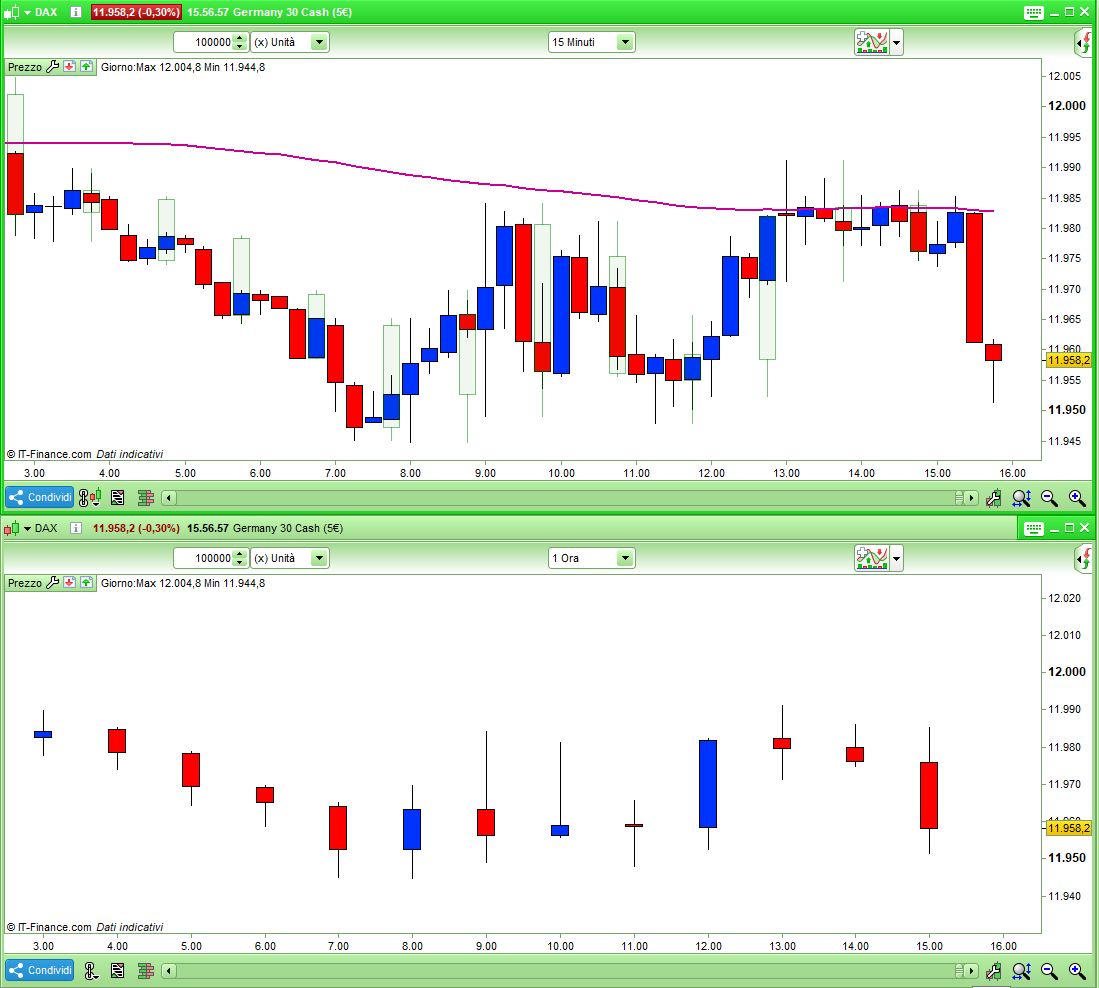
    You could define a 1-hour bar  on a 15-minute TF by combining the last 4 bars:

    DEFPARAM CalculateOnLastBars = 1000
    MaxOC     = max(open,close)
    MinOC     = min(open,close)
    MyH1high  = highest[4](high)
    MyH1low   = lowest[4](low)
    MyH1MaxOC = highest[4](MaxOC)
    MyH1MinOC = lowest[4](MinOC)
    MyH1Open  = max(MyH1MaxOC,MyH1MinOC)
    MyH1Close = min(MyH1MaxOC,MyH1MinOC)
    IF hour <> hour[1] THEN
       DRAWCANDLE(MyH1open,MyH1high,MyH1low,MyH1close) coloured(0,128,0,16) BORDERCOLOR(0,128,0,128)
    ENDIF
    RETURN

    This indicator shows, on a 15-minute TF, the whole 1-h candle, but it should be refined to show doji’s when 1-hour is a dojy and so forth….

    If this can be what you are looking for, then I may further work on it.

    x-4.jpg x-4.jpg
    #95724 quote
    robertogozzirobertogozzi
    Moderator
    Legend

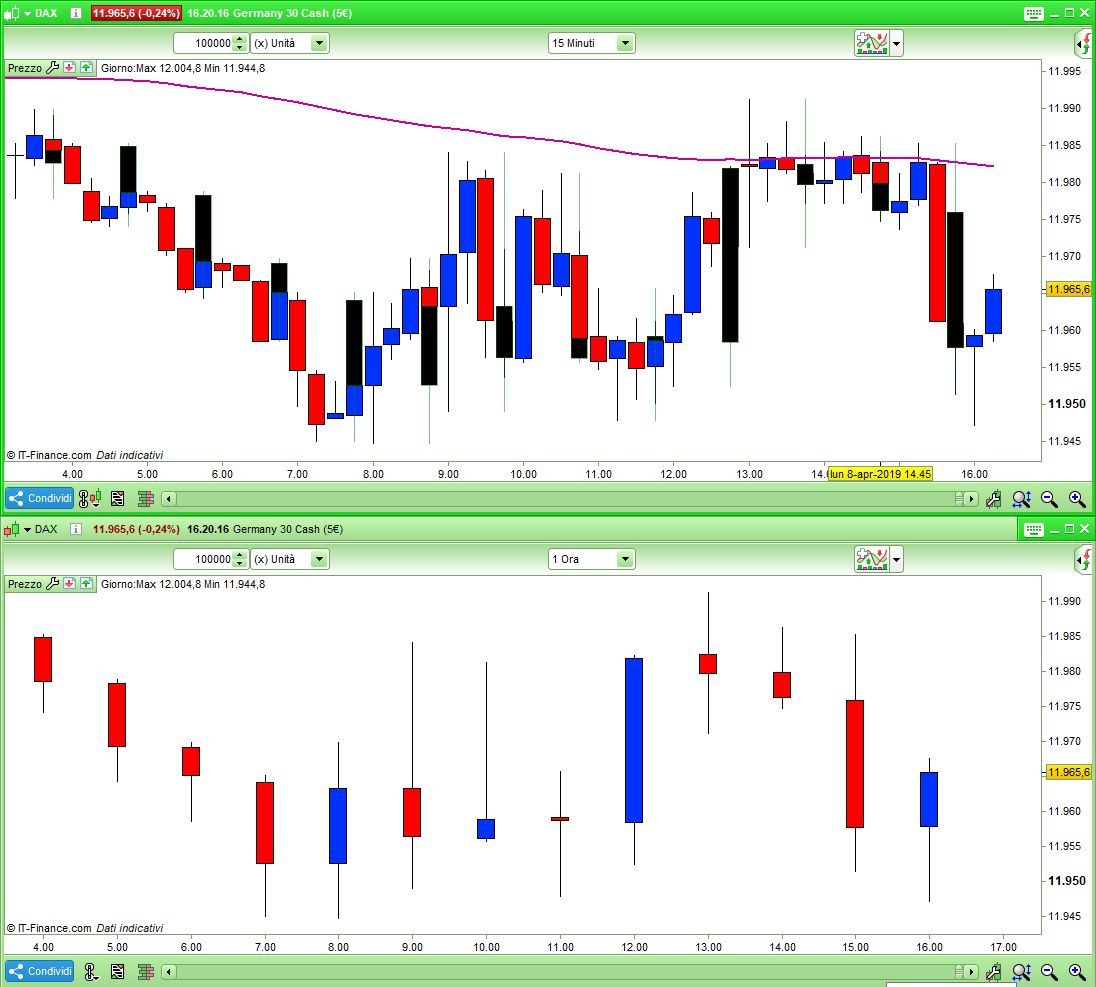
    This is much better:

    DEFPARAM CalculateOnLastBars = 1000
    //MaxOC     = max(open,close)
    //MinOC     = min(open,close)
    //MyH1high  = highest[4](high)
    //MyH1low   = lowest[4](low)
    //MyH1MaxOC = highest[4](MaxOC)
    //MyH1MinOC = lowest[4](MinOC)
    //MyH1Open  = max(MyH1MaxOC,MyH1MinOC)
    //MyH1Close = min(MyH1MaxOC,MyH1MinOC)
    //IF hour <> hour[1] THEN
    //DRAWCANDLE(MyH1open,MyH1high,MyH1low,MyH1close) coloured(0,128,0,16) BORDERCOLOR(0,128,0,128)
    //ENDIF
    H1high  = highest[4](high)
    H1low   = lowest[4](low)
    H1Open  = open[3]
    H1close = close
    IF hour <> hour[1] THEN
       DRAWCANDLE(H1open,H1high,H1low,H1close) coloured(0,0,0,255) BORDERCOLOR(0,128,0,128)
    ENDIF
    RETURN

    You will define HA candles for the 15-minute TF as usual, while for the 1-h TF you’ll need to write:

    IF hour <> hour[1] THEN
       xH1Close  = (H1open+H1close+H1low+H1high)/4    //TotalPrice
       xH1Open   = (xH1Open[1]+xH1Close[1])/2
       haH1High  = Max(xH1Open, xH1Close)
       haH1Low   = Min(xH1Open, xH1Close)
       xH1High   = Max(H1High,haH1High)
       xH1Low    = Min(H1Low,haH1Low)
    else
       xH1Close  = xH1Close[1]
       xH1Open   = xH1Open[1]
       xH1High   = xH1High[1]
       xH1Low    = xH1Low[1]
    endif
    x-5.jpg x-5.jpg
    #95726 quote
    robertogozzirobertogozzi
    Moderator
    Legend

    When you refer to a previous 15-minute HA candle you will use [1], [2],… while for 1-hour candles you’ll need to multiply the number in brackets by 4.

    Juan Salas thanked this post
    #95730 quote
    Juan SalasJuan Salas
    Participant
    Master

    Thanks so much Roberto,

    It is perfect. I was working on something but nothing compared to your idea..

    Muchas gracias,

    Juan

    #95784 quote
    robertogozzirobertogozzi
    Moderator
    Legend

    The code to access 1-hour bars should be:

    H1period = (Period - (Period mod 4)) / 4
    Juan Salas thanked this post
Viewing 6 posts - 1 through 6 (of 6 total)
  • You must be logged in to reply to this topic.
ProRealAI ProRealAI New

Stuck on this ProBuilder code?

Describe what this topic is trying to build, in plain English, and ProRealAI writes the ProRealTime™ indicator, screener or system for you.

Available in 7 languages
Try ProRealAI

MTF conversion


ProOrder: Automated Strategies & Backtesting

New Reply
Author
author-avatar
Juan Salas @juan-salas Participant
Summary

This topic contains 5 replies,
has 2 voices, and was last updated by robertogozzirobertogozzi
7 years, 7 months ago.

Topic Details
Forum: ProOrder: Automated Strategies & Backtesting
Language: English
Started: 04/08/2019
Status: Active
Attachments: 2 files
ProRealCode ProRealCode
Loading...