Money Management Tool

Viewing 4 posts - 1 through 4 (of 4 total)
  • Author
    Posts
  • #184918 quote
    SkyShark76
    Participant
    New

    Gibt es ein Tool welches mir die Anzahl der Aktien anzeigt, wenn ich z.B. einen Distanzmesser verwende? Dabei wäre dann der Ausgangspunkt mein Entry, der Endpunkt mein Stop Loss. Das Tool sollte mir die Anzahl der Aktien für ein festgelegtes Risiko (1% meines Kapitals) berechnen. Kann ich mir so ein Distanzmesser / Risikorechner selber coden?

    #184922 quote
    robertogozzi
    Moderator
    Master

    Da ist er:

    DEFPARAM DrawOnLastBarOnly   = True
    //
    //ONCE Capital        = 100000    //100000  Capital
    //ONCE MarginPC       = 5         //5%      margin required by the broker
    //ONCE RiskPC         = 5         //5%      max. risk
    //ONCE EntryPrice     = 16000     //16000   Entry price
    //ONCE ExchangeRate   = 1         //ExchangeRate
    //ONCE StopLossPrezzo = 15950     //15950   Stop Loss price
    //
    StopLossPips      = (EntryPrice - SLprice) / PipSize
    MyCapital         = Capital * ExchangeRate
    CapitalAtRisk     = round(((MyCapital * RiskPC) / 100) - 0.5)
    StopLossValue     = (StopLossPips * PipValue)
    MyMargin          = ((EntryPrice * MarginPC / 100) * PipValue)
    LotSize1          = CapitalAtRisk / StopLossValue
    Temp              = MyMargin * LotSize1
    IF Temp > CapitalAtRisk THEN
       LotSize1       = (LotSize1 * CapitalAtRisk) / Temp
    ENDIF
    LotSize2          = (Round((LotSize1 * 10) - 0.5))
    LotSize           = LotSize2 / 10
    LongSL            = EntryPrice - (StopLossPips * PipSize)
    ShortSL           = EntryPrice + (StopLossPips * PipSize)
    Distance          = 0//EntryPrice * 0.002
    DrawSegment(BarIndex,ShortSL-Distance,BarIndex + Offset,ShortSL-Distance) coloured(255,0,0,255) //R
    DrawSegment(BarIndex,LongSL +Distance,BarIndex + Offset,LongSL +Distance)  coloured(0,128,0,155) //V
    DrawText("Lots #LotSize#",BarIndex + Offset*2,ShortSL)             coloured(255,0,0,255) //R
    DrawText("Lots #LotSize#",BarIndex + Offset*2,LongSL)              coloured(0,128,0,155) //V
    RETURN

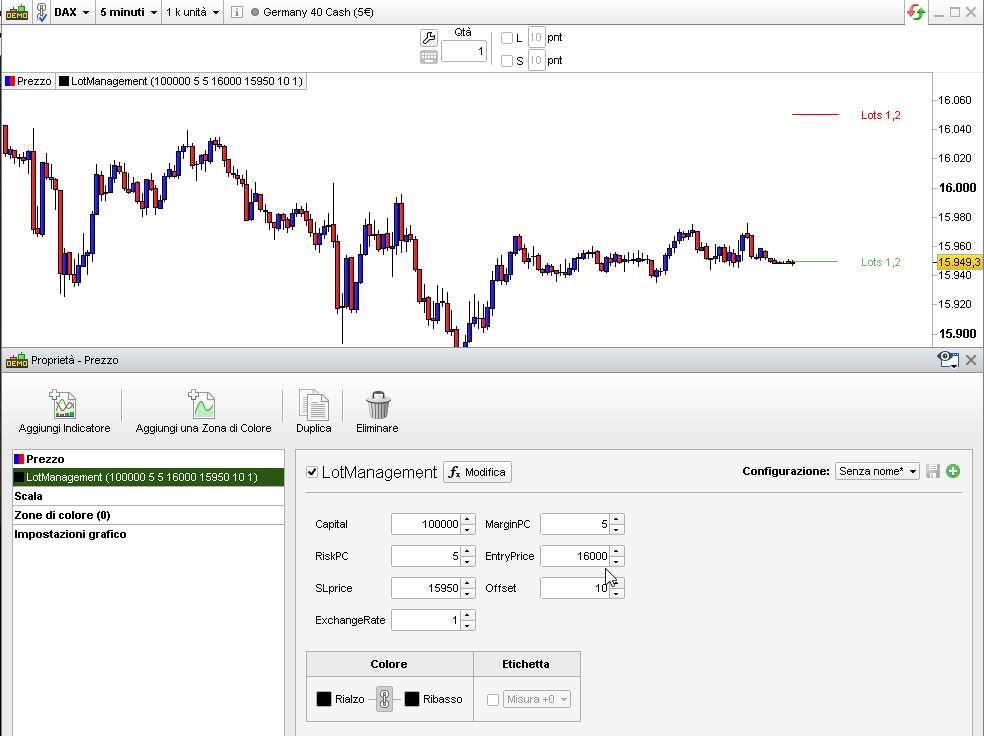
    Dies sind die Parameter, die in den Eigenschaften des Indikators angegeben werden müssen:

    • Capital              your Capital (in Ihrer bevorzugten Währung)
    • MarginPC         die Margin%, die der Broker für 1 Kontrakt benötigt
    • RiskPC               % Ihres Kapitals, das Sie riskieren möchten
    • EntryPrice        der Preis, bei dem Ihr Trade eröffnet wird
    • SLprice              Stop-Loss-Preis (wird verwendet, um die Größe Ihres Stop-Loss zu berechnen)
    • Offset                  Sie den Abstand (in Balken), der von grafischen Anweisungen verwendet wird
    • ExchangeRate der Wechselkurs der Währung des Instruments, das Sie handeln möchten, gegenüber der Währung Ihres Kapitals
    LotManagement-indicator.itf x-2.jpg x-2.jpg
    #184944 quote
    SkyShark76
    Participant
    New

    Danke,

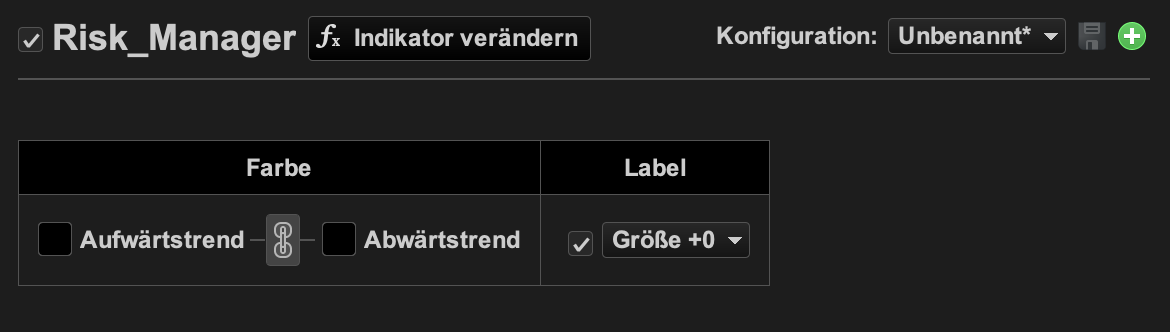
    wie bekomme ich das Eingabemenü für die  Werte hin?

    Bei mir wird nur Farbe Aufwärtstrend / Abwärtstrend angezeigt.

    Bildschirmfoto-2022-01-09-um-14.10.48.png Bildschirmfoto-2022-01-09-um-14.10.48.png
    #184948 quote
    SkyShark76
    Participant
    New

    Habs herausgefunden.

    Besten Dank!!

Viewing 4 posts - 1 through 4 (of 4 total)
  • You must be logged in to reply to this topic.

Money Management Tool


ProBuilder: Indikatoren & Custom Tools

New Reply
Author
author-avatar
SkyShark76 @skyshark76 Participant
Summary

This topic contains 3 replies,
has 2 voices, and was last updated by SkyShark76
4 years, 2 months ago.

Topic Details
Forum: ProBuilder: Indikatoren & Custom Tools
Language: German
Started: 01/09/2022
Status: Active
Attachments: 3 files
Logo Logo
Loading...