


Level visualisation

Viewing 3 posts - 1 through 3 (of 3 total)
  • Author
    Posts
  • #139007 quote
    GauvelGauvel
    Participant
    Average

    Hello Everyone,

    I am actually writing a simple code to show x500 ou x000 level.

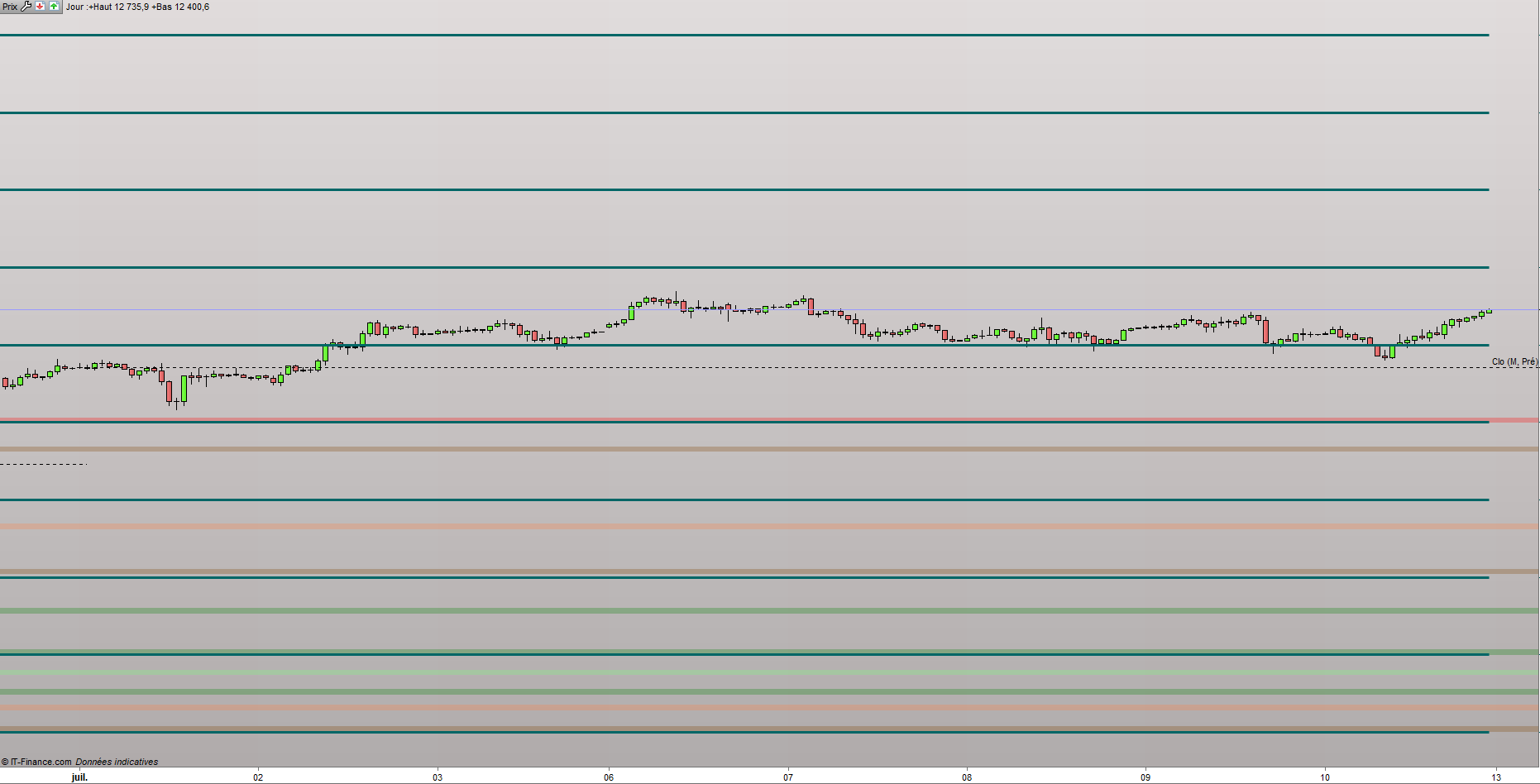
    The first problem I encountered is that when I press “space” for adapting the window I have every single level ( 10000 to 14500, here on the DAX ). It’s not really good to watch.

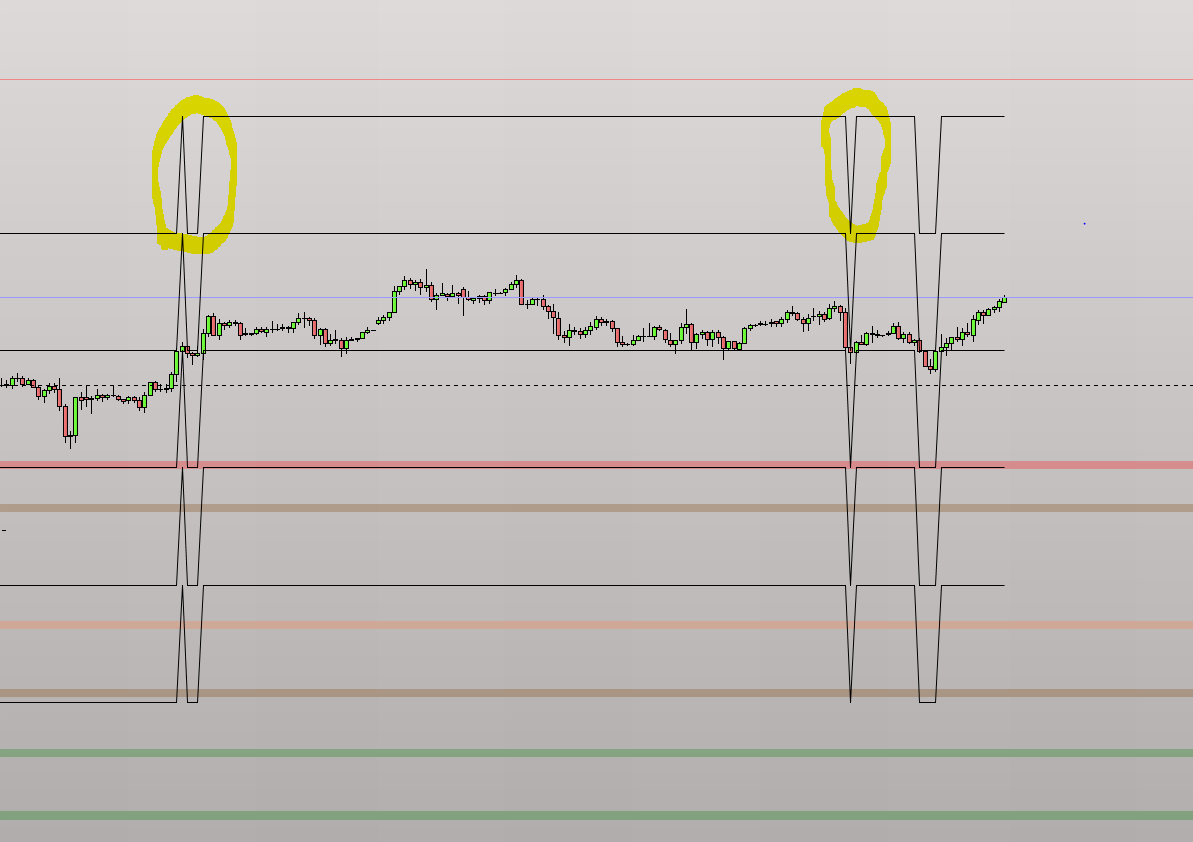
    So I have tried another way but it’s even uglier. I don’t want to see those “transition” circled in yellow in pics number 1.

    Maybe you have an idea to make it more watchable.


    ///// - LEVEL - x500 and x000
    
    
    L1 = 10000
    L2 = 10500
    L3 = 11000
    L4 = 11500
    L5 = 12000
    L6 = 12500
    L7 = 13000
    L8 = 13500
    L9 = 14000
    L10 = 14500
    
    
    AP = close
    
    IF AP > L1 then
    S1 = L1
    S2 = 9500
    S3 = 9000
    R1 = L2
    R2s = L3
    IF AP > L2 then
    S1 = L2
    S2 = L1
    S3 = 9500
    R1 = L3
    R2s = L4
    IF AP > L3 then
    S1 = L3
    S2 = L2
    S3 = L1
    R1 = L4
    R2s = L5
    IF AP > L4 then
    S1 = L4
    S2 = L3
    S3 = L2
    R1 = L5
    R2s = L6
    IF AP > L5 then
    S1 = L5
    S2 = L4
    S3 = L3
    R1 = L6
    R2s = L7
    IF AP > L6 then
    S1 = L6
    S2 = L5
    S3 = L4
    R1 = L7
    R2s = L8
    IF AP > L7 then
    S1 = L7
    S2 = L6
    S3 = L5
    R1 = L8
    R2s = L9
    IF AP > L8 then
    S1 = L8
    S2 = L7
    S3 = L6
    R1 = L9
    R2s = L10
    ENDIF
    endif
    endif
    endif
    endif
    endif
    endif
    endif
    
    
    Return S1 as "S1", S2 as "S2", S3 as "S3", R1 as "R1",R2s as "R2"


    Thanks a lot,


    Gauvel

    Mist1.png Mist1.png Mistake.png Mistake.png
    #139049 quote
    NicolasNicolas
    Keymaster
    Legend

    You should use graphical instruction like DRAWHLINE, DRAWSEGMENT, etc..

    In order to plot round numbers levels, you can try this snippet: https://www.prorealcode.com/topic/tracer-une-ligne-horizontal-a-chaque-centaine/#post-91468

    Gauvel thanked this post
    #139141 quote
    GauvelGauvel
    Participant
    Average

    Perfect ! Thanks a lot Nicolas

Viewing 3 posts - 1 through 3 (of 3 total)
  • You must be logged in to reply to this topic.

ProRealAI ProRealAI New

Stuck on this ProBuilder code?

Describe what this topic is trying to build, in plain English, and ProRealAI writes the ProRealTime™ indicator, screener or system for you.

Available in 7 languages
Try ProRealAI

Level visualisation


ProBuilder: Indicators & Custom Tools

New Reply
Author
author-avatar
Gauvel @gauvel Participant
Summary

This topic contains 2 replies,
has 2 voices, and was last updated by GauvelGauvel

6 years, 2 months ago.

Topic Details
Forum: ProBuilder: Indicators & Custom Tools
Language: English
Started: 07/11/2020
Status: Active
Attachments: 2 files
ProRealCode ProRealCode
Loading...


