How to pass parameters from ProRealCode to Indicator and even use them

Viewing 11 posts - 1 through 11 (of 11 total)

  • Author
    Posts
  • #159892 quote
    PeterSt
    Participant
    Master

    If this is in the wrong board, please move !

    I am having a hard time with passing data to an indicator and use it in there. I must be badly overlooking something. I tried to find video tutorials about it, I have been looking for hours via Google, read the manuals, searched this forum, … found the question a dozen times asked, found a few marked as “thanks” a couple of times, but never found an example of a solution PLUS it working. Never.
    Yesterday was I think the third time over the period of years, and today I am giving up on finding the solution myself. So now I am asking the community.
    If it is impossible, then I hope that people in the future will find this post so for once and for all it becomes clear that what I want is not possible. But far better : if it works, a clear explanation of the how-to.

    So just helping … maybe mainly myself. 🙂

    The call from the ProRealCode program :

    myDummy = CALL "DrawGain" [Gain]                                          // Gain is unequal zero when in a position. Set Gain to 10 etc. if you like.

    The super simple example of indicator code :

    DefParam DRAWONLASTBARONLY = True
    
    Gain = GainPar                                                            // This is in case it is required for ## notation in the line below.
    DRAWTEXT(Gain, barindex, close, SansSerif,Bold,16)coloured(255,153,0)     // This always shows the Default of the parameter (25 in this example).
    
    Return Gain as "Gain"                                                     // This always returns a line at the value of 25.

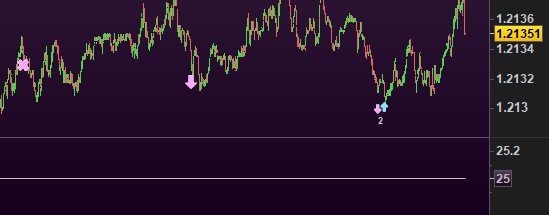
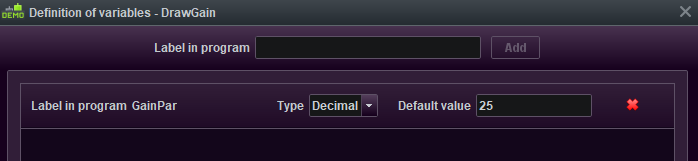
    The parameter and its default : (see 1st attachment).

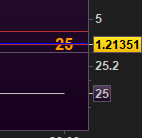
    The result in and out position, showing that the value is 25 always : (see 2nd attachment).


    I have no troubles in returning values hence graphs etc. at all. It is only the passing of values TO the Indicator that I can’t get done. And I am as far that it is not possible. Still quite some posts “tell” that it works. This even includes a post from Nicolas where he tells that a (close) should be added at the end of the call. But still that does not help a thing. And I see nobody complain, so it must be me.

    I think I have tried everything.

    This is from the documentation :

    myValue = CALL "my Personnal Indicator Name"[7,14]
     
    a = myValue / 2
     
    RETURN a

    But this is a kind of pitfall because here the Call has to be from an indicator itself (see the RETURN). Thus this might work (I did not try it), but I can not use that either, unless my whole program code is to be moved to an indicator.

    Hint for those who might be more creative than I am : When we define a variable to the ProRealCode program and use that for enumerating an optimisation, that variable DOES get passed to the Indicator. Thus, supposed I make a variable for optimization “Gain” in the main code and I let that enumerate from 1 to 10, then surely the 1 to 10 would be graphed and all. This must have been made explicitly (and is very useful), no matter how hidden that feature seems to be. But at least that proves that it can be done.

    Peter

    image_2021-01-30_104433.png image_2021-01-30_104433.png image_2021-01-30_104536.png image_2021-01-30_104536.png
    #159899 quote
    Vonasi
    Moderator
    Master

    Finding the question in your posts can be very difficult sometimes!

    Your first two coding examples are incorrect and make no sense at all. Also your syntax for DRAWTEXT is wrong.

    As I say – I am struggling to find the question (sometimes less info is more!) but if you are trying to pass data from a strategy to an indicator then that is not possible. A strategy can call an indicator and I believe an indicator can call another indicator but I always prefer the option of hard coding everything in one indicator.

    #159902 quote
    PeterSt
    Participant
    Master

    but I always prefer the option of hard coding everything in one indicator.

    It is not about that; it is about what type of code allows what.
    The syntax of that DrawText is perfectly fine, but if not and you feel it is related (which apparently is not the case) then let me know what is wrong with it, please ?

    I may have a few dozen examples of what I’d want to achieve, and one of them is drawing the figure of the gain somewhere. As in “$120”. We could try to deal with all the dozen examples, but …

    So let’s do that one then.

     if you are trying to pass data from a strategy to an indicator then that is not possible.

    It can, and I told the how-to (have a same parameter in the strategy code).

    #159904 quote
    robertogozzi
    Moderator
    Master

    Default values are only used when the indicator is added to your chart.

    When you CALL it only uses values passed on to it at runtime.

    #159905 quote
    Vonasi
    Moderator
    Master
    Gain = GainPar                                                            
    DRAWTEXT("#Gain#", barindex, close, SansSerif,Bold,16)coloured(255,153,0)

    DRAWTEXT cannot be used in a strategy and any variable value in a strategy cannot be called by an indicator. If you want to display a strategy gain value then you have to use GRAPH in a strategy (but this is not allowed for live codes) or code an indicator that simulates the strategy and then draws the text. The latter can get very complicated for complicated strategy codes and also the fact that indicators are drawn on the fly and strategies just at the close of a bar can add a lot of complications.

    #159907 quote
    PeterSt
    Participant
    Master

    Vonasi, I sure hope you did not miss this :

    // This is in case it is required for ## notation in the line below.

    So of course I know about the ## required. I have tried a million combinations of things to let it work, and this (without ##) is one of them. That works for accepted syntax btw. Try it. Btw, I showed it (the 25 on the chart – or maybe I didn’t because I deemed it not relevant, see attachment).

    DRAWTEXT cannot be used in a strategy and any variable value in a strategy cannot be called by an indicator. If you want to display a strategy gain value then you have to use GRAPH in a strategy (but this is not allowed for live codes) or code an indicator that simulates the strategy and then draws the text. The latter can get very complicated for complicated strategy codes and also the fact that indicators are drawn on the fly and strategies just at the close of a bar can add a lot of complications.

    So I suppose you now know what my question was. 🙂
    Still the docs and many replies from Nicolas and Mods at least imply that it is possible.

    Default values are only used when the indicator is added to your chart.

    When you CALL it only uses values passed on to it at runtime.

    So, another one. Next time someone searches for this, he will again find a reason to again try. Like I did.
    Dear Roberto, I wished you were right. If you know a means and can please show it via a working example, I will send your wife a giant bouquet of flowers. I mean it.

    Anyway, Vonasi, you hit the nail on the head (see the quote of your text). It is misery from all angles, because not really solvable. I can add to it :

    The Graphing not being allowed in run time code I overcame by getting used to it (remove the Graph commands from the code). It would be on my internal bug list, but not on the public one – just saying. However :
    Graphing (Gaph and GraphOnPrice) is ultimately slow and therefore I like to misuse an indicator for it. And then to think (or know) that I am (obviously !) not even talking about runtime. Just BackTest (as Backtest or as run in real time), not slowing down everything. So FYI :

    When I have two BackTests running in real time I already can’t normally trade any more, because of the cpu usage. This is caused by the graphing. But I need that … I want to move the lot to indicators (Graphing themselves, or by means of Return to the calling program).

    … And I don’t think I can move the main code (or the crucial parts of it) to an Indicator because in there nothing of ProOrder can be done. And I still can’t pass the relevant data as alternative …


    grrr ?

    image_2021-01-30_115025.png image_2021-01-30_115025.png
    #159913 quote
    Vonasi
    Moderator
    Master

    GRAPH is quite simply an instruction that was created to assist with bug solving when creating code. Yes it is quite RAM heavy but no where near as bad as it used to be! Its use should be limited to what it was designed for – visualising variable values for bug solving. If you want to see how much profit or loss a strategy that is running live has then simply open the chart for that strategy via the autotrading window. If backtesting then all the info is in the strategy report.

    Nothing personal PeterSt but you seem to find problems that don’t really exist for others and then blow them up out of proportion. Some of your posts are very long and quite challenging to read and even more challenging to understand (for me at least). I often find myself scanning over your posts having lost any idea what you are saying or asking after just one or two sentences. Perhaps the phrase ‘less is more’ is appropriate when trying to clarify things.

    Also by the way the name is Vonasi and not Vonassi. I have had to edit many of your posts to correct this.

    #159914 quote
    robertogozzi
    Moderator
    Master

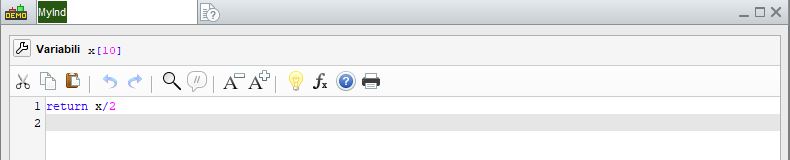
    This is MyInd indicator:

    //x = 10
    return x/2

    it returns nothing but 5 when added to your chart (below your chart).

    If you CALL it from this strategy it will output different values:

    y = OpenDay             //try also with UNDEFINED
    x = CALL MyInd[y]
    if not OnMarket then
       buy at market
    endif
    graph y
    graph x
    MyInd.itf MyInd.jpg MyInd.jpg
    #159926 quote
    PeterSt
    Participant
    Master

    it returns nothing but 5 when added to your chart (below your chart).
    If you CALL it from this strategy it will output different values:

    y = OpenDay             //try also with UNDEFINED
    x = CALL MyInd[y]
    if not OnMarket then
       buy at market
    endif
    graph y
    graph x

    No flowers yet. 🙂

    The above is obviously the very same as

    y = OpenDay             //try also with UNDEFINED -> errors out.
    //x = CALL MyInd[y]
    x = OpenDay[1] / 2
    if not OnMarket then
       buy at market
    endif
    graph y
    graph x

    and is thus a good example of how to avoid an Indicator and have the code (redundantly) in the strategy code itself.
    It does not solve a thing because it still requires the slow Graph commands.

    I am really sorry (to say it), but this :

    it returns nothing but 5 when added to your chart (below your chart).
    If you CALL it from this strategy it will output different values:

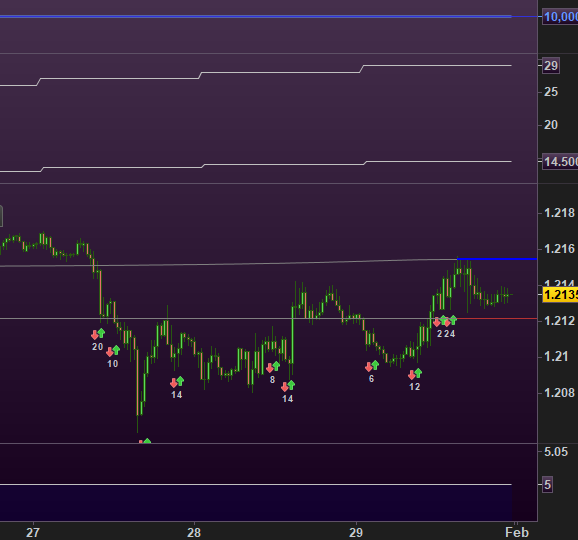
    literally and again suggests (almost explicitly) that what I ask for, works. But it does not (at all). Below the chart it still shows 5 (see attachment).
    Why in heaven’s sake is each of you guys responses to these questions from many, end up in the same “OK, I will try it again”. In this topic it it already happened two times.

    You can-not plot / draw / graph anything in the indicator code (like DrawArrow or DrawText), or by the indicator code (Return x as “MyLine”) that was passed as a parameter from strategy code to indicator code.


    It’s almost like the world is not allowed to know this.
    … but I rather had a solution …

    image_2021-01-30_160143.png image_2021-01-30_160143.png
    #159930 quote
    robertogozzi
    Moderator
    Master

    Strategies cannot plot anything because…. indicators are made for this purpose.

    They only have debugging aids.

    #159931 quote
    Vonasi
    Moderator
    Master

    Why in heaven’s sake is each of you guys responses to these questions from many, end up in the same

    Because either you do not make yourself very clear so neither of us understand what you want to happen or because we are both correct and in agreement on what is possible and what is not possible in ProOrder and ProBuilder but you just can’t accept that.

    I will remind you again of the forum rules:

    • Always be polite and courteous to others.


    Roberto and I are giving our time freely to try to help you and others to solve problems or get questions answered. If you don’t like the answer then wait for someone else to give you a different one but in the meantime remain calm and don’t shoot the messenger just because you don’t like their answer.

Viewing 11 posts - 1 through 11 (of 11 total)
  • You must be logged in to reply to this topic.

How to pass parameters from ProRealCode to Indicator and even use them


ProBuilder: Indicators & Custom Tools

New Reply
Author
author-avatar
PeterSt @peterst Participant
Summary

This topic contains 10 replies,
has 3 voices, and was last updated by Vonasi

5 years, 1 month ago.

Topic Details
Forum: ProBuilder: Indicators & Custom Tools
Language: English
Started: 01/30/2021
Status: Active
Attachments: 6 files
Logo Logo
Loading...