 BC
BCParticipant
Master
Hi PRT Master
I copy the syntax from below Blog to control the trade (Stop order, Long & Short) per day, but I found it will out of order if the 1st trade close at the 1st bar, is there any solution to solve this issue?
https://www.prorealcode.com/blog/automated-breakout-trading-strategy-french-cac40/
Thanks.
So you want to know if a pending stop order has triggered during the day and even if it has triggered and closed during the same bar?
BCParticipant
Master
Hi Nicolas
Yes and sorry for my poor description.
Thanks
Hi BC I notice you are from HK as well.
Feel free to contact me at [deleted by moderator] for more discussion and sharing of ideas.
btw i leave the message here because i don’t see any inbox function on this forum, or have I missed it?
@solar Sorry but there is no private messaging in the forum and sharing personal link is not allowed.
@BC You can use the snippet below, it returns a boolean if we were at market on the previous bar, and even if an order has opened and closed during it.
if ( (not onmarket and onmarket[1] and not onmarket[2]) or (tradeindex(1)=tradeindex(2) and tradeindex(1)=barindex[1] and tradeindex(1)>0) )  and lastcheck<>barindex then
 lastcheck = barindex
 wasonmarket=1
else
 wasonmarket=0
endif
So How can I contact somebody without violating the forum rules?
If BC is ok, I can make it possible for you to contact him off-forum.
BCParticipant
Master
Thanks Nicolas, will try your code tonight. Also I am OK let Solar contact me off forum.
Nice to meet you, Solar.
BCParticipant
Master
Hi Nicolas
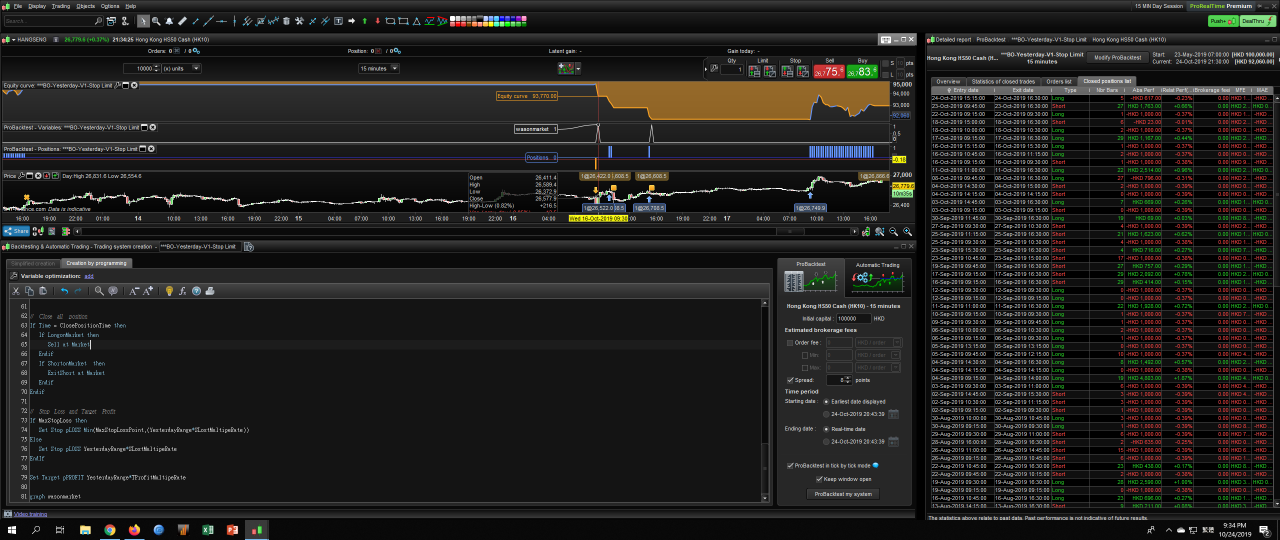
I tried but not work on below code, it seem [wasonmarket] will return=0 after a position close.
What I did wrong?
Thanks
Defparam Preloadbars = 5000
Defparam Cumulateorders = False

// no MM Position Size
Once noMMPositionSizeLong = 1
Once noMMPositionSizeShort = 1

// Target Profit and Stop Lost Setup
TProfitMultipeRate = 1.5
SLostMultipeRate = 0.75

// Function Switch
MaxStopLoss = 1

// Max Stop Loss
MaxStopLossPoint = 100

// Trade only on below time
Once StartBetTime = 91500
Once LastBetTime = 160000
TradingTime = Time >= StartBetTime and Time <= LastBetTime

// Cloase all Position
Once ClosePositionTime = 163000

// Capture Yesterday High Low
If DayofWeek = 1 then
Dayhigh = DHigh(2)
DayLow = DLow(2)
YesterdayRange = Dayhigh - DayLow
EndIf

If DayofWeek >=2 and DayofWeek < 6 then
Dayhigh = DHigh(1)
DayLow = DLow(1)
YesterdayRange = Dayhigh - DayLow
EndIf

// Trade Process
If TradingTime then

// Nicolas Code
if  ( (not onmarket and onmarket[1] and not onmarket[2]) or (tradeindex(1)=tradeindex(2) and tradeindex(1)=barindex[1] and tradeindex(1)>0) )  and lastcheck<>barindex then
lastcheck = barindex
wasonmarket=1
else
wasonmarket=0
EndIf

// Long Entry
If wasonmarket = 0 then
Buy noMMPositionSizeLong Contract at Dayhigh Stop
EndIf

// Short entry
If  wasonmarket = 0 then
SellShort noMMPositionSizeShort Contract at DayLow Stop
Endif

EndIf

// Close all position
If Time = ClosePositionTime then
If LongonMarket then
Sell at Market
Endif
If ShortonMarket  then
ExitShort at Market
Endif
Endif

// Stop Loss and Target Profit
If MaxStopLoss then
Set Stop pLOSS Min(MaxStopLossPoint,(YesterdayRange*SLostMultipeRate))
Else
Set Stop pLOSS YesterdayRange*SLostMultipeRate
EndIf

Set Target pPROFIT YesterdayRange*TProfitMultipeRate

graph wasonmarket
You didn’t adapt it correctly to your own strategy, because you should only reset the variable one time each day:
delete lines 46 and 47 and put that at the beginning of the code:
if day<>day[1] or intradaybarindex=0 then
 wasonmarket=0
endif
BCParticipant
Master
Hi Nicolas
I tried to follow your instruction, but seem not work correctly.
Thanks
Defparam Preloadbars = 5000
Defparam Cumulateorders = False

// no MM Position Size
Once noMMPositionSizeLong = 1
Once noMMPositionSizeShort = 1

// Target Profit and Stop Lost Setup
TProfitMultipeRate = 1.5
SLostMultipeRate = 0.75

// Function Switch
MaxStopLoss = 1

// Max Stop Loss
MaxStopLossPoint = 100


// Trade only on below time
Once StartBetTime = 91500
Once LastBetTime = 160000
TradingTime = Time >= StartBetTime and Time <= LastBetTime

// Cloase all Position
Once ClosePositionTime = 163000

// Capture Yesterday High Low
If DayofWeek = 1 then
Dayhigh = DHigh(2)
DayLow = DLow(2)
YesterdayRange = Dayhigh - DayLow
EndIf

If DayofWeek >=2 and DayofWeek < 6 then
Dayhigh = DHigh(1)
DayLow = DLow(1)
YesterdayRange = Dayhigh - DayLow
EndIf

// Trade Process
if day<>day[1] or intradaybarindex=0 then
wasonmarket=0
endif

If TradingTime then

// Nicolas Code
if  ( (not onmarket and onmarket[1] and not onmarket[2]) or (tradeindex(1)=tradeindex(2) and tradeindex(1)=barindex[1] and tradeindex(1)>0) )  and lastcheck<>barindex then
lastcheck = barindex
wasonmarket=1
EndIf

// Long Entry
If wasonmarket = 0 then
Buy noMMPositionSizeLong Contract at Dayhigh Stop
EndIf

// Short entry
If  wasonmarket = 0 then
SellShort noMMPositionSizeShort Contract at DayLow Stop
Endif

EndIf

// Close all position
If Time = ClosePositionTime then
If LongonMarket then
Sell at Market
Endif
If ShortonMarket  then
ExitShort at Market
Endif
Endif

// Stop Loss and Target Profit
If MaxStopLoss then
Set Stop pLOSS Min(MaxStopLossPoint,(YesterdayRange*SLostMultipeRate))
Else
Set Stop pLOSS YesterdayRange*SLostMultipeRate
EndIf

Set Target pPROFIT YesterdayRange*TProfitMultipeRate

graph wasonmarket
Because you included the condition into “tradingtime”, so the test cannot be made outside the time conditions. Anyway, I also made a small add to the condition to check another ‘wasonmarket’ situation that was not included.
Defparam Preloadbars = 5000
Defparam Cumulateorders = False

// no MM Position Size
Once noMMPositionSizeLong = 1
Once noMMPositionSizeShort = 1

// Target Profit and Stop Lost Setup
TProfitMultipeRate = 1.5
SLostMultipeRate = 0.75

// Function Switch
MaxStopLoss = 1

// Max Stop Loss
MaxStopLossPoint = 100


// Trade only on below time
Once StartBetTime = 91500
Once LastBetTime = 160000
TradingTime = Time >= StartBetTime and Time <= LastBetTime

// Cloase all Position
Once ClosePositionTime = 163000

// Capture Yesterday High Low
If DayofWeek = 1 then
Dayhigh = DHigh(2)
DayLow = DLow(2)
YesterdayRange = Dayhigh - DayLow
EndIf

If DayofWeek >=2 and DayofWeek < 6 then
Dayhigh = DHigh(1)
DayLow = DLow(1)
YesterdayRange = Dayhigh - DayLow
EndIf

// Trade Process
if day<>day[1] or intradaybarindex=0 then
wasonmarket=0
endif

// Nicolas Code
if  ( (not onmarket and onmarket[1] and not onmarket[2]) or (tradeindex(1)=tradeindex(2) and tradeindex(1)=barindex[1] and tradeindex(1)>0) or (not onmarket and onmarket[1]))  and lastcheck<>barindex then
lastcheck = barindex
wasonmarket=1
EndIf

If TradingTime then

// Long Entry
If wasonmarket = 0 then
Buy noMMPositionSizeLong Contract at Dayhigh Stop
EndIf

// Short entry
If  wasonmarket = 0 then
SellShort noMMPositionSizeShort Contract at DayLow Stop
Endif

EndIf

// Close all position
If Time = ClosePositionTime then
If LongonMarket then
Sell at Market
Endif
If ShortonMarket  then
ExitShort at Market
Endif
Endif

// Stop Loss and Target Profit
If MaxStopLoss then
Set Stop pLOSS Min(MaxStopLossPoint,(YesterdayRange*SLostMultipeRate))
Else
Set Stop pLOSS YesterdayRange*SLostMultipeRate
EndIf

Set Target pPROFIT YesterdayRange*TProfitMultipeRate

graph wasonmarket
BCParticipant
Master
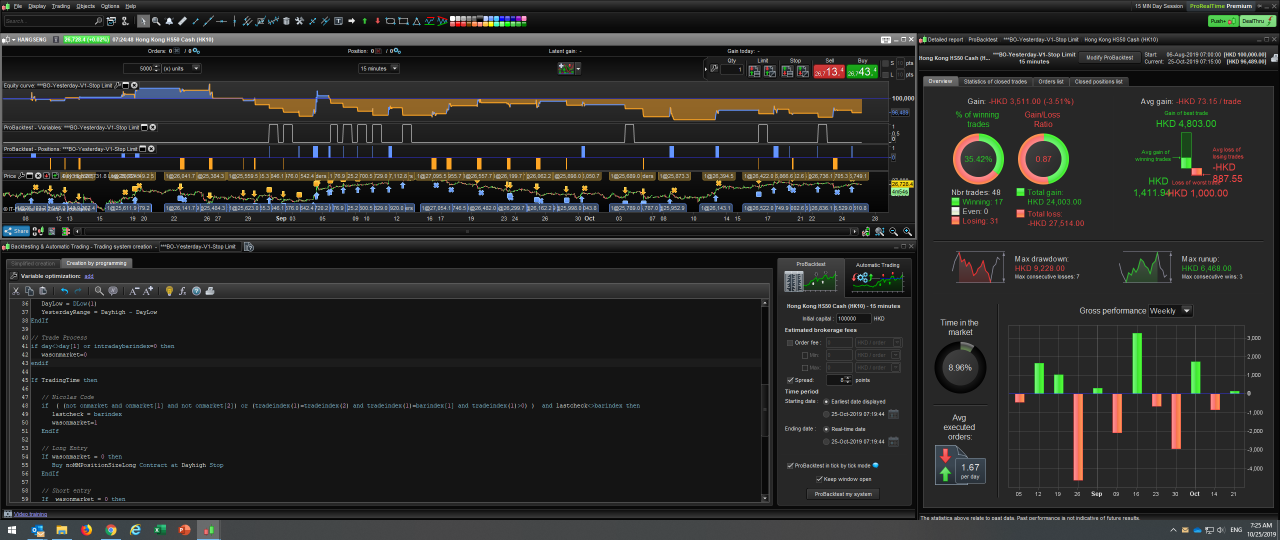
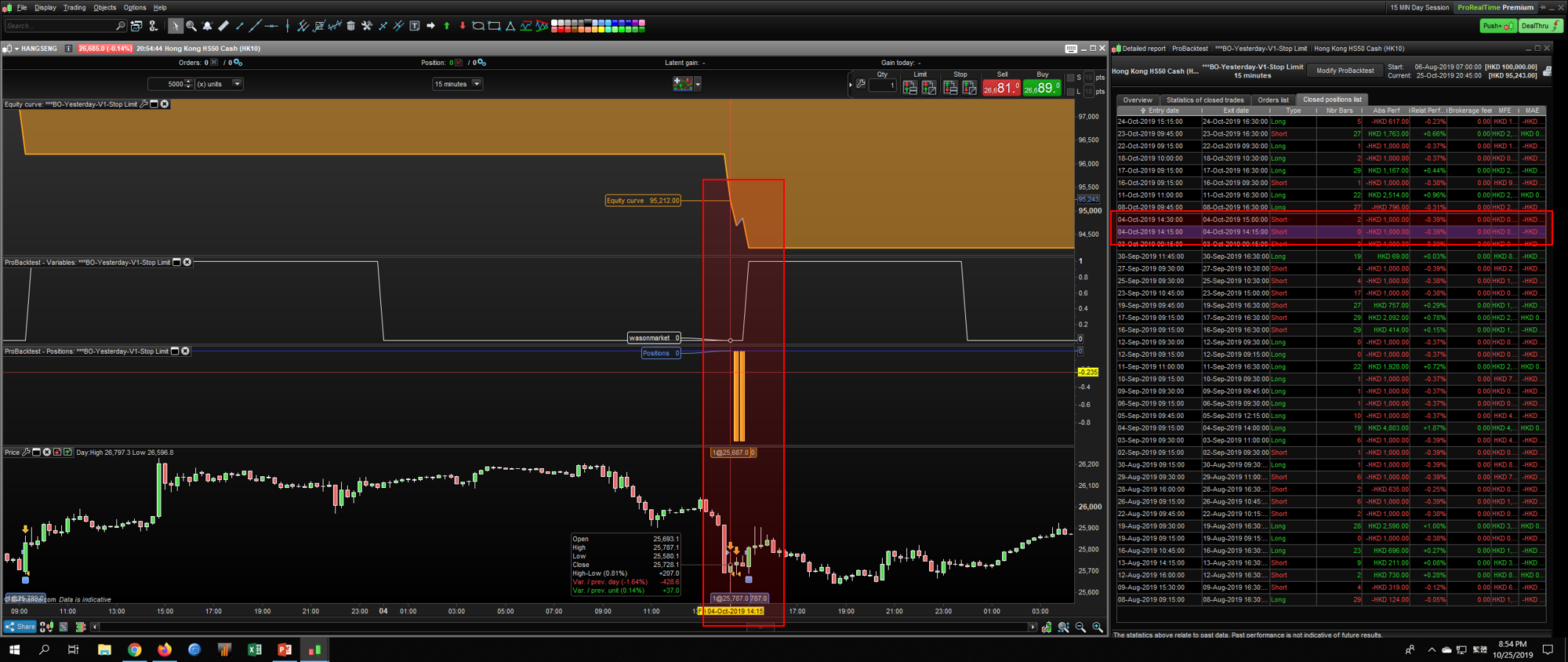
Thanks Nicolas, but I found it still open another trade if 1st trade close on same bar.
Seems to work well on the first trade at the left of the screenshot. How was closed this one you mentioned because I do not see any square (stoploss) or cross (code exit) symbol on the chart?
BCParticipant
Master
Most 1st trade on 1st bar can trigger [wasonmarket], but sometime not, very strange.