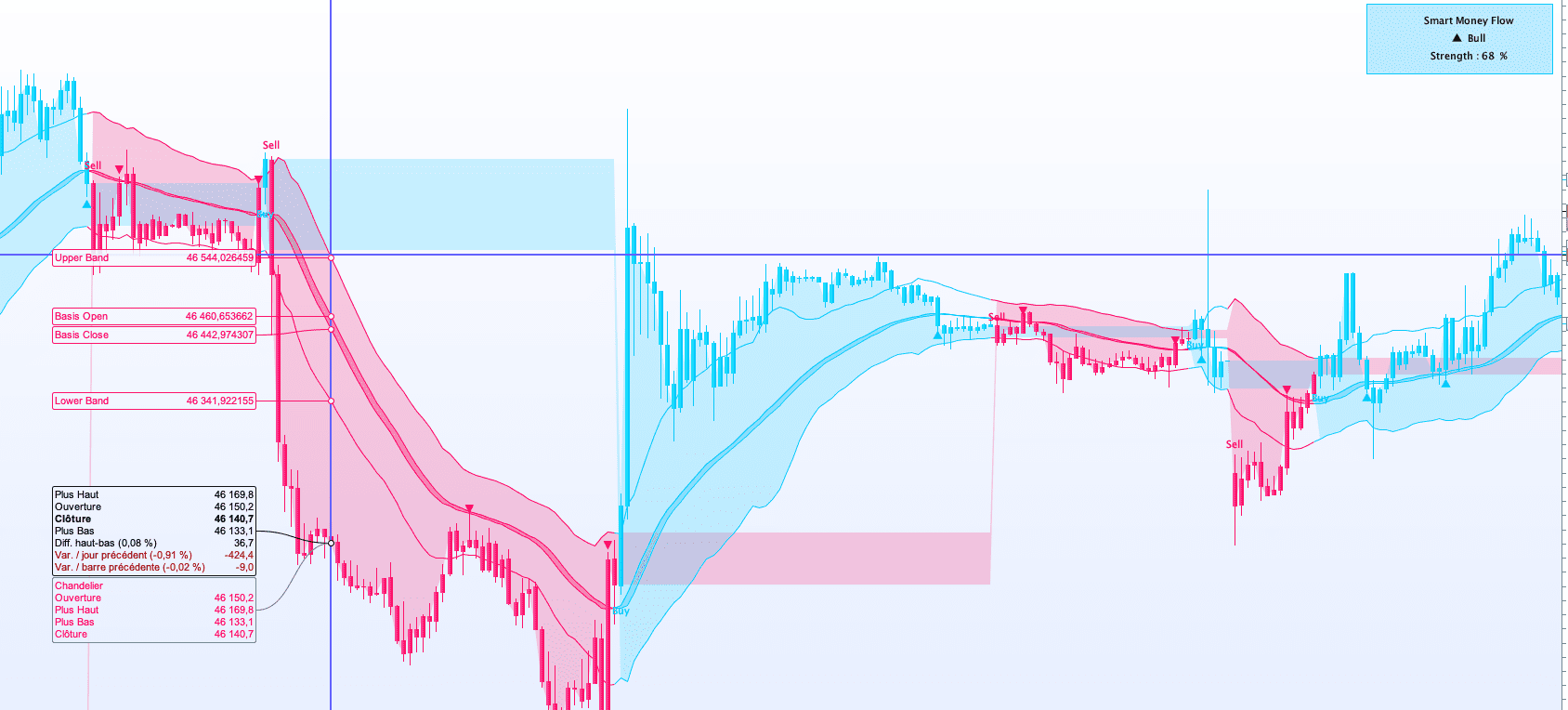
Hello,
there it is…..
// ================================================================
// Smart Money Flow Cloud [BOSWaves] – ProRealTime ProBuilder
// Adapted from Pine Script v6 (c) BOSWaves
//
// LIMITATIONS vs Pine Script original:
// – ALMA engine replaced by EMA (ALMA not built-in in ProBuilder)
// – Trend-strength gauge: use the companion oscillator script
// – Buy/Sell label styling is basic (no custom color per label)
//
// NOTE: In ProBuilder, period arguments in built-in functions must
// be LITERAL INTEGERS. To change a period, edit the number directly
// in the function call AND update the matching comment.
// ================================================================
// ─── Parameters ──────────────────────────────────────────────────
// Periods are hardcoded as literals — see note above.
// len=34 | basisSmooth=3 | mfLen=24 | mfSmooth=5 | atrLen=14
mfPower = 1.2 // Flow Boost [min 0.5]
minMult = 0.9 // Band Tightness (Calm) [min 0.1]
maxMult = 2.2 // Band Expansion (Strong)[min 0.1]
dotCooldown = 12 // Retest Signal Cooldown (bars)
// Bullish color #00C8FF → RGB(0, 200, 255)
bullR = 0
bullG = 200
bullB = 255
// Bearish color #FF005D → RGB(255, 0, 93)
bearR = 255
bearG = 0
bearB = 93
// ─── Basis ───────────────────────────────────────────────────────
// EMA(34) → EMA(3) smoothing on open & close
rawBasisC = EXPONENTIALAVERAGE[34](close)
rawBasisO = EXPONENTIALAVERAGE[34](open)
bC = EXPONENTIALAVERAGE[3](rawBasisC)
bO = EXPONENTIALAVERAGE[3](rawBasisO)
bMain = bC
// ─── Smart Money Flow (CLV × Volume) ────────────────────────────
IF high = low THEN
clv = 0
ELSE
clv = ((close – low) – (high – close)) / (high – low)
ENDIF
rawMF = clv * volume
// mfLen=24 — change both [24] below to adjust the flow window
sumRaw = SUMMATION[24](rawMF)
sumAbs = SUMMATION[24](ABS(rawMF))
IF sumAbs = 0 THEN
mfRatio = 0
ELSE
mfRatio = sumRaw / sumAbs
ENDIF
// mfSmooth=5
mfSm = EXPONENTIALAVERAGE[5](mfRatio)
mfStrength = MAX(0, MIN(1, POW(ABS(mfSm), mfPower)))
bandMult = minMult + (maxMult – minMult) * mfStrength
// ─── Adaptive Bands ──────────────────────────────────────────────
// atrLen=14
atr = AVERAGETRUERANGE[14]
upper = bMain + atr * bandMult
lower = bMain – atr * bandMult
// ─── Regime Tracking ─────────────────────────────────────────────
longCond = close > upper AND close[1] <= upper[1]
shortCond = close < lower AND close[1] >= lower[1]
IF BarIndex = 0 THEN
IF close >= bMain THEN
lastSignal = 1
ELSE
lastSignal = -1
ENDIF
ELSIF longCond THEN
lastSignal = 1
ELSIF shortCond THEN
lastSignal = -1
ELSE
lastSignal = lastSignal[1]
ENDIF
switchUp = (lastSignal = 1) AND (lastSignal[1] = -1)
switchDown = (lastSignal = -1) AND (lastSignal[1] = 1)
// ─── Retest Dot Cooldown ─────────────────────────────────────────
IF BarIndex = 0 THEN
lastBearDotBar = -10000
lastBullDotBar = -10000
ENDIF
bearDotCond = (lastSignal = -1) AND (high > bC)
bullDotCond = (lastSignal = 1) AND (low < bC)
bearOk = bearDotCond AND (dotCooldown = 0 OR (BarIndex – lastBearDotBar) >= dotCooldown)
bullOk = bullDotCond AND (dotCooldown = 0 OR (BarIndex – lastBullDotBar) >= dotCooldown)
IF bearOk THEN
lastBearDotBar = BarIndex
ENDIF
IF bullOk THEN
lastBullDotBar = BarIndex
ENDIF
// ─── Regime Color & Candles ──────────────────────────────────────
// DRAWCANDLE replaces Pine Script’s plotcandle() — colors body and border
IF lastSignal = 1 THEN
DRAWCANDLE(open, high, low, close) COLOURED(bullR, bullG, bullB) BORDERCOLOR(bullR, bullG, bullB)
r = bullR
g = bullG
b = bullB
ELSE
DRAWCANDLE(open, high, low, close) COLOURED(bearR, bearG, bearB) BORDERCOLOR(bearR, bearG, bearB)
r = bearR
g = bearG
b = bearB
ENDIF
// ─── ColorBetween Fills ──────────────────────────────────────────
// 1. Basis cloud: fill between bO and bC (regime-colored, 75% transparent)
ColorBetween(bO, bC, r, g, b, 75)
// 2. Bull fill: zone between lower band and close (bull regime only)
IF lastSignal = 1 THEN
ColorBetween(lower, close, bullR, bullG, bullB, 50)
ENDIF
// 3. Bear fill: zone between close and upper band (bear regime only)
IF lastSignal = -1 THEN
ColorBetween(close, upper, bearR, bearG, bearB, 50)
ENDIF
// ─── Trend Strength Calculation (tanh of normalized price position) ─
upSpan = MAX(upper – bMain, 0.0001)
dnSpan = MAX(bMain – lower, 0.0001)
IF lastSignal = 1 THEN
rawTS = (close – bMain) / upSpan
ELSE
rawTS = -(bMain – close) / dnSpan
ENDIF
tsX = rawTS * 1.5
tsEx = EXP(tsX)
tsEmx = EXP(-tsX)
tanhVal = (tsEx – tsEmx) / (tsEx + tsEmx)
strengthVal = EXPONENTIALAVERAGE[3](tanhVal)
strengthPct = ROUND(ABS(strengthVal) * 100)
// ─── Strength Dashboard (fixed panel, top-right corner) ──────────
// anchor(topRIGHT, XSHIFT, YSHIFT) → position fixe sur l’écran
// #strengthPct# → valeur dynamique insérée dans le texte
IF ISLASTBARUPDATE THEN
// Fond coloré selon le régime (rectangle semi-transparent)
DRAWRECTANGLE(-210, -25, -10, -100) ANCHOR(topRIGHT, XSHIFT, YSHIFT) FILLCOLOR(r, g, b, 70) BORDERCOLOR(r, g, b)
// Titre
DRAWTEXT(“Smart Money Flow”, -100, -42) ANCHOR(topRIGHT, XSHIFT, YSHIFT) COLOURED(25, 25, 25)
// Régime (▲ Bull / ▼ Bear)
IF lastSignal = 1 THEN
DRAWTEXT(“▲ Bull”, -100, -61) ANCHOR(topRIGHT, XSHIFT, YSHIFT) COLOURED(25, 25, 25)
ELSE
DRAWTEXT(“▼ Bear”, -100, -61) ANCHOR(topRIGHT, XSHIFT, YSHIFT) COLOURED(25, 25, 25)
ENDIF
// Pourcentage de force (valeur dynamique via #…#)
DRAWTEXT(“Strength : #strengthPct# %”, -100, -80) ANCHOR(topRIGHT, XSHIFT, YSHIFT) COLOURED(25, 25, 25)
endif
// ─── Buy / Sell Signal Labels ────────────────────────────────────
atrOff = atr * 0.25
IF switchUp THEN
DRAWTEXT(“Buy”, BarIndex, low – atrOff) COLOURED(bullR, bullG, bullB)
ENDIF
IF switchDown THEN
DRAWTEXT(“Sell”, BarIndex, high + atrOff) COLOURED(bearR, bearG, bearB)
ENDIF
// ─── Retest Markers (▲ below bar = bull retest, ▼ above = bear) ──
IF bullOk THEN
DRAWTEXT(“▲”, BarIndex, low – atrOff * 0.5) COLOURED(bullR, bullG, bullB)
ENDIF
IF bearOk THEN
DRAWTEXT(“▼”, BarIndex, high + atrOff * 0.5) COLOURED(bearR, bearG, bearB)
ENDIF
// ─── Series Output ───────────────────────────────────────────────
RETURN bC COLOURED(r, g, b) AS “Basis Close”,bO COLOURED(r, g, b) AS “Basis Open”,upper COLOURED(r, g, b) AS “Upper Band”,lower COLOURED(r, g, b) AS “Lower Band”