Exporting data

Viewing 12 posts - 1 through 12 (of 12 total)
  • Author
    Posts
  • #9879 quote
    robertogozzi
    Moderator
    Master

    I would like to export performance data to a file, Excel or text format.

    Is it possible?

    Thank you.

    Strategy-data.jpg Strategy-data.jpg
    #9886 quote
    Nicolas
    Keymaster
    Master

    Yes it’s possible, this question has been answered many times already 🙂

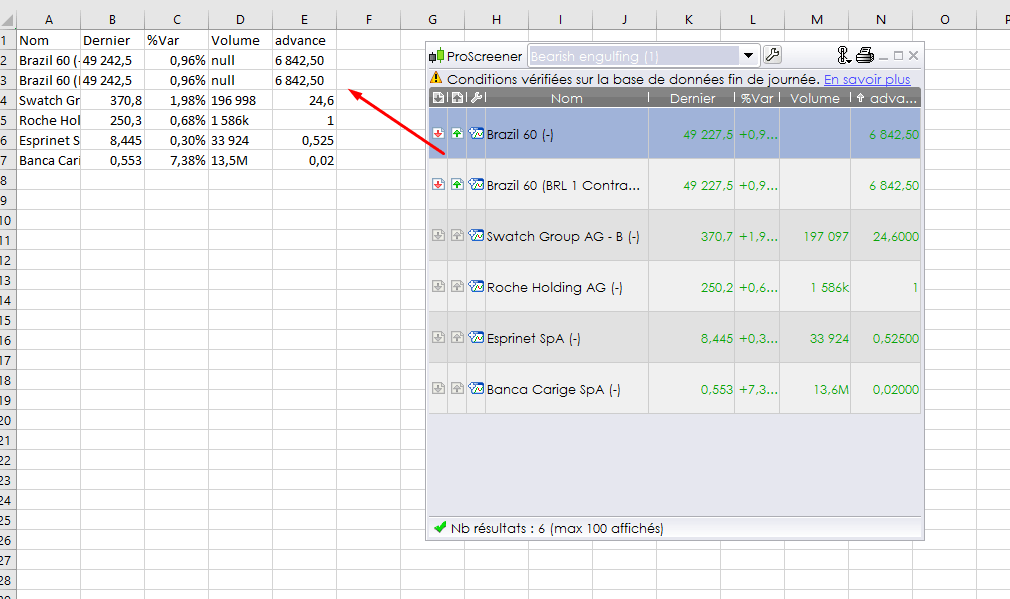
    You can drag and drop any prorealtime result window to Excel, look at picture attached with an example of ProScreener result. It can be also drag to any other text format software for csv export for example.

    screener-data-to-excel.png screener-data-to-excel.png
    #9895 quote
    robertogozzi
    Moderator
    Master

    Sorry, but can’t find any button or link to export data.

    Even right-clicking on the data doesn’t work.

    Probably exporting data is supported only by ProScreener and not by ProOrder.

    Strategy-data3.jpg Strategy-data3.jpg
    #9901 quote
    Nicolas
    Keymaster
    Master

    There is no button, just “drag and drop”, click on the result list of trades, hold your left mouse button and release it on Excel sheet.

    #9904 quote
    robertogozzi
    Moderator
    Master

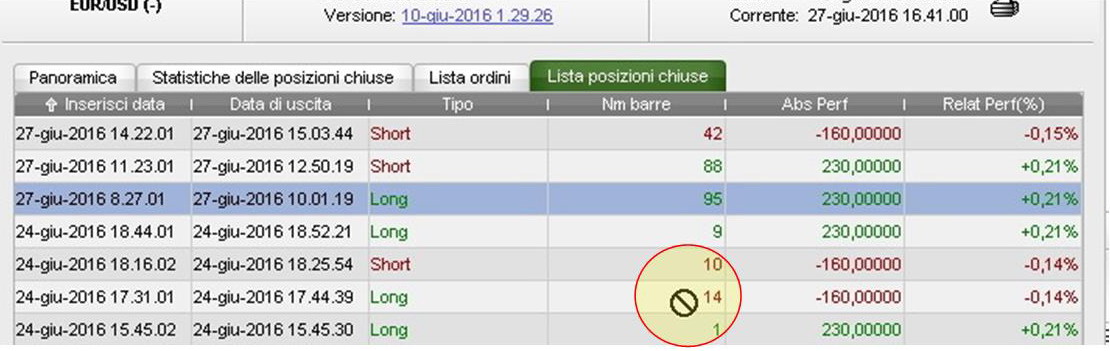
    I am clicking as you suggested (I also tried before writing this post), but as you can see a rejection icon appears on the screen not allowing me to select data.

    I am using ProRealTime with an IG demo account and Windows 10. Do they may affect the behaviour of mouse clicks?

    Strategy-data4.jpg Strategy-data4.jpg
    #9907 quote
    Nicolas
    Keymaster
    Master

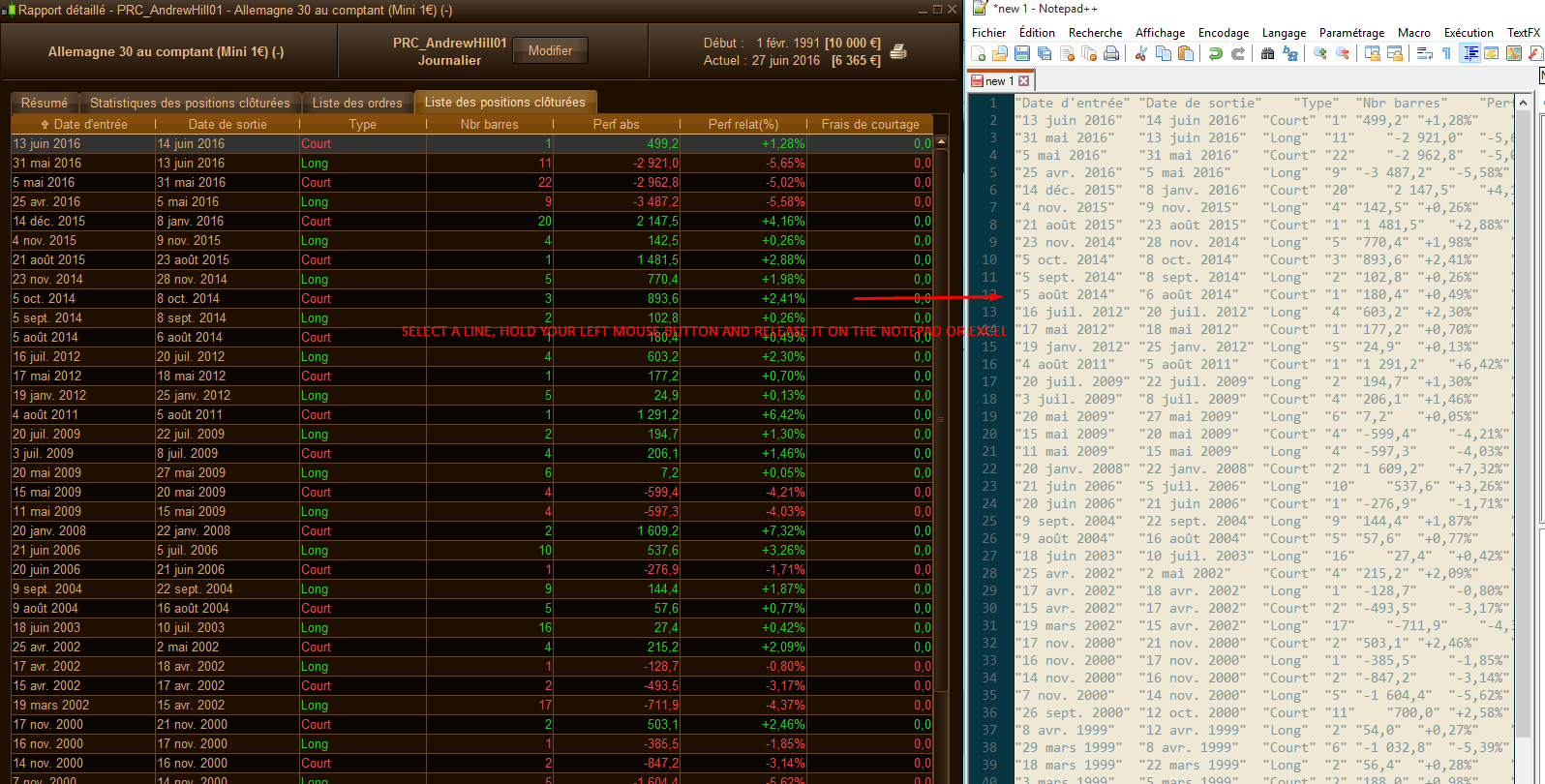
    Yes, just like me, this icon is normal. I just tried successfully.

    exporting-result-from-PRT.png exporting-result-from-PRT.png
    #9922 quote
    robertogozzi
    Moderator
    Master

    I succeeded.

    Thank you.

    #101672 quote
    mrfixituk41
    Participant
    New

    If I left click with Excel open it just disappears. I can’t get the proscreener results to minimise either

    #101692 quote
    Nicolas
    Keymaster
    Master

    Open the 2 windows side by side, just like I showed in my last post.

    #101699 quote
    AlgoAlex
    Participant
    Master

    Nicolas, how would you do a portfolio analisys after copying in Excel several backtest results?

    #101700 quote
    mrfixituk41
    Participant
    New

    Well if I could make the screen minimise I might be able to do it. The screen size doesn’t change if I click on full size or minimise (top right). This isn’t going to save me anytime anyway if I can’t select all at the same time.

    #101702 quote
    mrfixituk41
    Participant
    New

    Just figured it ouy. Very useful. Thanks

Viewing 12 posts - 1 through 12 (of 12 total)

  • You must be logged in to reply to this topic.

Exporting data


ProOrder: Automated Strategies & Backtesting

New Reply
Author
Summary

This topic contains 11 replies,
has 4 voices, and was last updated by mrfixituk41

6 years, 8 months ago.

Topic Details
Forum: ProOrder: Automated Strategies & Backtesting
Language: English
Started: 06/27/2016
Status: Active
Attachments: 5 files
Logo Logo
Loading...