Hello Community,
I am new here and i am struggling to code my strategy. Sorry for noob question, but i am confident i can improve my PRT language knowledge.
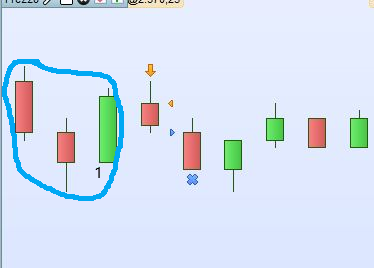
Enclosed you can find the typical issue i am finding during my probuilder backtest, In the “blue” circle there is the candestick pattern i want to trade. Engagement is pretty simple: Open a trade (short at market) on pattern detection and sell (exit) when price touch again the OPEN of the candle num. 1. As you can see from the pic, opening is correct (next candle –> short at market) but closing is wrong. Additionally, i did an extensive backtest doublecheck and i could be quite sure that my script detect correctly the patterns and open trade accordingly. But as i said, i am struggling to force the correct closing.
Here is my code snippet:
//------Open Trading Conditions + Target
If Pattern=1 then
MyProfitShort = Open[0]
ENDIF

IF NOT ONMARKET AND (Pattern=1) then
SellShort 1 Contracts at market
ENDIF

IF SHORTONMARKET THEN
EXITSHORT AT MyProfitShort Stop
endif
By the way, i have a last question. If the code is correct, can you confirm that PRT is able to manage 2 orders executions at same candle? To get more clear, in the pic example below, the first candle which is following num.1 candle could touch again the opening (exit point) of candle num.1 in certain conditions, so the result is that in the same candle we should have the SELL AT MARKET but even the EXITSHORT.
Thank you for the help!
At line 11 use LIMIT instead of STOP, since your exit price is favorable because you exit by buying at a lower price.
STOP will not exit correctly.
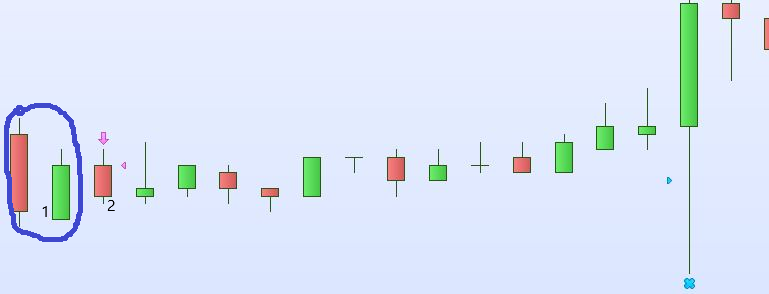
Thanks Roberto for ponting it out. But i have still some issue, after fixing the code: Would you please check the pic please?
The opening is correct (short at market after pattern detection in blue circle) but close is earlier than Open of the green candle (num. 1 candle) in the pattern.
Any suggestion?
Without the complete code it’s impossible to answer.
DEFPARAM Cumulateorders = false

Bullish = close > open
Bearish = open > close
Body    = (abs(open - close) > 0.5 * pipsize)
UpperSHGreen =  High > Close

IF Bearish[1] and (close>open) and (Low=Open) and (Body[1]) AND UpperSHGreen THEN
GreenNSH=1
MyProfitShort = Open[0]
ELSE
GreenNSH=0
ENDIF


//------Open Trading

IF NOT ONMARKET AND (GreenNSH=1) then
SellShort 1 Contracts at market
ENDIF


//----- Trade Closing Conditions


IF SHORTONMARKET THEN
EXITSHORT AT MyProfitShort Limit
endif

IF ONMARKET AND (Barindex - Tradeindex >= 80) then
ExitShort at Market
endif
The only issue seems to be not abiding by the minimum distance required by IG.
Try using GRAPH to monitor your profit target and close. They could be too tight.
If the conditions in line 8 are ever true again while you are on the market then your stop price will be changed. If you want to keep it fixed at the value when the trade was opened then set it at this time only or add a NOT ONMARKET to the line 8 conditions.
You should also add an extra EXITSHORT AT MyProfitShort Limit after line 19 as otherwise there is a one candle delay with no exit order when a trade is opened.
Hello Roberto
I don’t use IG. The backtest i sent you is from Interactive Broker and i am backtesting it on the Mini S&P (future)
Also IB might have minimum distance requirements.
Still what Vonasi pointed out will change your target even while OnMarket, so adding his solution could also be beneficial.
Hello Vonasi,
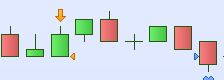
I fixed the script as your suggestion but still not meet the logic. As you can see in the pic, Trade opening is correct (pattern circled in blue) but the open of green candle num.1 must be the target profit. Closening happens later. Basically, in this example, i want that opening and closing (with profit) are included in the same candle.
Here the script fixed:
DEFPARAM Cumulateorders = false

Bullish = close > open
Bearish = open > close
Body    = (abs(open - close) > 0.5 * pipsize)
UpperSHGreen =  High > Close

IF Bearish[1] and (close>open) and (Low=Open) and (Body[1]) AND UpperSHGreen AND NOT ONMARKET THEN
GreenNSH=1
MyProfitShort = Open[0]
ELSE
GreenNSH=0
ENDIF


//------Open Trading

IF NOT ONMARKET AND (GreenNSH=1) then
SellShort 1 Contracts at market
ENDIF


//----- Trade Closing Conditions


IF SHORTONMARKET THEN
EXITSHORT AT MyProfitShort Limit
endif

IF ONMARKET AND (Barindex - Tradeindex >= 80) then
ExitShort at Market
endif
That is because of the second point that I made
- You should also add an extra EXITSHORT AT MyProfitShort Limit after line 19 as otherwise there is a one candle delay with no exit order when a trade is opened.
DEFPARAM Cumulateorders = false

Bullish = close > open
Bearish = open > close
Body    = (abs(open - close) > 0.5 * pipsize)
UpperSHGreen =  High > Close

IF Bearish[1] and (close>open) and (Low=Open) and (Body[1]) AND UpperSHGreen AND NOT ONMARKET THEN
GreenNSH=1
MyProfitShort = Open[0]
ELSE
GreenNSH=0
ENDIF


//------Open Trading

IF NOT ONMARKET AND (GreenNSH=1) then
SellShort 1 Contracts at market
EXITSHORT AT MyProfitShort Limit
ENDIF


//----- Trade Closing Conditions


IF SHORTONMARKET THEN
EXITSHORT AT MyProfitShort Limit
endif

IF ONMARKET AND (Barindex - Tradeindex >= 80) then
ExitShort at Market
endif
Hello Vonasi,
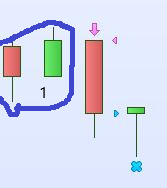
Now the script works well, thank you. I just need an help for the last filter. How to avoid the possible situation in the pic below?
There is a small Lap Down after the pattern (pattern = first 2 candles in the pic), so the trade is opening at the same price of the opening of the previous candle
In this case, the short strategy will never make a profit (in fact you can see the closing in draw, but obviously need to subtract contract fees and, in the worst case, could become a loss.)
Thank you!
In live trading your exit order would most likely be rejected anyway and not placed on the market as it is too close to your entry price. You really need to add a minimum distance filter so as not to enter the market unless your profit level is at least a minimum distance from the close price.
Due to gaps it is impossible to know what exact price your position will be opened at until it is opened so it is impossible to avoid situations such as in your image. You could compare the TRADEPRICE to your exit level price at the close of the first candle and then adjust the exit price if it turns out to be too close. Not perfect but at least you will have acted as early as is possible. Using MTF would allow you to act very quickly but would seriously limit the amount of back test data available to you.
The adjusted code below should only open trades where the exit price is a minimum distance from close and should then check at the close of the first candle if the actual trade price you entered at was too close to your exit price (due to a gap) and set a different exit price if it is. Not tested.
I notice that you do not have any stop loss exit except for a time based one. This could do some serious damage to your bank balance if you get caught in a big bull rally in those 80 candles!
DEFPARAM Cumulateorders = false

minstopdistance = 10

Bullish = close > open
Bearish = open > close
Body    = (abs(open - close) > 0.5 * pipsize)
UpperSHGreen =  High > Close

IF Bearish[1] and (close>open) and (Low=Open) and (Body[1]) AND UpperSHGreen AND NOT ONMARKET THEN
GreenNSH=1
MyProfitShort = Open[0]
ELSE
GreenNSH=0
ENDIF


//------Open Trading

IF NOT ONMARKET AND (GreenNSH=1) then
if close - myprofitshort >= minstopdistance then
SellShort 1 Contracts at market
EXITSHORT AT MyProfitShort Limit
ENDIF
endif

//----- Trade Closing Conditions


IF SHORTONMARKET THEN
myprofitshort = min(tradeprice - minstopdistance, myprofitshort)
EXITSHORT AT MyProfitShort Limit
endif

IF ONMARKET AND (Barindex - Tradeindex >= 80) then
ExitShort at Market
endif
Thanks for the help. do you think the issue could affect even the future instrument?
For stop loss, yeah i know i am testing some additional filters to avoid that worst case!