Etat des alertes change

Viewing 2 posts - 1 through 2 (of 2 total)
  • Author
    Posts
  • #229655 quote
    MANUBRIONMANUBRION
    Participant
    New

    Bonjour,

    Quand une alerte se déclenche elle apparaît en “déclenchée” dans l’état des alertes. Or j’ai des alertes qui étaient déclenchées qui ne le sont plus…

    Ce qui est ennuyeux est que des alertes avaient sans doute été déclenchées quand je n’étais pas devant l’ordi et quand j’y retourne sont toujours “en attente”

    Quelqu’un aurait il une explication ou une solution?

    Merci

    Manu

    #229659 quote
    drubydruby
    Participant
    New

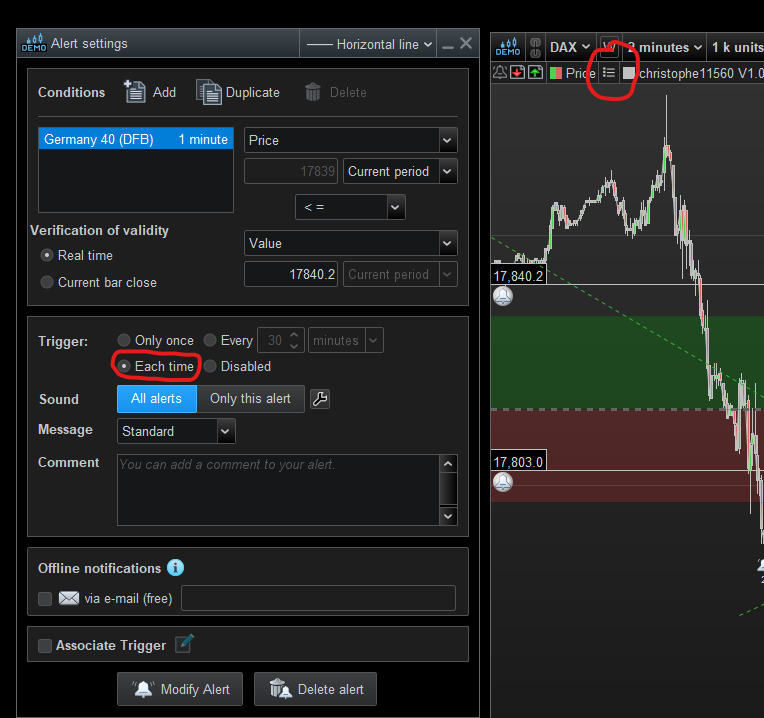
    Is the “Every time” option selected in the alert settings!.

    And you can choose to see which alert has been triggered and how many times from the chart window next to “Price”.

    Druby.

    manubrion1-alerts.png manubrion1-alerts.png
Viewing 2 posts - 1 through 2 (of 2 total)
  • You must be logged in to reply to this topic.

ProRealAI ProRealAI New

From idea to ProBuilder code in seconds.

Your coding copilot for ProRealTime™. Ask in plain English — get clean, ready-to-paste indicators, screeners and systems.

Available in 7 languages
Try ProRealAI

Etat des alertes change


Support Plateforme : Graphiques, Données & Courtiers

New Reply
Author
author-avatar
MANUBRION @manubrion Participant
Summary

This topic contains 1 reply,
has 2 voices, and was last updated by drubydruby

2 years, 6 months ago.

Topic Details
Forum: Support Plateforme : Graphiques, Données & Courtiers
Language: French
Started: 03/12/2024
Status: Active
Attachments: 1 files
ProRealCode ProRealCode
Loading...