DrawSegment dynamique sur différentes UT

Viewing 3 posts - 1 through 3 (of 3 total)
  • Author
    Posts
  • #88152 quote
    jmlfr83 Marcojmlfr83 Marco
    Participant
    New

    Bonjour,

    débutant sur PRT, je vais essayer d’être explicite.

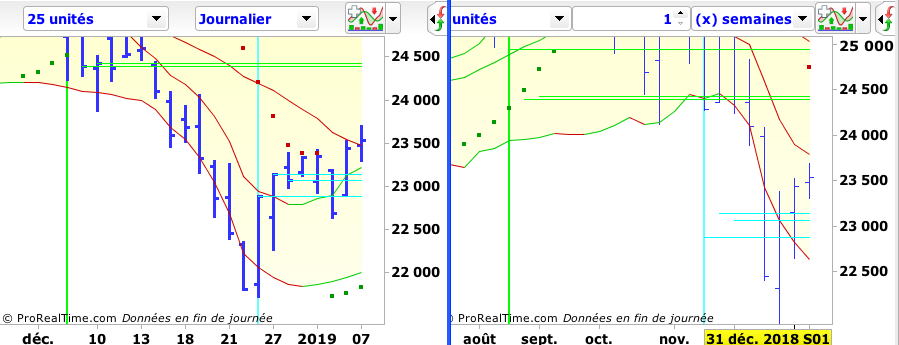
    Je désire faire apparaitre 3 segments correspondants aux niveaux de clôture à -8, -7 et -6 bar.

    (et 3 segments pour -21, -20 et -19).

    Cela pour anticiper les niveaux de valeur des M7 et M20. (Analyse Technique Systémique).

    Cela, quelque soit l’UT sélectionnée.

    Mais ma programmation (simple) n’affiche que les bons segments pour l’UT jour, quelque soit l’UT sélectionnée.

    (ex si je choisi un affichage hebdo, les segments restent sur des valeurs jours, cf graphes)

    Quelle est mon erreur svp ?

    D’avance merci pour votre aide (et votre indulgence !)

    Marco.

    // Oggy et Jack définies en variable, à 8 et 21
    
    DefParam DrawOnLastBarOnly = true
    
    Drawsegment((barindex-(oggy -1)), Dclose(Oggy-1), barindex, Dclose(Oggy - 1) ) coloured(0,255,255)
    Drawsegment((barindex-(oggy -2)), Dclose(Oggy-2), barindex, Dclose(Oggy - 2) ) coloured(0,255,255)
    Drawsegment((barindex-(oggy -3)), Dclose(Oggy-3), barindex, Dclose(Oggy - 3) ) coloured(0,255,255)
    
    Drawsegment((barindex-(Jack -1)), Dclose(Jack-1), barindex, Dclose(Jack - 1) ) coloured(0,255,0)
    Drawsegment((barindex-(Jack -2)), Dclose(Jack-2), barindex, Dclose(Jack - 2) ) coloured(0,255,0)
    Drawsegment((barindex-(Jack -3)), Dclose(Jack-3), barindex, Dclose(Jack - 3) ) coloured(0,255,0)
    
    return
    
    Capture-d’écran-2019-01-08-à-10.34.19.png Capture-d’écran-2019-01-08-à-10.34.19.png
    #88157 quote
    NicolasNicolas
    Keymaster
    Legend

    Tout simplement parce que tu utilises l’instruction DClose(n) qui contient uniquement les valeurs OHLC du timeframe journalier.

    Pour obtenir le Close de l’unité de temps affichée, il faut simplement utiliser “Close[n]”, soit dans ton code: (exemple)

    Drawsegment((barindex-(oggy -1)), close[Oggy-1], barindex, close[Oggy - 1] ) coloured(0,255,255)

    remarque également l’utilisation de crochet pour l’offset (référence à une valeur du passé) et non des parenthèses pour cette instruction.

    jmlfr83 Marco thanked this post
    #88167 quote
    jmlfr83 Marcojmlfr83 Marco
    Participant
    New

    Merci Nicolas.

Viewing 3 posts - 1 through 3 (of 3 total)

  • You must be logged in to reply to this topic.

ProRealAI ProRealAI New

Stuck on this ProBuilder code?

Describe what this topic is trying to build, in plain English, and ProRealAI writes the ProRealTime™ indicator, screener or system for you.

Available in 7 languages
Try ProRealAI

DrawSegment dynamique sur différentes UT


ProBuilder : Indicateurs & Outils Personnalisés

New Reply
Author
Summary

This topic contains 2 replies,
has 2 voices, and was last updated by jmlfr83 Marcojmlfr83 Marco
7 years, 8 months ago.

Topic Details
Forum: ProBuilder : Indicateurs & Outils Personnalisés
Language: French
Started: 01/08/2019
Status: Active
Attachments: 1 files
ProRealCode ProRealCode
Loading...