Draw segments in the future barindex

Viewing 12 posts - 1 through 12 (of 12 total)
  • Author
    Posts
  • #61010 quote
    AsedubelinAsedubelin
    Participant
    Junior

    How can I draw segments starting from last bar and ending in the future?
    In some videos I see that someone did it

    #61014 quote
    NicolasNicolas
    Keymaster
    Legend

    Please tell me what video as I can’t explain how  it is possible!

    #61019 quote
    AsedubelinAsedubelin
    Participant
    Junior

    For example this video:

    #61020 quote
    NicolasNicolas
    Keymaster
    Legend

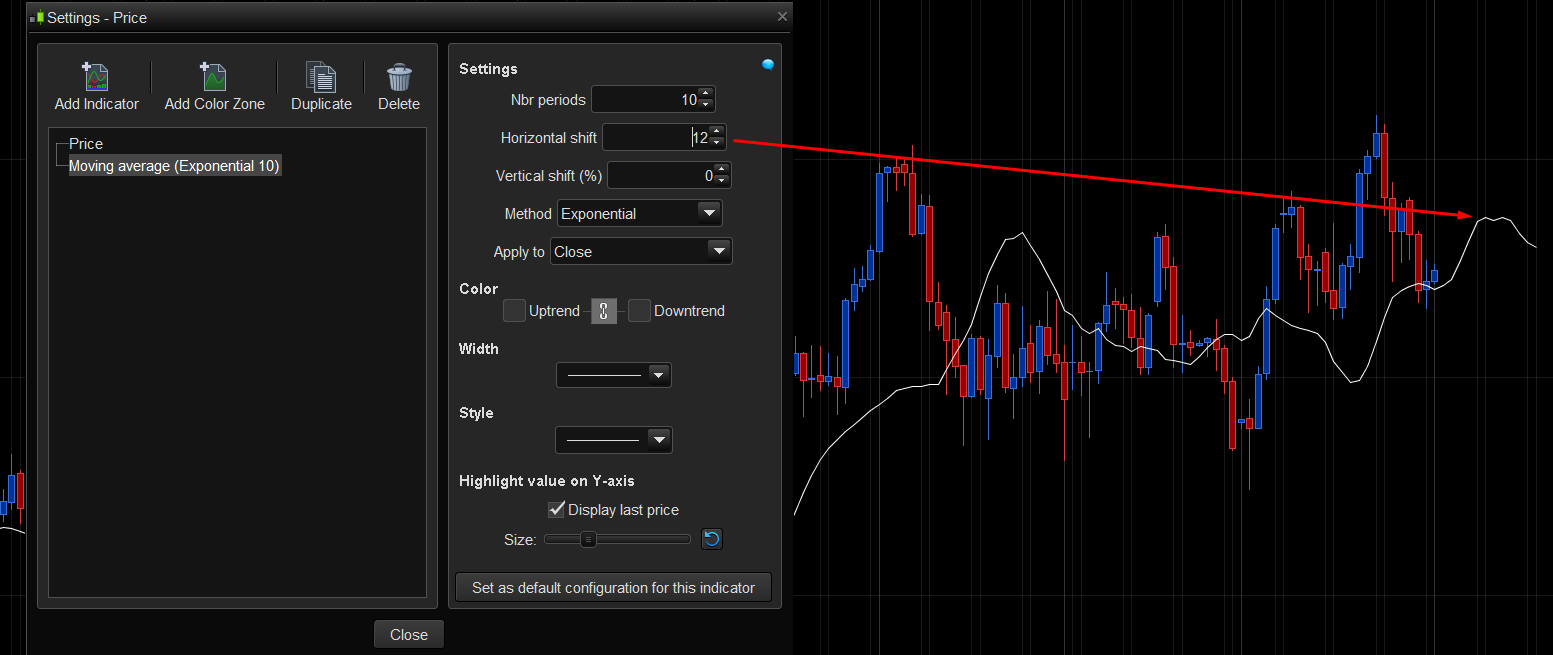
    Yes, but it is not created with code, it is a moving average displaced in the future. Only built-in indicators of prorealtime can draw in the future of price, just like Ichimoku for example.

    #61113 quote
    AsedubelinAsedubelin
    Participant
    Junior

    I don’t think it’s a built-in moving average shifted to the right, anyway you are saying that it is not possible to code even a simple moving average shifted to the right in a zone where there is not yet a bar?
    Only few people can use the library able to do this feature?

    Another question: a moving average can be applied only to Close, Open, Low, High, Typical, Total … or even to the result of another indicator?

    #61117 quote
    robertogozzirobertogozzi
    Moderator
    Legend

    A Moving Average can be applied to anything, even another MA or any other indicator.

    x = Average[200,0](close)  //sma 200
    y = Average[21,1](x)       //ema 20  of sma 200
    z = Average[50,2](Rsi[14]) //wma 50  of rsi 14

    https://www.prorealcode.com/documentation/average/

    #61119 quote
    AsedubelinAsedubelin
    Participant
    Junior

    Yes, thanks.
    But  Average can be applied to everything inside the code but inside the code I can’t shift it to the right in a no-bar zone.

    The built-in Average can be shifted to the right but it can’t be applied to everything (only Close, Open …).

    I can’t solve my problem, is it correct?

    #61139 quote
    NicolasNicolas
    Keymaster
    Legend

    Since no bars exist in the future, and X coordinates is made with barindex, you can’t reference anything to be drawn in the future. Add text on the right of a last candlestick is possible if you add sufficient space before the text.

    #61141 quote
    AsedubelinAsedubelin
    Participant
    Junior

    A text is not enough,
    I would like to plot  some expectation values of asset for the next bars
    But it seems impossible, isn’t it?

    #61165 quote
    NicolasNicolas
    Keymaster
    Legend

    Right, it is not possible because no barindex are already known.

    #61168 quote
    AsedubelinAsedubelin
    Participant
    Junior

    Nevertheless someone shows in video that it is possible to plot forecast.
    Probably there are hidden resource that allows you to perform this.

    #61171 quote
    NicolasNicolas
    Keymaster
    Legend

    Sorry but there is no hidden ressource 🙂
    The moving average is shifted to the right like in my attached picture.

    moving-average-horizontal-shift.png moving-average-horizontal-shift.png
Viewing 12 posts - 1 through 12 (of 12 total)
  • You must be logged in to reply to this topic.

ProRealAI ProRealAI New

Stuck on this ProBuilder code?

Describe what this topic is trying to build, in plain English, and ProRealAI writes the ProRealTime™ indicator, screener or system for you.

Available in 7 languages
Try ProRealAI

Draw segments in the future barindex


ProBuilder: Indicators & Custom Tools

New Reply
Author
author-avatar
Asedubelin @asedubelin Participant
Summary

This topic contains 11 replies,
has 3 voices, and was last updated by NicolasNicolas

8 years, 7 months ago.

Topic Details
Forum: ProBuilder: Indicators & Custom Tools
Language: English
Started: 01/30/2018
Status: Active
Attachments: 1 files
ProRealCode ProRealCode
Loading...