données mm hebdo sur graphe journalier

Viewing 4 posts - 1 through 4 (of 4 total)
  • Author
    Posts
  • #176966 quote
    CrockyCrocky
    Participant
    Junior

    Bonjour,

    Je souhaiterai coder un indicateur qui réalise une tâche que je fais aujourd’hui manuellement:

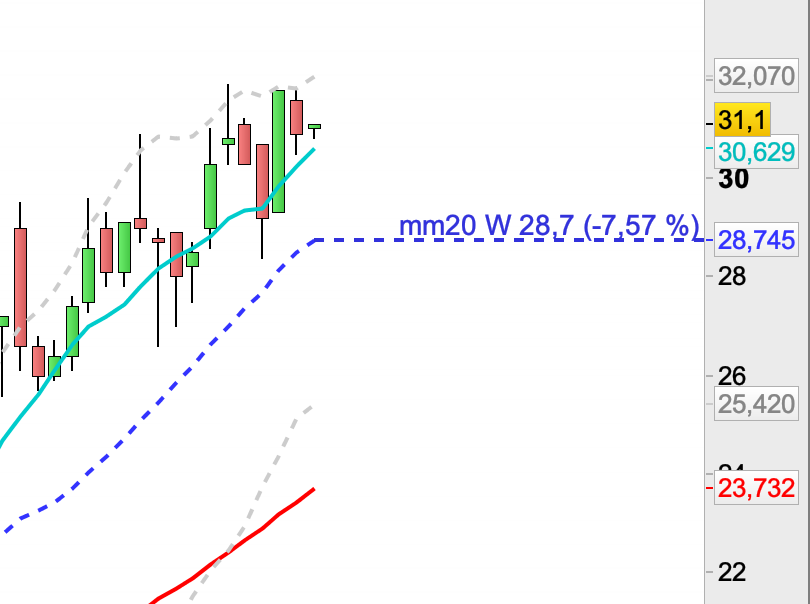
    J’affiche d’abord mon graphique en hebdo, puis je trace manuellement avec les outils de dessin une ligne pointillée correspondante à la dernière valeur de la mm20 hebdo (graphe de gauche)

    [attachment file=”Capture d’écran 2021-09-07 à 22.07.31.png”]

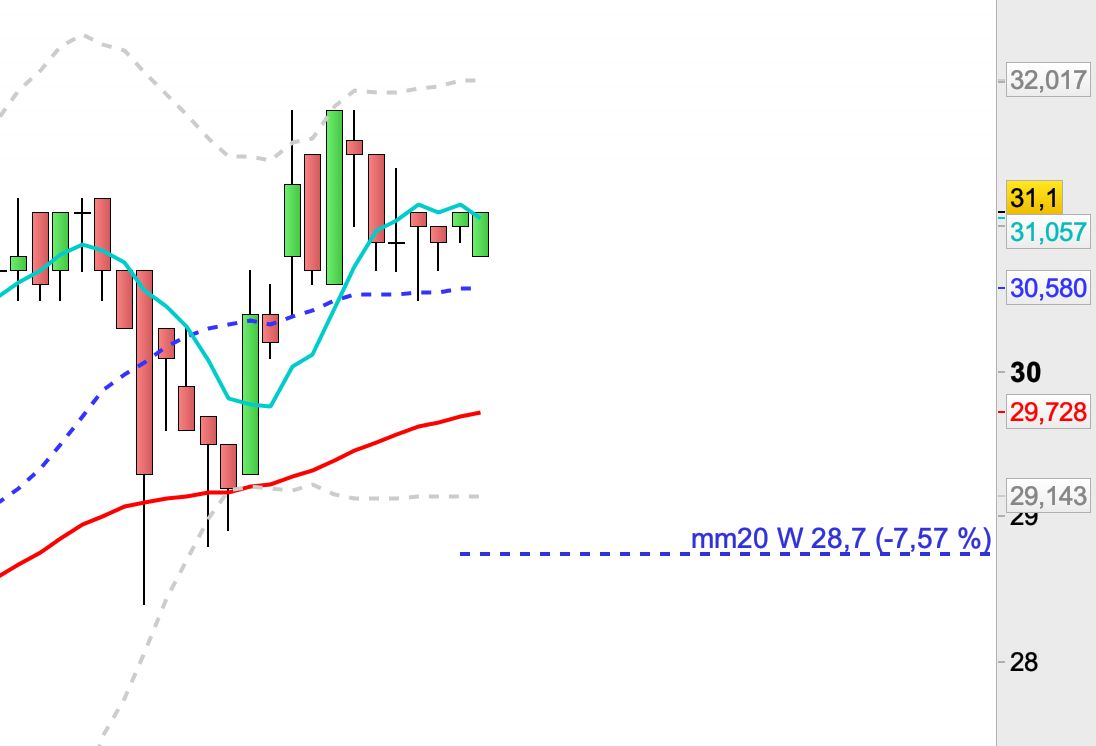
    Puis je bascule en vue journalière et j’ai toujours à l’écran la ligne pointillée correspondant à la dernière mm20 hebdo (graphe de droite)

    [attachment file=”Capture d’écran 2021-09-07 à 22.07.51.png”]

    Je tâtonne avec les commandes DRAWRAY , DRAWTEXT mais je ne parviens toujours pas à automatiser cette tâche. Si une âme généreuse pouvait passer par là…

    Merci à tous.

    Capture-decran-2021-09-07-a-22.07.31.png Capture-decran-2021-09-07-a-22.07.31.png Capture-decran-2021-09-07-a-22.07.51.png Capture-decran-2021-09-07-a-22.07.51.png
    #176980 quote
    JC_BywanJC_Bywan
    Moderator
    Master

    Bonsoir,

    (sujet déplacé du forum “support plateforme” au forum “support probuilder)

    defparam DRAWONLASTBARONLY=true
    
    once decaH=10 // décalage horizontal du texte en barres
    once decaV=0.2 // décalage vertical du texte en points ou pips
    
    timeframe(1 week,default)
    mm20w=Average[20](close)
    
    timeframe(default)
    DRAWRAY(barindex, mm20w, barindex+20, mm20w) coloured(0,0,255) style(dottedline,3)
    DRAWTEXT("MM20 W #mm20w#", barindex+decaH, mm20w+decaV*pipsize) coloured(0,0,255)
    
    return
    Crocky thanked this post
    #176994 quote
    CrockyCrocky
    Participant
    Junior

    Bonjour,

    Un grand merci pour le code !

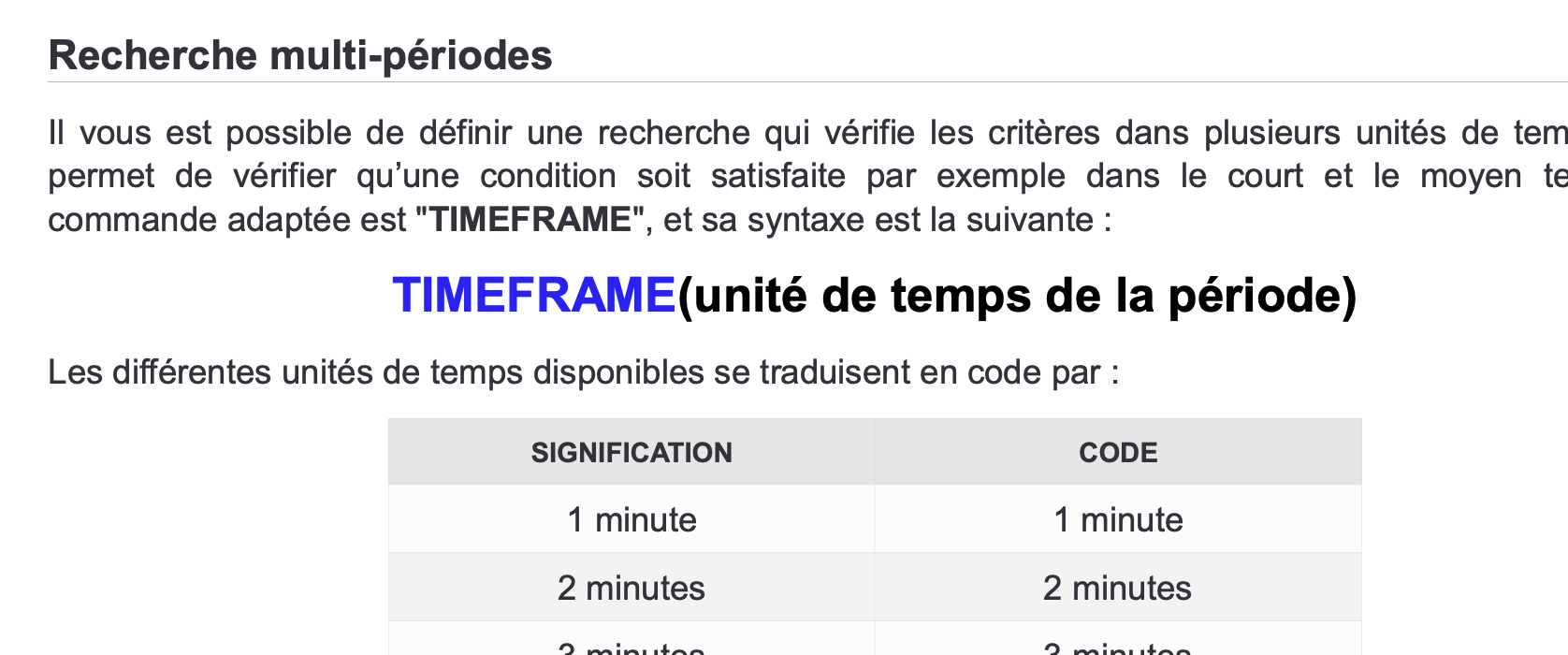
    La seule instruction que je ne comprends pas c’est le:  timeframe(1 week,default)

    Dans le manuel je vois écrit que cela permet d’imposer l’unité de temps utilisé (via le paramètre entre parenthèses) mais dans votre instruction il y en a 2: “1 week” et “default”

    [attachment file=”Capture d’écran 2021-09-08 à 07.50.39.png”]

    Capture-decran-2021-09-08-a-07.50.39.png Capture-decran-2021-09-08-a-07.50.39.png
    #176996 quote
    JC_BywanJC_Bywan
    Moderator
    Master

    Bonjour,

    Dispo sur le site via menu “help” ci-dessus, puis choix “probuilder documentation”, pour mot-clé timeframe, pour accéder à son usage avec les spécifications “default”, “updateonclose”: https://www.prorealcode.com/documentation/timeframe-probacktest-proorder/

    Crocky thanked this post
Viewing 4 posts - 1 through 4 (of 4 total)
  • You must be logged in to reply to this topic.

ProRealAI ProRealAI New

Stuck on this ProBuilder code?

Describe what this topic is trying to build, in plain English, and ProRealAI writes the ProRealTime™ indicator, screener or system for you.

Available in 7 languages
Try ProRealAI

données mm hebdo sur graphe journalier


ProBuilder : Indicateurs & Outils Personnalisés

New Reply
Author
author-avatar
Crocky @xavier-bescond Participant
Summary

This topic contains 3 replies,
has 2 voices, and was last updated by JC_BywanJC_Bywan

5 years ago.

Topic Details
Forum: ProBuilder : Indicateurs & Outils Personnalisés
Language: French
Started: 09/07/2021
Status: Active
Attachments: 3 files
ProRealCode ProRealCode
Loading...