


Conversion of regression intercept indicator

Viewing 3 posts - 1 through 3 (of 3 total)

  • Author
    Posts
  • #161311 quote
    cc267
    Participant
    Average

    Hello, I have not come across one in the library, can anyone help with converting this regression intercept indicator originally posted on tradingview – https://www.tradingview.com/v/2roMOB3L/

    For some reason its not letting me insert the code with the PRT function, I just get a white box appear with no input area to input the code.

    #161312 quote
    cc267
    Participant
    Average
    //@version=4
    ////////////////////////////////////////////////////////////
    //  Copyright by HPotter v1.1 30/05/2020
    // Linear Regression Intercept is one of the indicators calculated by using the 
    // Linear Regression technique. Linear regression indicates the value of the Y 
    // (generally the price) when the value of X (the time series) is 0. Linear 
    // Regression Intercept is used along with the Linear Regression Slope to create 
    // the Linear Regression Line. The Linear Regression Intercept along with the Slope 
    // creates the Regression line.
    //
    // WARNING:
    // - This script to change bars colors.
    ////////////////////////////////////////////////////////////
    study(title="Line Regression Intercept Strategy", overlay = true)
    Length = input(14, minval=1)
    xSeria = input(title="Source", type=input.source, defval=close)
    xX = Length * (Length - 1) * 0.5
    xDivisor = xX * xX - Length * Length * (Length - 1) * (2 * Length - 1) / 6
    xXY = 0.0
    pos = 0
    for i = 0 to Length-1
    	xXY := xXY + (i * xSeria[i])
    xSlope = (Length * xXY - xX * sum(xSeria, Length)) / xDivisor
    xLRI = (sum(xSeria, Length) - xSlope * xX) / Length
    pos := iff(close > xLRI, 1,
             iff(close < xLRI, -1, nz(pos[1], 0))) 
    barcolor(pos == -1 ? color.red: pos == 1 ? color.green : color.blue )
    plot(xLRI, color=color.blue, title="LRI")
    #263114 quote
    Nicolas
    Keymaster
    Legend

    Hi, a bit late here, but stumble upon your topic because of a query about intercept calculation.

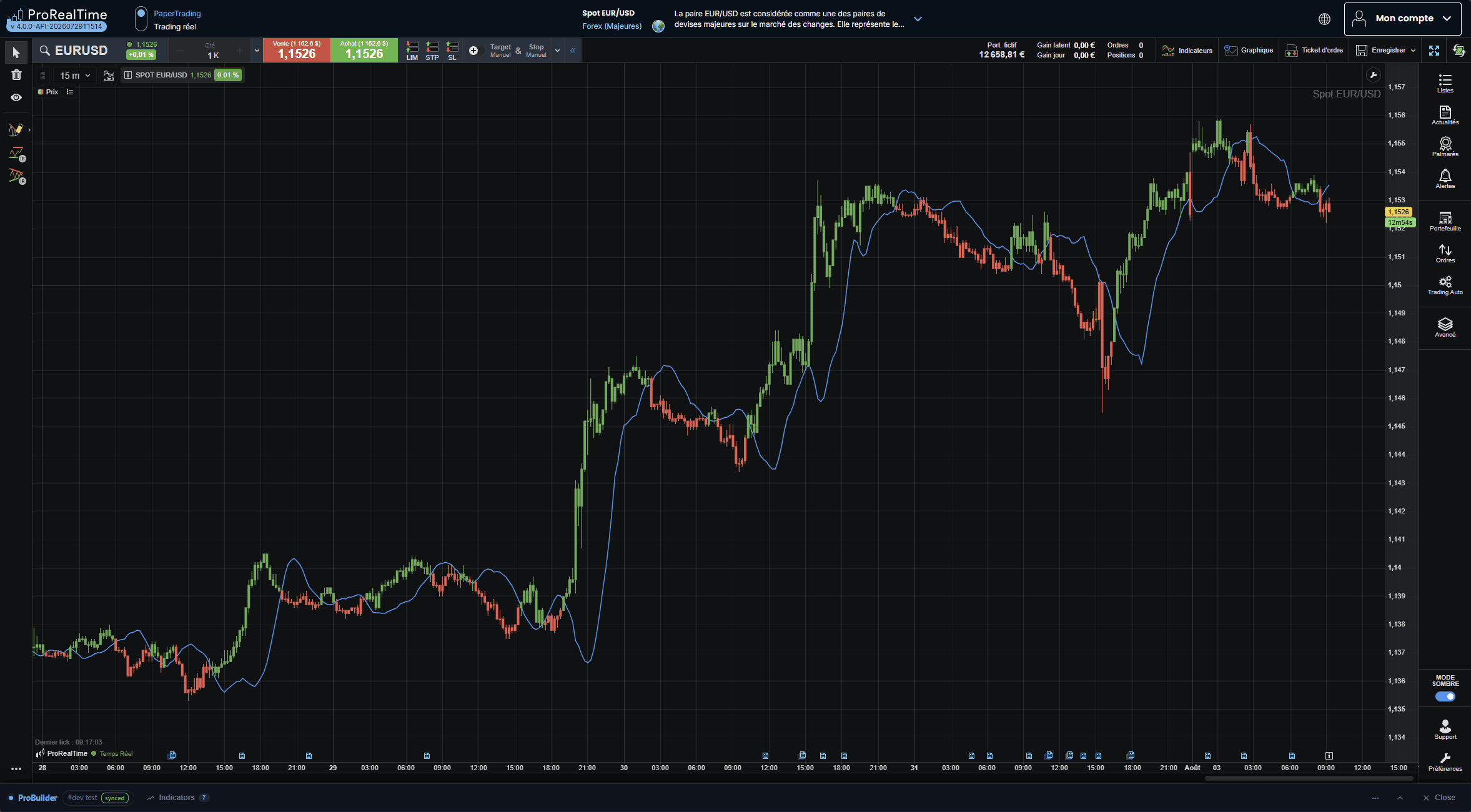
    Here is the translated code:

    Length = 14
    
    
    xX = Length * (Length - 1) * 0.5
    xDivisor = xX * xX - Length * Length * (Length - 1) * (2 * Length - 1) / 6
    
    
    xLRI = undefined
    
    
    IF barindex >= Length - 1 THEN
        xXY = 0
        FOR i = 0 TO Length - 1 DO
            xXY = xXY + i * close[i]
        NEXT
        xSum = Summation[Length](close)
        xSlope = (Length * xXY - xX * xSum) / xDivisor
        xLRI = (xSum - xSlope * xX) / Length
    ENDIF
    
    
    IF close > xLRI THEN
        pos = 1
    ELSIF close < xLRI THEN
        pos = -1
    ELSE
        pos = pos[1]
    ENDIF
    
    
    IF pos = -1 THEN
        cR = 255 
        cG = 82 
        cB = 82
    ELSIF pos = 1 THEN
        cR = 76 
        cG = 175 
        cB = 80
    ELSE
        cR = 33 
        cG = 150 
        cB = 243
    ENDIF
    
    
    DRAWCANDLE(open, high, low, close) COLOURED(cR, cG, cB) BORDERCOLOR(cR, cG, cB)
    
    
    RETURN xLRI COLOURED(33, 150, 243) AS "LRI"


    Line-Regression-Intercept-Strategy.png Line-Regression-Intercept-Strategy.png
Viewing 3 posts - 1 through 3 (of 3 total)
  • You must be logged in to reply to this topic.

Conversion of regression intercept indicator


ProBuilder: Indicators & Custom Tools

New Reply
Author
author-avatar
cc267 @cc267 Participant
Summary

This topic contains 2 replies,
has 2 voices, and was last updated by Nicolas

6 days, 19 hours ago.

Topic Details
Forum: ProBuilder: Indicators & Custom Tools
Language: English
Started: 02/13/2021
Status: Active
Attachments: 1 files
Logo Logo
Loading...

