Conversion of Pine Script OBV OSC 0.1

Viewing 5 posts - 1 through 5 (of 5 total)
  • Author
    Posts
  • #177548 quote
    DavidMClarke1974DavidMClarke1974
    Participant
    New

    High guys.

    I am in the process of converting from Tradingview to Prorealtime but want to bring my strategy with me. Unfortunately however, Prorealtime does not have the indicators i use so i need to convert them. How do i go about doing that? Are there any conversion notes/articles i can read that will help me convert things like – “obv(src) => cum(change(src) > 0 ? volume : change (src) < 0 ? -volume : 0*volume)”. Creating the variables such as src and volume is straight forward, it’s the other bits i’m having issues with.

    Any help would be greatly appreciated. I would be happy to code it myself if there is any helpful guidance.


    Thanks in advance

    OBV-Oscillator.txt
    #177565 quote
    robertogozzirobertogozzi
    Moderator
    Legend

    There you go:

    Periods = 20
    MyOBV   = OBV(close)
    Sma     = Average[Periods,0](MyOBV)
    Diff    = MyOBV - Sma
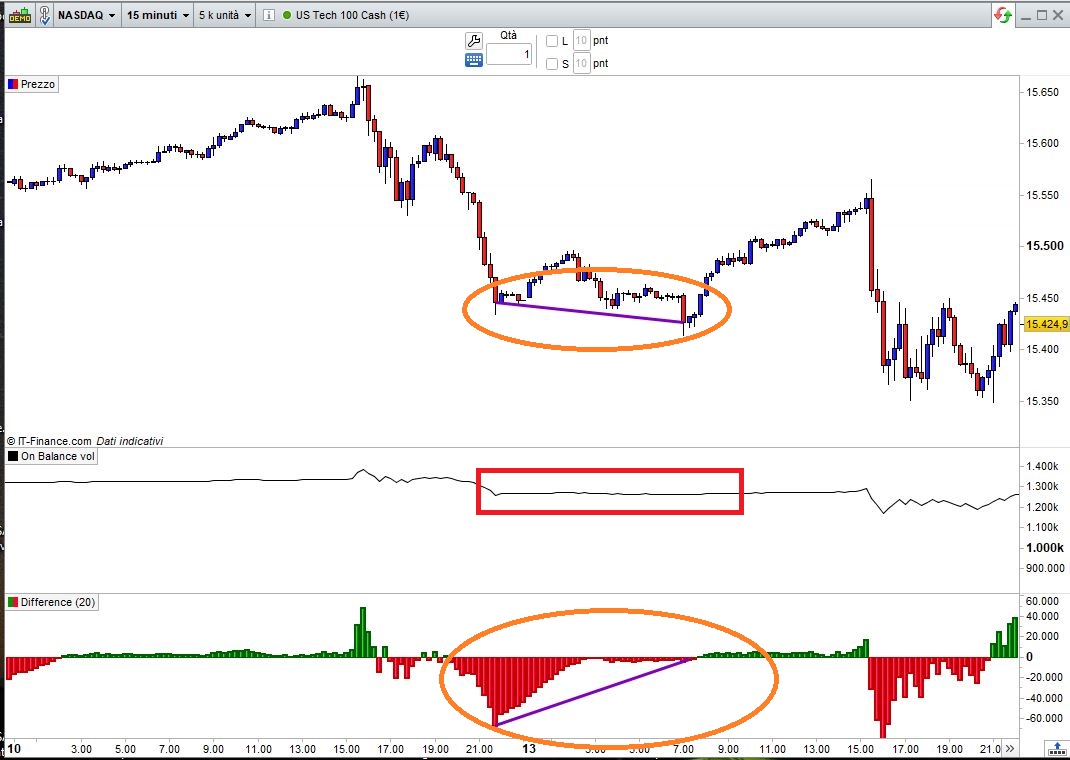
    RETURN Diff AS "Difference"
    On-Balance-Volume-Oscillator.jpg On-Balance-Volume-Oscillator.jpg
    #177572 quote
    DavidMClarke1974DavidMClarke1974
    Participant
    New

    Thanks Roberto.

    It looks like the conversion has been simplified as it doesn’t produce the same output as the original.

    I have attached a screen shot of the original in the hope that it helps.

    Thanks again for your assistance.

    OBV-1.jpg OBV-1.jpg
    #177592 quote
    robertogozzirobertogozzi
    Moderator
    Legend

    I needed to see screenshots and as you had not posted any link I found this one OBV Oscillator

    I see some code was appended at a later moment. Can you provide a link to that code and pic, so that I can find details about its purpose?

    There you go:

    // OBV Oscillator2
    //
    // On Balance Volume Oscillator
    //
    // https://www.tradingview.com/script/Ox9gyUFA-Indicator-OBV-Oscillator/
    // https://www.prorealcode.com/topic/conversion-of-pine-script-obv-osc-0-1/
    //
    // It makes easier to detect DIVERGENCES
    //
    // Periods  = 20
    // Periods2 = 14
    Periods     = max(1,min(999,Periods))
    Periods2    = max(1,min(999,Periods2))
    //
    MyOBV       = OBV(close)
    ma1         = 0
    IF BarIndex > max(Periods,Periods2) THEN
       Sma        = Average[Periods,0](MyOBV)
       Diff       = MyOBV - Sma
       // --- added later:
       //    (https://www.prorealcode.com/topic/conversion-of-pine-script-obv-osc-0-1/#post-177572)
       Sma         = Average[Periods,0](MyOBV)
       Diff        = MyOBV - Sma
       //////////////////////////////////
       ONCE wmaPERC = 1 / Periods2
       ONCE maP = max(1,round(exp(0.5*log(Periods2))))
       //
       ma1   = (Diff * wmaPERC) + (ma1[1] * (1 - wmaPERC))     //Wilder Average 1
       //ma1 = ((ma1[1] * (Periods2 - 1)) + Diff) / Periods2   //Wilder Average 2
       //
       ma2 = average[maP,0](ma1)
       r = 255                          //Orange
       g = 100
       b = 10
       IF ma1 > ma2 THEN
          r = 20                        //Cyan
          g = 150
          b = 255
       ENDIF
       ma3 = ma1 * exp(0.15*log(Periods2))
       //DrawText("•",BarIndex,Ma3,Dialog,Bold,10) coloured(r,g,b,255)
       // --- end additional code
    ENDIF
    RETURN Diff AS "Difference",ma3 AS "ma3"
    KumoNoJuzza thanked this post
    On-Balance-Volume-Oscillator2.itf On-Balance-Volume-Oscillator-1.itf
    #177691 quote
    DavidMClarke1974DavidMClarke1974
    Participant
    New

    Thanks Roberto

    I’m going to have a play with this today.


    Thanks again.

Viewing 5 posts - 1 through 5 (of 5 total)
  • You must be logged in to reply to this topic.

ProRealAI ProRealAI New

Stuck on this ProBuilder code?

Describe what this topic is trying to build, in plain English, and ProRealAI writes the ProRealTime™ indicator, screener or system for you.

Available in 7 languages
Try ProRealAI

Conversion of Pine Script OBV OSC 0.1


ProBuilder: Indicators & Custom Tools

New Reply
Author
Summary

This topic contains 4 replies,
has 2 voices, and was last updated by DavidMClarke1974DavidMClarke1974
5 years ago.

Topic Details
Forum: ProBuilder: Indicators & Custom Tools
Language: English
Started: 09/14/2021
Status: Active
Attachments: 5 files
ProRealCode ProRealCode
Loading...