


Conversion de code pine script

Viewing 2 posts - 1 through 2 (of 2 total)

  • Author
    Posts
  • #241476 quote
    Gmx91Gmx91
    Participant
    New

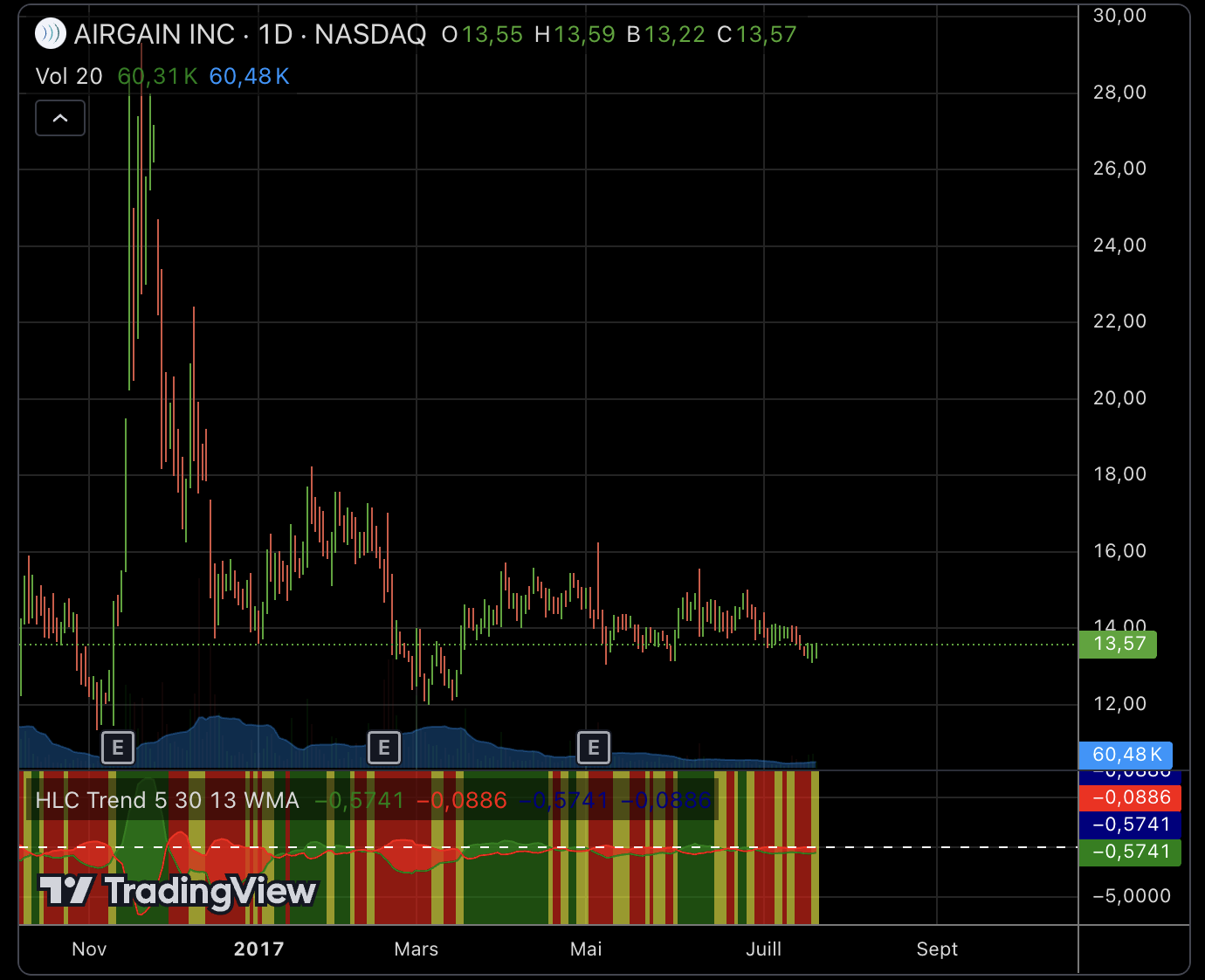
    Bonjour, pouvez-vous m’aider à convertir ce code pine script en Probuilder pour PRT ?

    //@version=3
    study(“HLC Trend”)

    // Pull traditional HLC
    sHigh = security(tickerid, period, high)
    sLow = security(tickerid, period, low)
    sClose = security(tickerid, period, close)
    sOpen = security(tickerid, period, open)

    // Inputs
    option_SMA = ‘SMA’, option_EMA = ‘EMA’, option_WMA = ‘WMA’

    length_Close = input(defval = 5, title = “Close MA Period Length”, type = integer)
    length_High = input(defval = 30, title = “High MA Period Length”, type = integer)
    length_Low = input(defval = 13, title = “Low MA Period Length”, type = integer)
    type_MA = input(defval = option_SMA, title = “Moving Average Type”, type = string, options = [option_SMA, option_EMA, option_WMA])
    fill_Cloud = input(defval = true, title = “Use cloud coloring for Bull/Bear identification?”, type = bool)
    fill_BG = input(defval = true, title = “Color Indicator background based on Bull/Bear/Neautral?”, type = bool)

    // Calculations
    ma_High = type_MA == option_SMA ? sma(sHigh, length_High) : type_MA == option_EMA ? ema(sHigh, length_High) : type_MA == option_WMA ? wma(sHigh, length_High) : sma(sHigh, length_High)
    ma_Low = type_MA == option_SMA ? sma(sLow, length_Low) : type_MA == option_EMA ? ema(sLow, length_Low) : type_MA == option_WMA ? wma(sLow, length_Low) : sma(sLow, length_Low)
    ma_Close = type_MA == option_SMA ? sma(sClose, length_Close) : type_MA == option_EMA ? ema(sClose, length_Close) : type_MA == option_WMA ? wma(sClose, length_Close) : sma(sClose, length_Close)
    ma_CH = ma_Close – ma_High
    ma_LC = ma_Low – ma_Close

    // Draw Colors
    fill_Color = ma_CH > ma_LC ? green : red
    bg_Color = ma_CH >= ma_LC ? ma_CH < 0 and ma_CH < ma_CH[1] ? yellow : green : ma_LC < 0 and ma_LC < ma_LC[1] ? yellow : red

    // Draw Out
    hline(0, color = white, title = "Zero Line")
    plot_CH = plot(ma_CH, color = green, transp = 0, title = "MA Close – MA High")
    plot_LC = plot(ma_LC, color = red, transp = 0, title = "MA Low – MA Close")
    bgcolor(fill_BG == true ? bg_Color : na, transp = 40, title = "Indicator Background Color")
    // Cloud fill selector
    fill_plot_CH = fill_Cloud == true ? ma_CH : na
    fill_plot_LC = fill_Cloud == true ? ma_LC : na
    cloud_plot_CH = plot(fill_plot_CH, transp = 100, title = "Hidden MA Close – MA High Cloud")
    cloud_plot_LC = plot(fill_plot_LC, transp = 100, title = "Hidden MA Low – MA Close Cloud")
    fill(cloud_plot_CH, cloud_plot_LC, color = fill_Color, transp = 40, title = "Cloud Color")
    // END Cloud fill selector

    Capture-decran-2024-12-16-a-18.23.44.png Capture-decran-2024-12-16-a-18.23.44.png
    #241500 quote
    Iván GonzálezIván González
    Moderator
    Legend

    Voici ce que vous avez :

    //--------------------------------------------//
    //PRC_HLC Trend
    //version = 0
    //17.12.24
    //Iván González @ www.prorealcode.com
    //Sharing ProRealTime knowledge
    //--------------------------------------------//
    //-----------Inputs---------------------------//
    //--------------------------------------------//
    typeMA=0
    lengthClose=5
    lengthHigh=30
    lengthLow=13
    fillCloud=1
    fillBG=1
    //--------------------------------------------//
    //----------Calculations----------------------//
    //--------------------------------------------//
    maHigh=average[lengthHigh,typeMA](high)
    maLow=average[lengthLow,typeMA](low)
    maClose=average[lengthClose,typeMA](close)
    
    maCH=maClose-maHigh
    maLC=maLow-maClose
    //--------------------------------------------//
    //----------Cloud Color-----------------------//
    //--------------------------------------------//
    if maCH>maLC then
    rf=0
    gf=255
    bf=0
    af=100
    else
    rf=255
    gf=0
    bf=0
    af=100
    endif
    colorbetween(maLC,maCH,rf,gf,bf,af)
    //--------------------------------------------//
    //----------Background Color------------------//
    //--------------------------------------------//
    if maCH>=maLC then
    if maCH<0 and maCH<maCH[1] then
    rb=255
    gb=255
    bb=0
    ab=40
    else
    rb=0
    gb=255
    bb=0
    ab=40
    endif
    else
    if maLC<0 and maLC<maLC[1] then 
    rb=255
    gb=255
    bb=0
    ab=40
    else
    rb=255
    gb=0
    bb=0
    ab=40
    endif
    endif
    backgroundcolor(rb,gb,bb,ab)
    //--------------------------------------------//
    return maCH as "MA Close-MA High"coloured("green",200), maLC as "MA low-MA close" coloured("red",200), 0 as "zero"style(dottedline)
    
    Choliver thanked this post
Viewing 2 posts - 1 through 2 (of 2 total)
  • You must be logged in to reply to this topic.

ProRealAI ProRealAI New

Stuck on this ProBuilder code?

Describe what this topic is trying to build, in plain English, and ProRealAI writes the ProRealTime™ indicator, screener or system for you.

Available in 7 languages
Try ProRealAI

Conversion de code pine script


ProBuilder : Indicateurs & Outils Personnalisés

New Reply
Author
author-avatar
Gmx91 @gmx91 Participant
Summary

This topic contains 1 reply,
has 2 voices, and was last updated by Iván GonzálezIván González

1 year, 9 months ago.

Topic Details
Forum: ProBuilder : Indicateurs & Outils Personnalisés
Language: French
Started: 12/16/2024
Status: Active
Attachments: 1 files
ProRealCode ProRealCode
Loading...

