


Conversion code TSI depuis celui de TradingView

Viewing 6 posts - 1 through 6 (of 6 total)
  • Author
    Posts
  • #198010 quote
    maxlysmaxlys
    Participant
    Senior

    Bonjour,

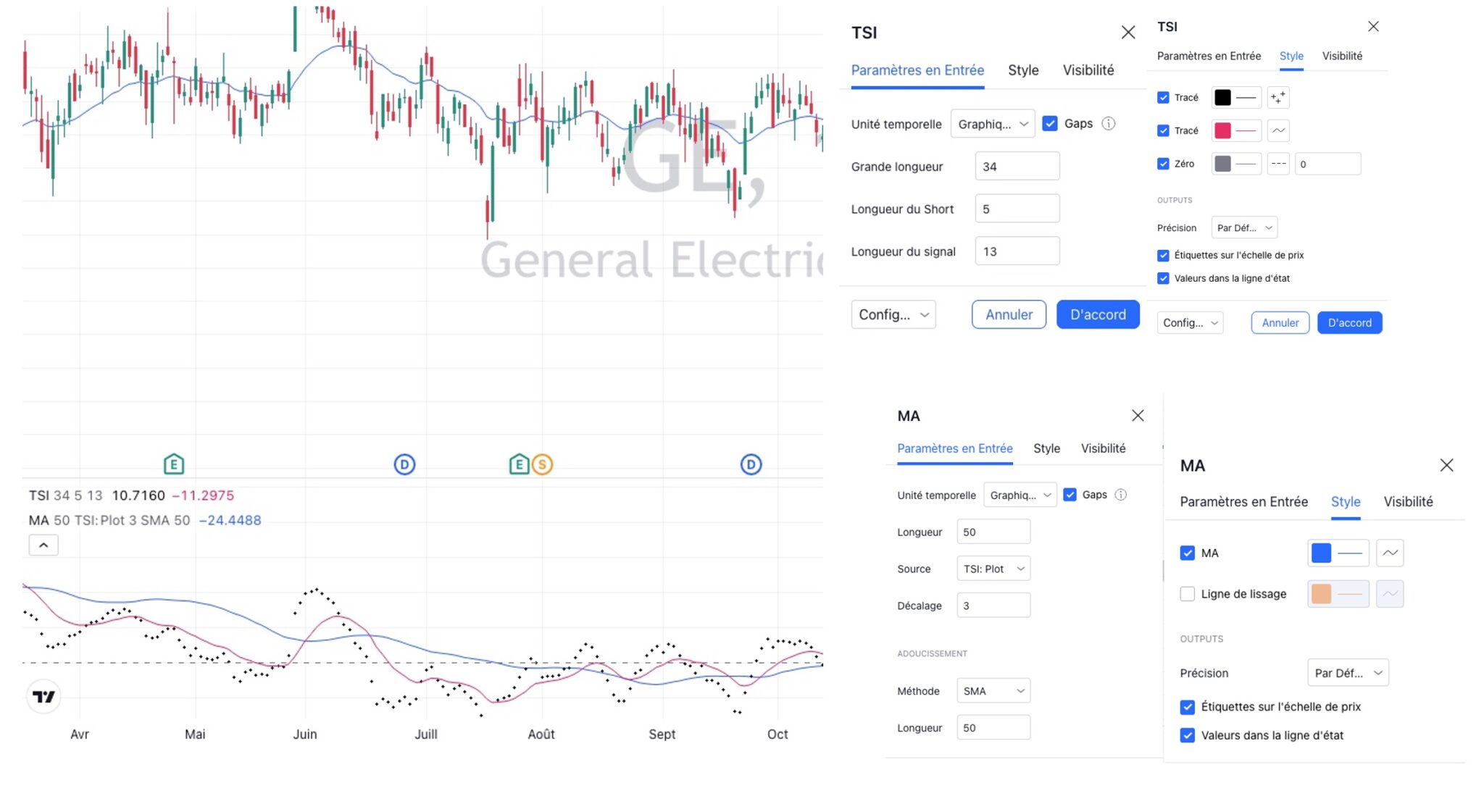
    Su TV, j’utilise un TSI avec parametres 34.5.13 (affichage en point pour ligne parametre 3 et le signal en rouge ligne pleine, voir photo jointe) dont voici le code :

    //@version=5
    indicator("True Strength Indicator", shorttitle="TSI", format=format.price, precision=4, timeframe="", timeframe_gaps=true)
    long = input(title="Long Length", defval=25)
    short = input(title="Short Length", defval=13)
    signal = input(title="Signal Length", defval=13)
    price = close
    double_smooth(src, long, short) =>
    fist_smooth = ta.ema(src, long)
    ta.ema(fist_smooth, short)
    pc = ta.change(price)
    double_smoothed_pc = double_smooth(pc, long, short)
    double_smoothed_abs_pc = double_smooth(math.abs(pc), long, short)
    tsi_value = 100 * (double_smoothed_pc / double_smoothed_abs_pc)
    plot(tsi_value, color=#2962FF)
    plot(ta.ema(tsi_value, signal), color=#E91E63)
    hline(0, title="Zero", color=#787B86)


    Ensuite sur ce même indicateur j’applique une SMA50 basé sur le TSI 3 (en points)
    Code TV :

    //@version=5
    indicator(title="Moving Average", shorttitle="MA", overlay=true, timeframe="", timeframe_gaps=true)
    len = input.int(9, minval=1, title="Length")
    src = input(close, title="Source")
    offset = input.int(title="Offset", defval=0, minval=-500, maxval=500)
    out = ta.sma(src, len)
    plot(out, color=color.blue, title="MA", offset=offset)
    
    ma(source, length, type) =>
    switch type
    "SMA" => ta.sma(source, length)
    "EMA" => ta.ema(source, length)
    "SMMA (RMA)" => ta.rma(source, length)
    "WMA" => ta.wma(source, length)
    "VWMA" => ta.vwma(source, length)
    
    typeMA = input.string(title = "Method", defval = "SMA", options=["SMA", "EMA", "SMMA (RMA)", "WMA", "VWMA"], group="Smoothing")
    smoothingLength = input.int(title = "Length", defval = 5, minval = 1, maxval = 100, group="Smoothing")
    
    smoothingLine = ma(out, smoothingLength, typeMA)
    plot(smoothingLine, title="Smoothing Line", color=#f37f20, offset=offset, display=display.none)


    Est-il possible d’obtenir une transcription de ces 2 codes en un seul pour PRT ?
    Le top serait d’avoir les parametres de chaque signal modifiable par le menu de l’indicateur directement au lieu d’aller dans le code a chaque fois.
    Avec le TSI proposé sur PRT en natif je n’obtiens pas les mêmes choses.

    En vous remerciant

    tsi.jpg tsi.jpg
    #198012 quote
    NicolasNicolas
    Keymaster
    Legend

    L’indicateur TSI se trouve ici: True Strength Index TSI

    On peut lui appliquer une moyenne mobile via la liste des indicateurs de la plateforme ensuite.

    #198013 quote
    NicolasNicolas
    Keymaster
    Legend

    Autre version, sans doute plus proche car avec la ligne de signal: https://www.prorealcode.com/topic/tsi-osc-mt4-pour-prorealtime/

    #198017 quote
    maxlysmaxlys
    Participant
    Senior

    Merci Nicolas pour le retour d’infos, mais j’ai testé avec ces indicateurs mais je n’obtiens pas les mêmes choses.

    #198070 quote
    NicolasNicolas
    Keymaster
    Legend

    Ci-dessous le code de cette version du TSI convertit pour ProRealTime.

    //"True Strength Indicator"
    long = 25//Long Length
    short = 13 //Short Length
    signal = 13 //Signal Length
    iprice = close
    
    pc = Variation(iprice)
    doublesmoothedpc = average[short,1](average[long,1](pc))
    doublesmoothedabspc = average[short,1](average[long,1](abs(pc)))
    
    tsivalue = 100 * (doublesmoothedpc / doublesmoothedabspc)
    
    return tsivalue coloured(41, 98, 255),average[signal,1](tsivalue) coloured(233, 30, 99),0 coloured(120, 123, 134)

    Tu n’as plus qu’a appliquer la moyenne mobile de ton choix sur la valeur de l’indicateur.

    #198085 quote
    maxlysmaxlys
    Participant
    Senior

    Merci Nicolas pour ton travail.

    C’est OK

Viewing 6 posts - 1 through 6 (of 6 total)

  • You must be logged in to reply to this topic.

ProRealAI ProRealAI New

Stuck on this ProBuilder code?

Describe what this topic is trying to build, in plain English, and ProRealAI writes the ProRealTime™ indicator, screener or system for you.

Available in 7 languages
Try ProRealAI

Conversion code TSI depuis celui de TradingView


ProBuilder : Indicateurs & Outils Personnalisés

New Reply
Author
author-avatar
maxlys @maxlys Participant
Summary

This topic contains 5 replies,
has 2 voices, and was last updated by maxlysmaxlys

4 years, 1 month ago.

Topic Details
Forum: ProBuilder : Indicateurs & Outils Personnalisés
Language: French
Started: 07/28/2022
Status: Active
Attachments: 1 files
ProRealCode ProRealCode
Loading...

