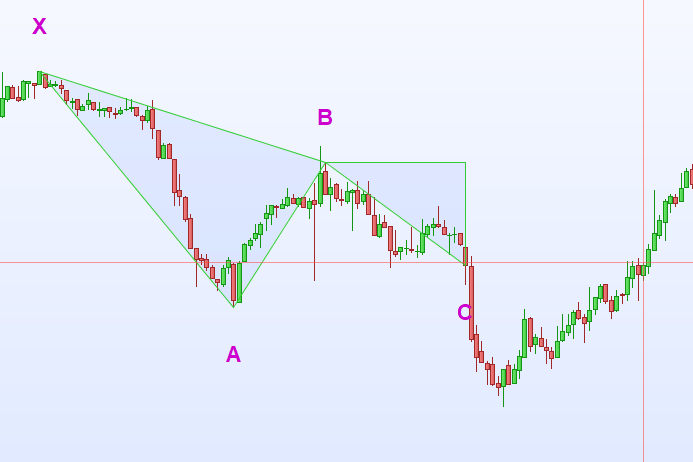
Bonjour à tous,
j’essaie de retravailler un code créé par un italien afin d’y apporter ma touche perso.
Je souhaiterais que le point D (angle du second triangle de ma pattern), soit le résultat d’une target 1 et d’une target 2 qui correspondraient respectivement à un retracement fibo de BC * 1.272 et BC * 1.618
Une fois ces deux targets trouvées et mon second triangle tracé, je souhaiterais que le code dessine une zone entre ces deux tragets.
Pensez-vous que celà est possible? J’ai essayé plusieurs choses mais rien ne fonctionne…….
Merci d’avance ! 🙂
//LmaxBars   = 100
//LMinBars  = 5
//Ldistance = 15
//------------------------------------------------------------------------------------
//                               Bearish Gartley
//------------------------------------------------------------------------------------
IF BarIndex = 0 THEN
LMaxBars  = 100
LMinBars  = 5
Ldistance = Ldistance * pipsize
LpointA   = high
LbarA     = BarIndex
LpointB   = low
LbarB     = BarIndex
LpointC   = 0
LbarC     = 0
LpointD   = 0
LbarD     = 0
LpointE   = 0
LbarE     = 0
Lcount    = 0
XLpointA  = 0
XLbarA    = 0
XLpointB  = 0
XLbarB    = 0
XLpointC  = 0
XLbarC    = 0
XLpointD  = 0
XLbarD    = 0
XLpointE  = 0
XLbarE    = 0
Itarget1  = 0
Itarget2 =  0
Fibo0=11
ENDIF
//
IF Lcount > LmaxBars  THEN
XLpointA  = LpointA
XLbarA    = LbarA
XLpointB  = LpointB
XLbarB    = LbarB
XLpointC  = LpointC
XLbarC    = LbarC
XLpointD  = LpointD
XLbarD    = LbarD
XLpointE  = LpointE
XLbarE    = LbarE
LpointA   = high
LbarA     = BarIndex
LpointB   = low
LbarB     = BarIndex
LpointC   = 0
LbarC     = 0
LpointD   = 0
LbarD     = 0
LpointE   = 0
LbarE     = 0
Lcount    = 0
ENDIF
Lcount = Lcount + 1
LpointA = max(LpointA,high)
IF LpointA > LpointA[1] THEN
LbarA   = BarIndex
Lcount  = 0
LpointB = low
LbarB   = BarIndex
LpointC = 0
LbarC   = 0
LpointD = 0
LbarD   = 0
LpointE = 0
LbarE   = 0
ENDIF

IF LpointC = 0 THEN
LpointB = min(LpointB,low)
IF LpointB < LpointB[1] THEN
LbarB = BarIndex
ENDIF
ENDIF
irange = high - fibo0
LdiffAB = LpointA - LpointB
LfibC1  = LdiffAB * 0.61
LfibC2  = LdiffAB * 0.62
LfibD1  = LpointC - (LfibC1 * 0.382)
LfibD2  = LpointC - (LfibC2 * 0.886)
Itarget1  = fibo0+irange * 1.272
Itarget2  = fibo0+irange * 1.618
IF high >= (LpointB + LfibC1) AND high <= (LpointB + LfibC2) THEN
LpointC = high
LbarC   = BarIndex
IF LpointC < LpointC[1] THEN
LpointC = LpointC[1]
LbarC   = LbarC[1]
ENDIF
ELSIF close > (LpointB + LfibC2) THEN
// ...altrimenti si riparte daccapo con un nuovo Lpoint A ed un nuovo Lpoint B
LpointA = high
LbarA   = BarIndex
LpointB = low
LbarB   = BarIndex
LpointC = 0
LbarC   = 0
LbarD   = 0
LpointD = 0
LbarE   = 0
LpointE = 0
Lcount  = 0
ENDIF
//
// Una volta superato il 161.8 si riparte daccapo
//
IF close < LfibD2 AND LpointD > 0 THEN
XLpointA= LpointA
XLbarA  = LbarA
XLpointB= LpointB
XLbarB  = LbarB
XLpointC= LpointC
XLbarC  = LbarC
XLpointD= LpointD
XLbarD  = LbarD
LpointA = high
LbarA   = BarIndex
LpointB = low
LbarB   = BarIndex
LpointC = 0
LbarC   = 0
LpointD = 0
LbarD   = 0
LpointE = 0
LbarE   = 0
Lcount  = 0
ENDIF
IF close < LfibE1 AND LpointE > 0 THEN
XLpointA= LpointA
XLbarA  = LbarA
XLpointB= LpointB
XLbarB  = LbarB
XLpointC= LpointC
XLbarC  = LbarC
XLpointD= LpointD
XLbarD  = LbarD
LpointA = high
LbarA   = BarIndex
LpointB = low
LbarB   = BarIndex
LpointC = 0
LbarC   = 0
LpointD = 0
LbarD   = 0
LpointE = 0
LbarE   = 0
Lcount  = 0
ENDIF
IF LpointC > 0 THEN
IF LpointD = 0 THEN
IF close <= LfibD1 AND close >= LfibD2 THEN
LpointD = close
LbarD   = BarIndex
ELSIF close < LfibD2 THEN
LpointD = LfibD2
LbarD = BarIndex
ENDIF
ELSE
IF close <= LfibD1 AND close >= LfibD2 THEN
LpointD = close
IF LpointD < LpointD[1] THEN
LbarD   = BarIndex
ELSE
LpointD = LpointD[1]
ENDIF

IF LpointD > 0 THEN
IF LpointE = 0 THEN
IF close <= LfibE1 AND close >= LfibE2 THEN
LpointE = close
LbarE   = BarIndex
ELSIF close < LfibE2 THEN
LpointE = LfibE2
LbarE = BarIndex
ENDIF
ELSE
IF close <= LfibE1 AND close >= LfibE2 THEN
LpointE = close
IF LpointE < LpointE[1] THEN
LbarE   = BarIndex
ELSE
LpointE = LpointE[1]
ENDIF

ELSE
XLpointA= LpointA
XLbarA  = LbarA
XLpointB= LpointB
XLbarB  = LbarB
XLpointC= LpointC
XLbarC  = LbarC
XLpointD= LpointD
XLbarD  = LbarD
XLpointE= LpointE
XlbarE  = LbarE
LpointA = high
LbarA   = BarIndex
Lcount  = 0
LpointB = 0
LbarB   = 0
LpointC = 0
LbarC   = 0
LpointD = 0
LbarD   = 0
LpointE = 0
LbarE   = 0
ENDIF
ENDIF
ENDIF
ENDIF
ENDIF
ENDIF
// si stampano i punti trovati, ognuno dipendente dal precedente, si stampa A, poi B solo se A è stato stampato, poi C solo se B è stato stampato ed infine D se anche C è stato stampato
IF LpointC > 0 THEN
IF ((LbarC - LbarA) < LminBars ) THEN
LpointC = 0
x = BarIndex - LbarB
FOR i = x DOWNTO 0
IF low[i] < LpointB THEN
LpointB = low[i]
LbarB   = BarIndex[i]
ENDIF
NEXT
ENDIF
ENDIF
IF LpointD > 0 THEN
IF((LbarC - LbarA) < LminBars ) OR ((LbarD -LbarC) < LminBars ) THEN
LpointD = 0
ENDIF
ENDIF
IF LpointE > 0 THEN
IF((LbarC - LbarA) < LminBars ) OR ((LbarD -LbarC) < LminBars ) THEN
LpointE = 0
ENDIF
ENDIF
//IF LpointD > 0 THEN
//IF ((LbarC - LbarA) < LminBars ) OR ((LbarD - LbarC) < LminBars ) THEN
//LpointD = 0
//ENDIF
//ENDIF
IF LpointA > 0 THEN
IF LpointB > 0 THEN
IF LpointC > 0 THEN
IF LpointD > 0 THEN
IF LpointE > 0 THEN
//IF LpointD[1] = 0 THEN
XLpointA  = LpointA
XLbarA    = LbarA
XLpointB  = LpointB
XLbarB    = LbarB
XLpointC  = LpointC
XLbarC    = LbarC
XLpointD  = LpointD
XLbarD    = LbarD
XlpointE  = LpointE
XLbarE    = LbarE
//ENDIF
DRAWTEXT("X",LbarA,LpointA + Ldistance+10*pointsize,Dialog,Bold,22) coloured(205,0,205,255)
DRAWTEXT("A",LbarB,LpointB + Ldistance-10*pointsize,Dialog,Bold,22) coloured(205,0,205,255)
DRAWTEXT("B",LbarC,LpointC - Ldistance+10*pointsize,Dialog,Bold,22) coloured(205,0,205,255)
DRAWTEXT("C",LbarD,LpointD + Ldistance-10*pointsize,Dialog,Bold,22) coloured(205,0,205,255)
DRAWTEXT("D",LbarE,LpointE + Ldistance-10*pointsize,Dialog,Bold,22) coloured(205,0,205,255)
DRAWTRIANGLE(LbarA,LpointA,LbarB,LpointB,LbarC,LpointC)coloured(50,205,50,255)
DRAWTRIANGLE(LbarC,LpointC,LbarD,LpointC,LbarD,LpointD)coloured(50,205,50,255)
ENDIF
ENDIF
ENDIF
ENDIF
ENDIF
IF LpointD = 0 AND XLpointD > 0 THEN
DRAWTEXT("X",XLbarA,XLpointA - Ldistance+10*pointsize,Dialog,Bold,22) coloured(205,0,205,255)
DRAWTEXT("A",XLbarB,XLpointB + Ldistance-10*pointsize,Dialog,Bold,22) coloured(205,0,205,255)
DRAWTEXT("B",XLbarC,XLpointC - Ldistance+10*pointsize,Dialog,Bold,22) coloured(205,0,205,255)
DRAWTEXT("C",XLbarD,XLpointD + Ldistance-10*pointsize,Dialog,Bold,22) coloured(205,0,205,255)
DRAWTEXT("D",XLbarE,XLpointE + Ldistance+10*pointsize,Dialog,Bold,22) coloured(205,0,205,255)
DRAWTRIANGLE(XLbarA,XLpointA,XLbarB,XLpointB,XLbarC,XLpointC)coloured(50,205,50,255)
DRAWTRIANGLE(XLbarC,XLpointC,XLbarD,XLpointC,XLbarD,XLpointD)coloured(50,205,50,255)
ENDIF