Comment démarrer Probuilder

Viewing 3 posts - 1 through 3 (of 3 total)

  • Author
    Posts
  • #184921 quote
    Naej EdualcNaej Edualc
    Participant
    New

    Bonjour,
    Question de néophyte qui va faire sourire beaucoup.

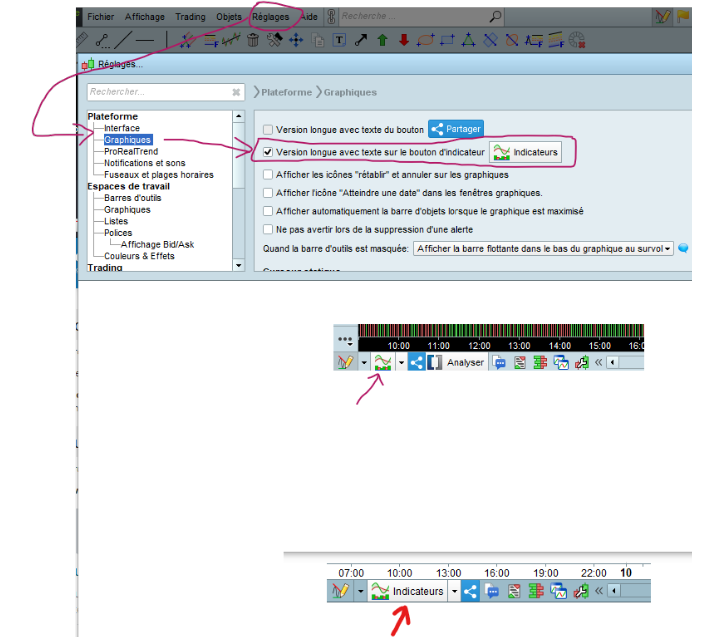
    J’aimerai apprendre la programmation d’indicateurs et j’ai commencé à suivre la formation de Nicolas. J’utilise pour l’instant la version journalière V11.1 -1.8.0_202, et je ne trouve pas comment démarrer Probuilder. J’ai vu sur certaines vidéos qu’il y a un bouton dans la barre du haut, mais qui n’apparait pas chez moi.

    Une petite aide ?

    #184941 quote
    JC_BywanJC_Bywan
    Moderator
    Master

    Bonjour, le bouton en haut était en v10.3, en v11 il est en bas à gauche, et avec option de rajouter le mot “indicateurs” ou pas (cf image attachée)

    v11-bouton-avec-ou-sans-texte-indicateurs.png v11-bouton-avec-ou-sans-texte-indicateurs.png
    #184962 quote
    Naej EdualcNaej Edualc
    Participant
    New

    Merci de votre réponse rapide.

    Bon WE.

    JC

Viewing 3 posts - 1 through 3 (of 3 total)
  • You must be logged in to reply to this topic.

ProRealAI ProRealAI New

Stuck on this ProBuilder code?

Describe what this topic is trying to build, in plain English, and ProRealAI writes the ProRealTime™ indicator, screener or system for you.

Available in 7 languages
Try ProRealAI

Comment démarrer Probuilder


ProBuilder : Indicateurs & Outils Personnalisés

New Reply
Author
Summary

This topic contains 2 replies,
has 2 voices, and was last updated by Naej EdualcNaej Edualc
4 years, 8 months ago.

Topic Details
Forum: ProBuilder : Indicateurs & Outils Personnalisés
Language: French
Started: 01/09/2022
Status: Active
Attachments: 1 files
ProRealCode ProRealCode
Loading...