"Combined stops cannot be used in ProOrder"

Viewing 7 posts - 1 through 7 (of 7 total)

  • Author
    Posts
  • #13776 quote
    MikeGC
    Participant
    Average

    Can anyone assist please, with the meaning of the above quote from ProOrder.  It occurs when I added the trailing stop loss to the MGC Trend Chaser code “SET STOP $LOSS 200 $TRAILING 50”

    If I REM out the “$TRAILING 50” it makes no difference, so it can’t mean that the standard stop loss is combined with the trailing stop loss.

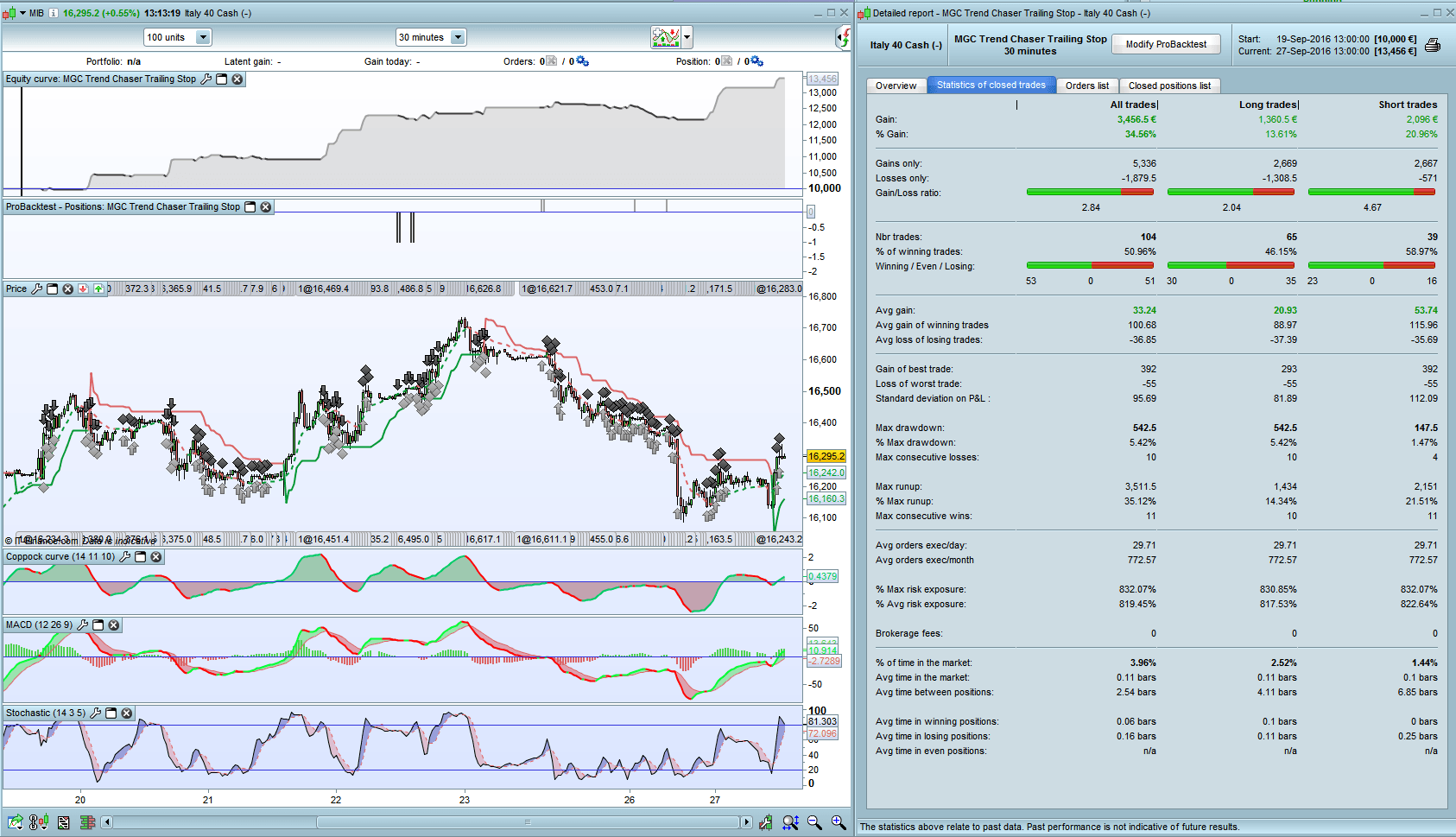
    The back test is spectacular but without being able to run it in ProOrder, it is useless.

    //-------------------------------------------------------------------------
    // Main code : MGC Trend Chaser with Trailing Stop
    //-------------------------------------------------------------------------
    /// Definition of code parameters
    DEFPARAM CumulateOrders = false // Cumulating positions deactivated
    
    COI = WEIGHTEDAVERAGE[14](ROC[11]+ROC[10])
    MAC= MACDline[12,26,9](close)
    STO = Stochastic[14,5](close)
    ST = supertrend[3.3,2]
    
    // Conditions to enter long positions
    c1 = (COI > COI[1])
    c2 = (MAC > MAC[1])
    c3 = (STO > 20)
    c4 = (STO < 40)
    c5 = (STO > STO[1])
    c6 = COI < 0
    
    IF HIGHEST[5](c1)=1 AND HIGHEST[5](c2)=1 AND HIGHEST[5](c3)=1 AND HIGHEST[5](c4)=1 AND HIGHEST[5](c5)=1 AND c6 AND NOT ONMARKET THEN
    BUY 1 CONTRACT AT MARKET
    ENDIF
    
    //Trailing Stop Loss - not avbailable in ProOrder
    SET STOP $LOSS 200 $TRAILING 50
    
    //Exit
    IF Close CROSSES UNDER ST THEN
    SELL AT MARKET
    ENDIF
    
    // Conditions to enter short positions
    c11 = (COI < COI[1])
    c12 = (MAC < MAC[1])
    c13 = (STO < 80)
    c14 = (STO > 60)
    c15 = (STO < STO[1])
    c16 = COI > 0
    
    
    IF HIGHEST[5](c11)=1 AND HIGHEST[5](c12)=1 AND HIGHEST[5](c13)=1 AND HIGHEST[5](c14)=1 AND HIGHEST[5](c15)=1 AND c16 AND NOT ONMARKET THEN
    SELLSHORT 1 CONTRACT AT MARKET
    ENDIF
    
    //Exit
    IF close CROSSES OVER ST THEN
    EXITSHORT AT MARKET
    ENDIF
    Italy40-BackTest-MGC-Trend-Chaser-with-Stop-Loss.png Italy40-BackTest-MGC-Trend-Chaser-with-Stop-Loss.png
    #13783 quote
    Nicolas
    Keymaster
    Master

    Because IG protocol don’t like to have 2 stoploss “hard coded”, it’s not possible for your line 25 to be correctly executed by the server.

    That’s why if you plan to use to use trailing stop, you need to use the functions I wrote (or any other ones..). You’ll find trailing stop functions in the blog.

    #13830 quote
    MikeGC
    Participant
    Average

    Many thanks, Nicolas.

    #78155 quote
    simeong
    Participant
    Average

    Hi Nicolas ,

    Thanks for clarifying the situation.

    could you please provide a link to a trailing stop that you coded

    Kind Regards,

    #78158 quote
    Vonasi
    Moderator
    Master

    The search box is your friend. Just type ‘Trailing Stop’ in it and all will be revealed! 🙂

    #139209 quote
    GenesisEX
    Participant
    New

    Thank you for your help and input all.  I too had run into the same problem.

    #139225 quote
    GraHal
    Participant
    Master

    If you look on the link below you will find several hard coded TS … let us know which you find the best / most beneficial please?

    Snippet Link Library

Viewing 7 posts - 1 through 7 (of 7 total)
  • You must be logged in to reply to this topic.

"Combined stops cannot be used in ProOrder"


ProOrder: Automated Strategies & Backtesting

New Reply
Author
author-avatar
MikeGC @mikegc Participant
Summary

This topic contains 6 replies,
has 6 voices, and was last updated by GraHal

5 years, 7 months ago.

Topic Details
Forum: ProOrder: Automated Strategies & Backtesting
Language: English
Started: 09/27/2016
Status: Active
Attachments: 1 files
Logo Logo
Loading...