Chiusura accidentale finestre

Viewing 2 posts - 1 through 2 (of 2 total)

  • Author
    Posts
  • #262429 quote
    StenozarStenozar
    Participant
    Master

    Ciao, per errore ho cliccato su “chiudi tutte le finestre” relativamente al mio piano di lavoro e ho perso quindi tutti i vari grafici con le configurazioni che avevo inpostato; c’è modo di recuperare le finestre in qualche modo?

    Grazie


    #262432 quote
    Iván GonzálezIván González
    Moderator
    Legend

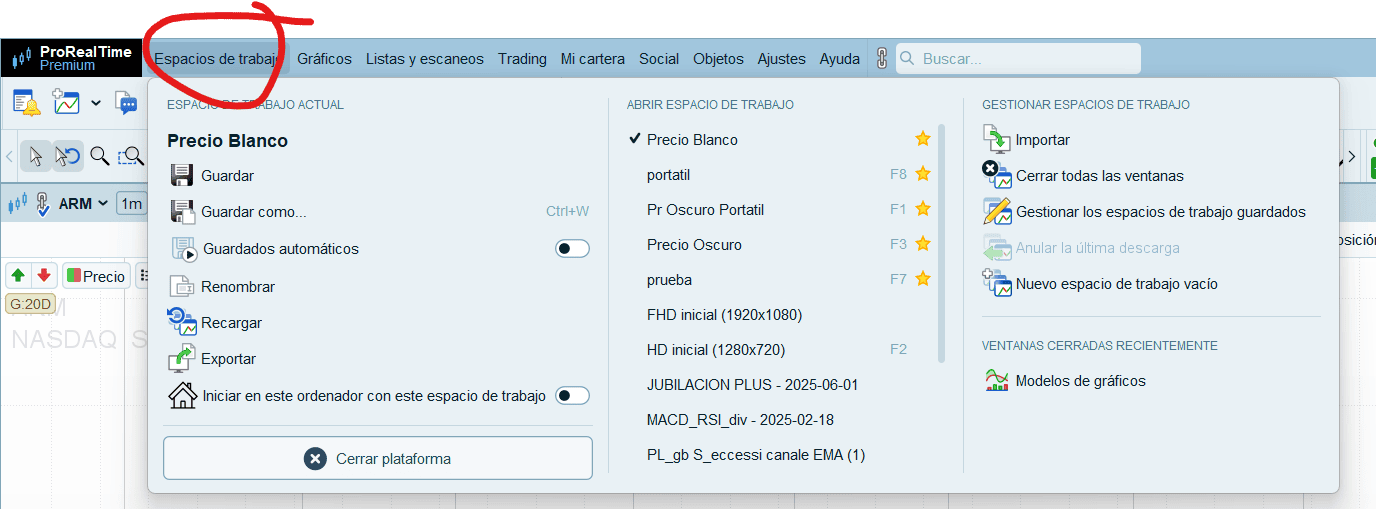
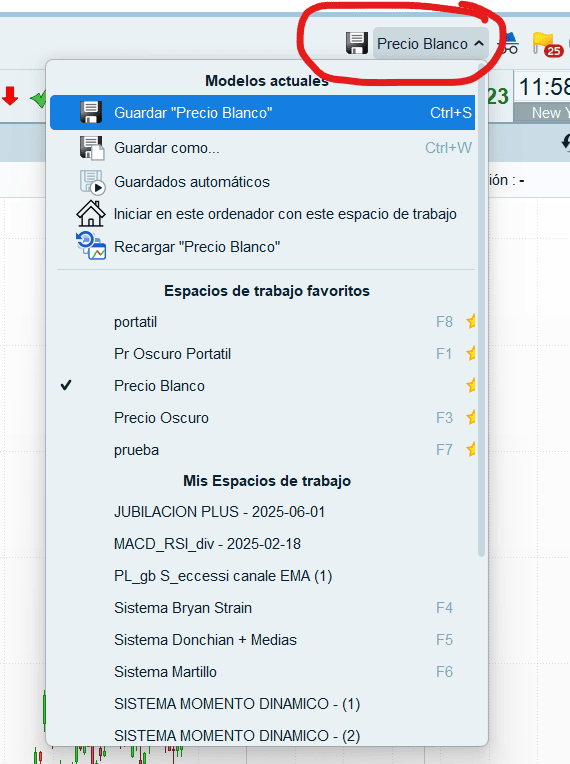
    Ciao. Se non avevi salvato quell’area di lavoro in precedenza, non potrai recuperarla. Tuttavia, puoi verificarlo cliccando su “Area di lavoro” e visualizzando quelle che hai salvato.

    Vedi screenshot

    Captura-de-pantalla-2026-07-09-175901.png Captura-de-pantalla-2026-07-09-175901.png Captura-de-pantalla-2026-07-09-175928.png Captura-de-pantalla-2026-07-09-175928.png
Viewing 2 posts - 1 through 2 (of 2 total)
  • You must be logged in to reply to this topic.

ProRealAI ProRealAI New

From idea to ProBuilder code in seconds.

Your coding copilot for ProRealTime™. Ask in plain English — get clean, ready-to-paste indicators, screeners and systems.

Available in 7 languages
Try ProRealAI

Chiusura accidentale finestre


Supporto Piattaforma: Grafici, Dati e Broker

New Reply
Author
author-avatar
Stenozar @stenozar Participant
Summary

This topic contains 1 reply,
has 2 voices, and was last updated by Iván GonzálezIván González

2 months, 1 week ago.

Topic Details
Forum: Supporto Piattaforma: Grafici, Dati e Broker
Language: Italian
Started: 07/09/2026
Status: Active
Attachments: 2 files
ProRealCode ProRealCode
Loading...