CANDELSTICK STOCHASTIC FIBO

Viewing 4 posts - 1 through 4 (of 4 total)
  • Author
    Posts
  • #249672 quote
    ARLEQUIN49ARLEQUIN49
    Participant
    Veteran

    Bonjour à tous,

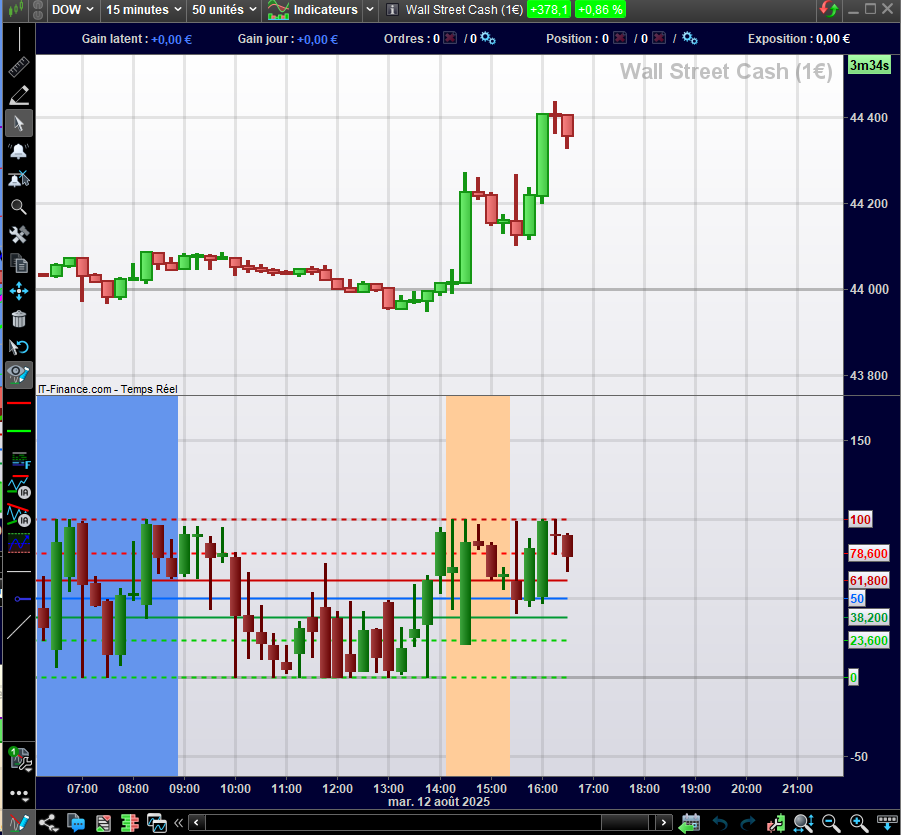
    Serait-il possible de mettre une valeur sur le dernier chandelier afin de pouvoir déclencher mes alertes

    //PRC_CandlesticksStochastic | indicator
    //25.10.2016
    //Nicolas @ http://www.prorealcode.com
    //Sharing ProRealTime knowledge

    period = 7
    ////////////////////////////////////////////////////////////////////
    //lastest highhest high and lowest low over “period”
    hh = highest[period](high)
    ll = lowest[period](low)
    scale = hh-ll
    dynO = ((Open-ll)/scale)*100
    dynH = ((High-ll)/scale)*100
    dynL = ((Low-ll)/scale)*100
    dynC = ((Close-ll)/scale)*100
    //candle color
    if Open>Close then
    r = 0
    g = 102
    else
    r = 102
    g = 0
    endif
    //draw candlesticks
    DRAWCANDLE(dynO,dynH,dynL,dynC) coloured(g,r,0) bordercolor (g,r,0)

    return 0 as ” 0 ” ,23.6 as “23.6 % level”,38.2 as ” 38.2 “, 50 as “50% level”, 61.8 as ” 61.8 ” ,78.6 as “78.6% level”, 100 as ” 100 ”

    // Variables :
    // period = 26

    Sans-titre-1.png Sans-titre-1.png
    #249674 quote
    robertogozzirobertogozzi
    Moderator
    Legend

    J’ai ajouté la ligne 26 (mySignal = 0), où vous pouvez saisir la valeur ou l’expression de votre choix.
    Les données ou le résultat seront renvoyés comme première valeur de la ligne 27 (RETURN) :

    //PRC_CandlesticksStochastic | indicator
    //25.10.2016
    //Nicolas @ http://www.prorealcode.com
    //Sharing ProRealTime knowledge
    
    period = 7
    ////////////////////////////////////////////////////////////////////
    //lastest highhest high and lowest low over "period"
    hh = highest[period](high)
    ll = lowest[period](low)
    scale = hh-ll
    dynO = ((Open-ll)/scale)*100
    dynH = ((High-ll)/scale)*100
    dynL = ((Low-ll)/scale)*100
    dynC = ((Close-ll)/scale)*100
    //candle color
    if Open>Close then
       r = 0
       g = 102
    else
       r = 102
       g = 0
    endif
    //draw candlesticks
    DRAWCANDLE(dynO,dynH,dynL,dynC) coloured(g,r,0) bordercolor (g,r,0)
    mySignal = 0   //you can set any value of your choice here
    return mySignal AS "Signal",0 as " 0 " ,23.6 as "23.6 % level",38.2 as " 38.2 ", 50 as "50% level", 61.8 as " 61.8 " ,78.6 as "78.6% level", 100 as " 100 "
    
    // Variables :
    // period = 26
    MySignalIndicator.itf
    #249693 quote
    ARLEQUIN49ARLEQUIN49
    Participant
    Veteran

    merci Roberto, mais je n’ai pas de valeur qui s’affiche sur le dernier chandelier. J’aimerai pouvoir ajouter une ligne dynamique horizontale.

    #249698 quote
    robertogozzirobertogozzi
    Moderator
    Legend

    Voilà:

    //PRC_CandlesticksStochastic | indicator
    //25.10.2016
    //Nicolas @ http://www.prorealcode.com
    //Sharing ProRealTime knowledge
    DEFPARAM DrawOnLastBarOnly = True
    period = 7
    ////////////////////////////////////////////////////////////////////
    //lastest highhest high and lowest low over "period"
    hh = highest[period](high)
    ll = lowest[period](low)
    scale = hh-ll
    dynO = ((Open-ll)/scale)*100
    dynH = ((High-ll)/scale)*100
    dynL = ((Low-ll)/scale)*100
    dynC = ((Close-ll)/scale)*100
    //candle color
    if Open>Close then
    r = 0
    g = 102
    else
    r = 102
    g = 0
    endif
    //draw candlesticks
    DRAWCANDLE(dynO,dynH,dynL,dynC) coloured(g,r,0) bordercolor (g,r,0)
    mySignal = (abs(close - close[1])>= (range+range[1]))//0   //you can set any value of your choice here
    IF mySignal <= 0 THEN
    mySignal = mySignal[1]
    ELSE
    Offset = high
    myBar  = BarIndex
    ENDIF
    IF mySignal > 0 THEN
    DrawSegment(myBar,Offset,BarIndex+20,Offset) style(line,2) coloured("Cyan")
    ENDIF
    return mySignal AS "Signal",0 as " 0 " ,23.6 as "23.6 % level",38.2 as " 38.2 ", 50 as "50% level", 61.8 as " 61.8 " ,78.6 as "78.6% level", 100 as " 100 "

    À la ligne 26, vous devrez définir votre condition pour que le segment apparaisse sur le dernièr chandelier (celle où le signal s’est produit).
    Si vous souhaitez qu’il commence sur le dernièr chandelier, remplacez la ligne 34 par ceci :

    DrawSegment(barIndex,Offset,BarIndex+20,Offset) style(line,2) coloured("Cyan")
    MySignalIndicator2.itf
Viewing 4 posts - 1 through 4 (of 4 total)
  • You must be logged in to reply to this topic.

ProRealAI ProRealAI New

Stuck on this ProBuilder code?

Describe what this topic is trying to build, in plain English, and ProRealAI writes the ProRealTime™ indicator, screener or system for you.

Available in 7 languages
Try ProRealAI

CANDELSTICK STOCHASTIC FIBO


ProBuilder : Indicateurs & Outils Personnalisés

New Reply
Author
author-avatar
ARLEQUIN49 @arlequin49 Participant
Summary

This topic contains 3 replies,
has 2 voices, and was last updated by robertogozzirobertogozzi
1 year, 1 month ago.

Topic Details
Forum: ProBuilder : Indicateurs & Outils Personnalisés
Language: French
Started: 08/12/2025
Status: Active
Attachments: 3 files
ProRealCode ProRealCode
Loading...