Call MTF indicator

Viewing 11 posts - 1 through 11 (of 11 total)
  • Author
    Posts
  • #192650 quote
    deleted23092025
    Participant
    New

    Example of strategy below

    timeframe (4 hour)

    indicator1 = ADX[15]
    indicator2 = ADXR[20]
    entrycond1 = (indicator1[1] > indicator2[1])

    timeframe ( default)

    indicator3 = ADX[10]
    indicator4 = ADXR[14]
    entrycond2 = (indicator3[1] > indicator4[2])

    If entrycond1 and entrycond2 then

    buy 1 contract at market

    If I would split it into indicator and strategy without the MTF I know that it would just be done like below:
    indicator:

    indicator1 = ADX[15]
    indicator2 = ADXR[20]
    entrycond1 = (indicator1[1] > indicator2[1])

    indicator3 = ADX[10]
    indicator4 = ADXR[14]
    entrycond2 = (indicator1[3] > indicator2[4])

    return entrycond1, entrycond2

    strategy:

    entrycond1, entrycond2 = CALL “indicator”

    if entrycond1 and entrycond2 then

    buy 1 contract at market.

    Above is just wihtout MTF but why is it not with MTF same with indicator and on strategy file
    Timeframe (4 hour)

    entrycond1 = call “indicator”

    timeframe (default)

    entrycond2 = call “indicator”

    if entrycond1 and entrycond2 then

    buy 1 contract at market.

    Why is it not working like above, and what am I doing wrong?

    #192683 quote
    robertogozzi
    Moderator
    Master

    Can you post a screenshot with the mouse sitting on a bar whose dataare visible?

    Do you always use a 4h TF for both the split indicator+strategy?

    #192691 quote
    deleted23092025
    Participant
    New

    I think I got missunderstood.

    The strategy above is just random, I dont even know if it does work. I just want to know how to CALL for a indicator when using MTF.

    #192692 quote
    deleted23092025
    Participant
    New
    indicator1 = random1
    indicator2 = random2
    entrycond1 = (random1 > random2])
    
    indicator3 = random3
    indicator4 = random4
    entrycond2 = (random3 > random4)
    
    return entrycond1, entrycond2


    timeframe (4 hours)
    entrycond1 = CALL "indicator"
    
    timeframe (default)
    entrycond2 = CALL "indicator"
    
    if entrycond1 and entrycond2 then
    buy 1 contract at market
    endif

    Why does it not work like this? How should I be doing it to make it work? I do not use this code above I am just talking in general. What am I doing wrong with the CALL on MTF.

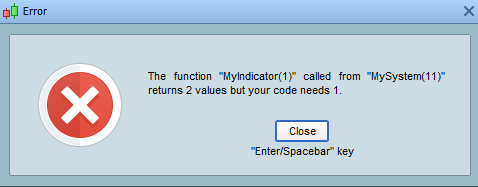
    Because when I do call like this (wiht my other strategies) I get this message “the function “indicator” called from “strategy” returns 21 values but your codes needs 2. I can not understand what I am doing wrong..

    #192695 quote
    deleted23092025
    Participant
    New

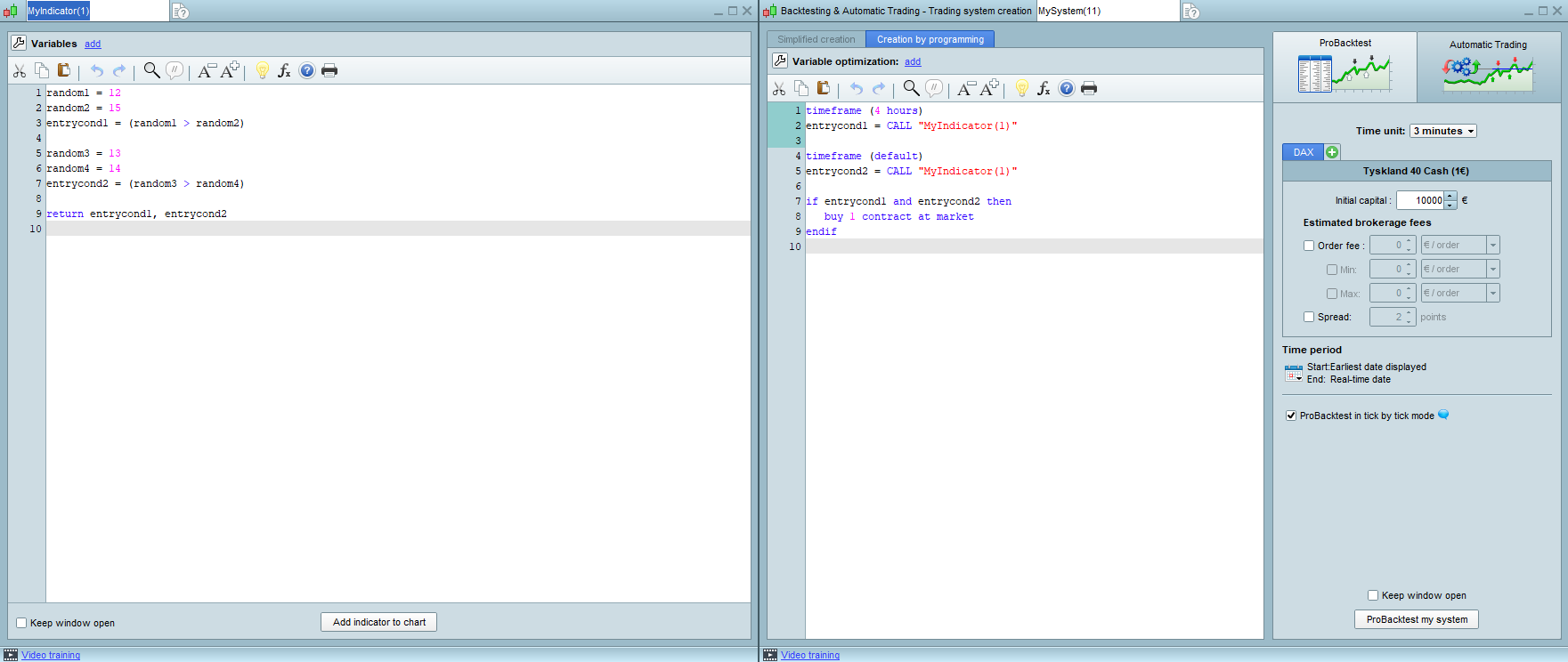
    Attached pictures of what I mean.. What am I doing wrong here?

    8f923852b52adaa7c2f1976139843b37.png 8f923852b52adaa7c2f1976139843b37.png 5c6a65d4f1cda69d22db23bcd1bb9c07.png 5c6a65d4f1cda69d22db23bcd1bb9c07.png
    #192705 quote
    robertogozzi
    Moderator
    Master

    The indicator returns 2 values, so you need to use 2 variables when using CALL.

    thanked this post
    #192732 quote
    deleted23092025
    Participant
    New

    Thanks alot!

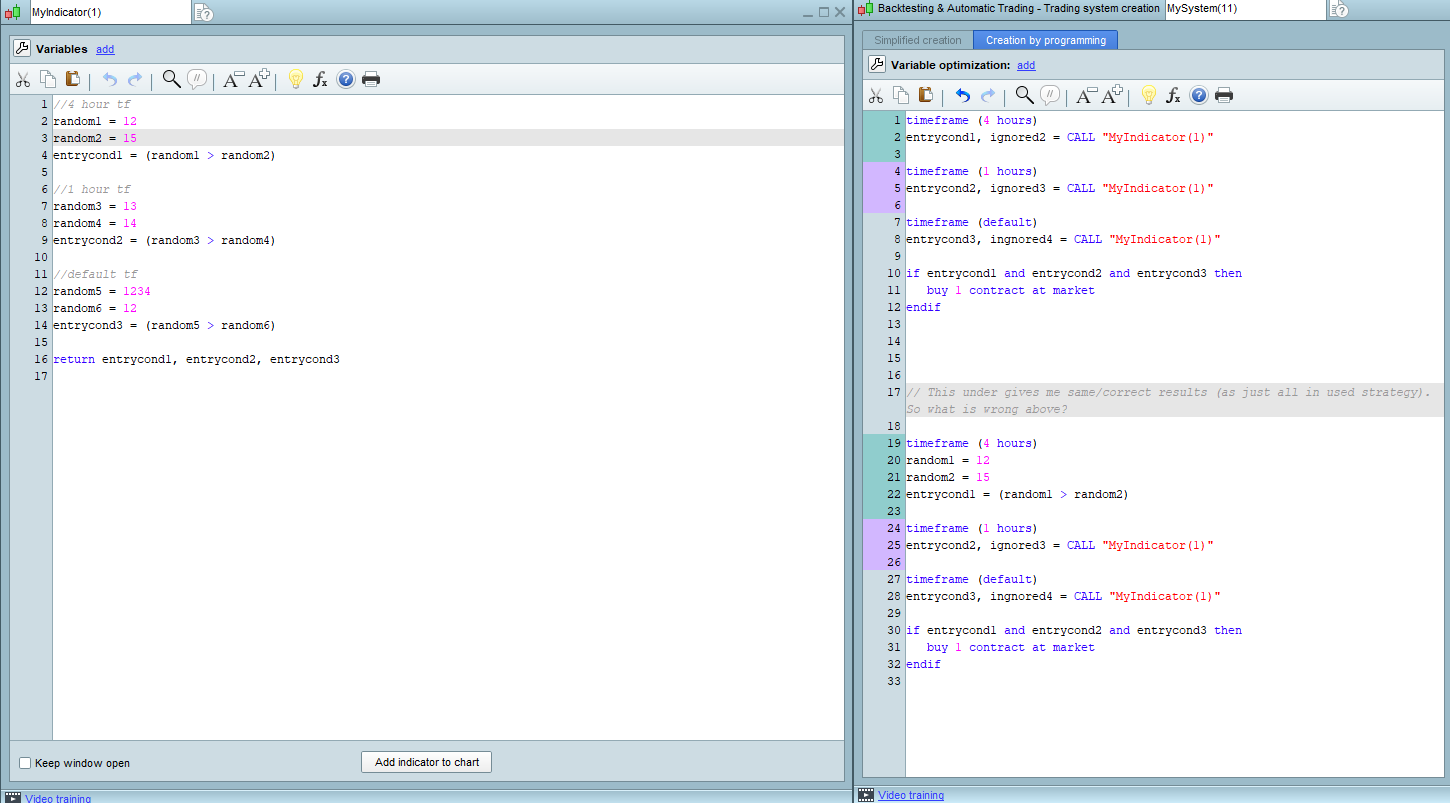
    Can you explain this (attached photo)?

    7552d203554a9fb3c163db261ffbb0e4.png 7552d203554a9fb3c163db261ffbb0e4.png
    #192743 quote
    robertogozzi
    Moderator
    Master

    The indicator RETURNs 3 data so you need to use 3 variables when CALLing it.

    #192744 quote
    deleted23092025
    Participant
    New

    Ofcourse I did wrong in the example. But even with 3 data and 3 varialbes on calling it, it somehows give different result. It works to backtest but the result differ when its 3 different timesframes (it does not work correctly)

    #192745 quote
    robertogozzi
    Moderator
    Master

    Post the complete code and details about issues, date and time of candles with wrong data, instrument and default TF used, so I can get the same results.

    thanked this post
    #192785 quote
    deleted23092025
    Participant
    New

    I solved it. Thanks anyway Roberto, you are a good man. Helping people like this!

Viewing 11 posts - 1 through 11 (of 11 total)
  • You must be logged in to reply to this topic.

Call MTF indicator


ProOrder: Automated Strategies & Backtesting

New Reply
Author
Summary

This topic contains 10 replies,
has 2 voices, and was last updated by deleted23092025
3 years, 9 months ago.

Topic Details
Forum: ProOrder: Automated Strategies & Backtesting
Language: English
Started: 05/04/2022
Status: Active
Attachments: 3 files
Logo Logo
Loading...