CALL Indicator

Viewing 9 posts - 1 through 9 (of 9 total)

  • Author
    Posts
  • #74698 quote
    Cameron
    Participant
    New

    Hi all.  Before I ask this question, I promise I have searched the site and am struggling to get this to work.

    I am trying to call an indicator however it keeps saying

    // Conditions to enter long positions
    ignored, ignored, ignored, ignored, indicator1, ignored = CALL CamTDI


    The indicator is the TDI which I got from this site but I cant work out how to declare values and or parameters.

    The TDI indicator is below and I was hoping someone could assist or tell me what I am missing


    lengthRSI = 13
    lengthband = 34
    lengthrsipl = 2
    lengthtradesl = 7
    
    r = rsi[lengthrsi](close)
    ma = average[lengthband](r)
    offs = (1.6185 * std[lengthband](r))
    up = ma+offs
    dn = ma-offs
    mid = (up+dn)/2
    mab = average[lengthrsipl](r)
    mbb = average[lengthtradesl](r)
    
    lineup = 75
    linemid = 50
    linedown = 25
    
    RETURN lineup as "line up", linemid as "line mid", linedown as "line down", up coloured(0,0,255) as "up", dn coloured(0,0,255) as "dn", mid coloured(255,165,0) as "mid", mab coloured(0,255,0), mbb coloured(255,0,0)
    #74704 quote
    Vonasi
    Moderator
    Master

    Please use the ‘Insert PRT Code’ button when putting code in your future posts to make it more readable. I have tidied up your post for you. 🙂

    #74705 quote
    Vonasi
    Moderator
    Master

    The indicator returns 8 values but you only have 6 in your CALL instruction.

    #74709 quote
    Cameron
    Participant
    New

    Thanks heaps for that. How would I write it to call even 2? Sorry I have no idea

    #74711 quote
    Cameron
    Participant
    New

    I am just trying to call the indicator and have no idea how to do it

    #74726 quote
    Vonasi
    Moderator
    Master

    Have you read this:

    CALL

    #74728 quote
    robertogozzi
    Moderator
    Master

    To get returned values you simply have to:

    lineup,linemid,linedown,up,dn,mid,mab,mbb=CALL CamTDI  //or x1,x2,x3,x4,x5,x6,x7,x8=CALL CamTDI or ignored,ignored,x3,x4,x5,x6,x7,ignored=CALL CamTDI (choose the values of interest for you)

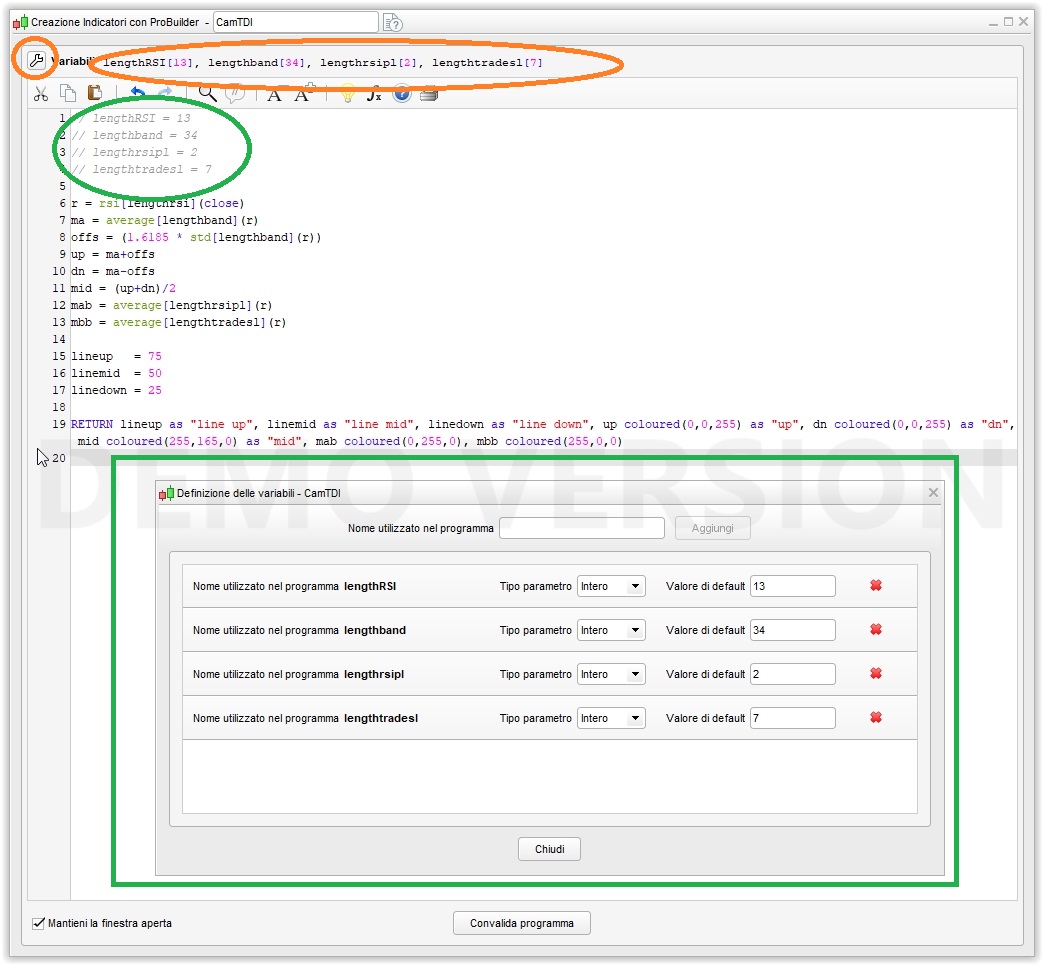
    If, instead, you want to change the values passed on to the indicator, then you have not to declare them inside the indicator as static variables, but declare them from within ProBuilder clicking on the upper left spanner and then iserting the names of the variables in the desidered order (comment them out in the code), then call it with either constants or variables:

    lineup,linemid,linedown,up,dn,mid,mab,mbb=CALL CamTDI(13,34,2,7)
    //              or
    v1=13
    ve=34
    v3=2
    v4=7
    lineup,linemid,linedown,up,dn,mid,mab,mbb=CALL CamTDI(v1,v2,v3,v4)

    documentation will be of further help, as Vonasi suggested.

    #74754 quote
    Cameron
    Participant
    New

    Thank you so much gents.

    I will get cracking on it.

    i did read the link that was posted however I still couldn’t work it out . Thanks so much for your guidance. It is very much appreciated

    #74759 quote
    robertogozzi
    Moderator
    Master

    You can import the attached file.

    Nicolas thanked this post
Viewing 9 posts - 1 through 9 (of 9 total)

  • You must be logged in to reply to this topic.

CALL Indicator


ProBuilder: Indicators & Custom Tools

New Reply
Author
author-avatar
Cameron @cameron Participant
Summary

This topic contains 8 replies,
has 3 voices, and was last updated by robertogozzi
7 years, 7 months ago.

Topic Details
Forum: ProBuilder: Indicators & Custom Tools
Language: English
Started: 06/29/2018
Status: Active
Attachments: 2 files
Logo Logo
Loading...