amleiorer cet indic James Bond

Viewing 5 posts - 1 through 5 (of 5 total)

  • Author
    Posts
  • #261854 quote
    Géraud LaveissiereGéraud Laveissiere
    Participant
    Senior

    condition

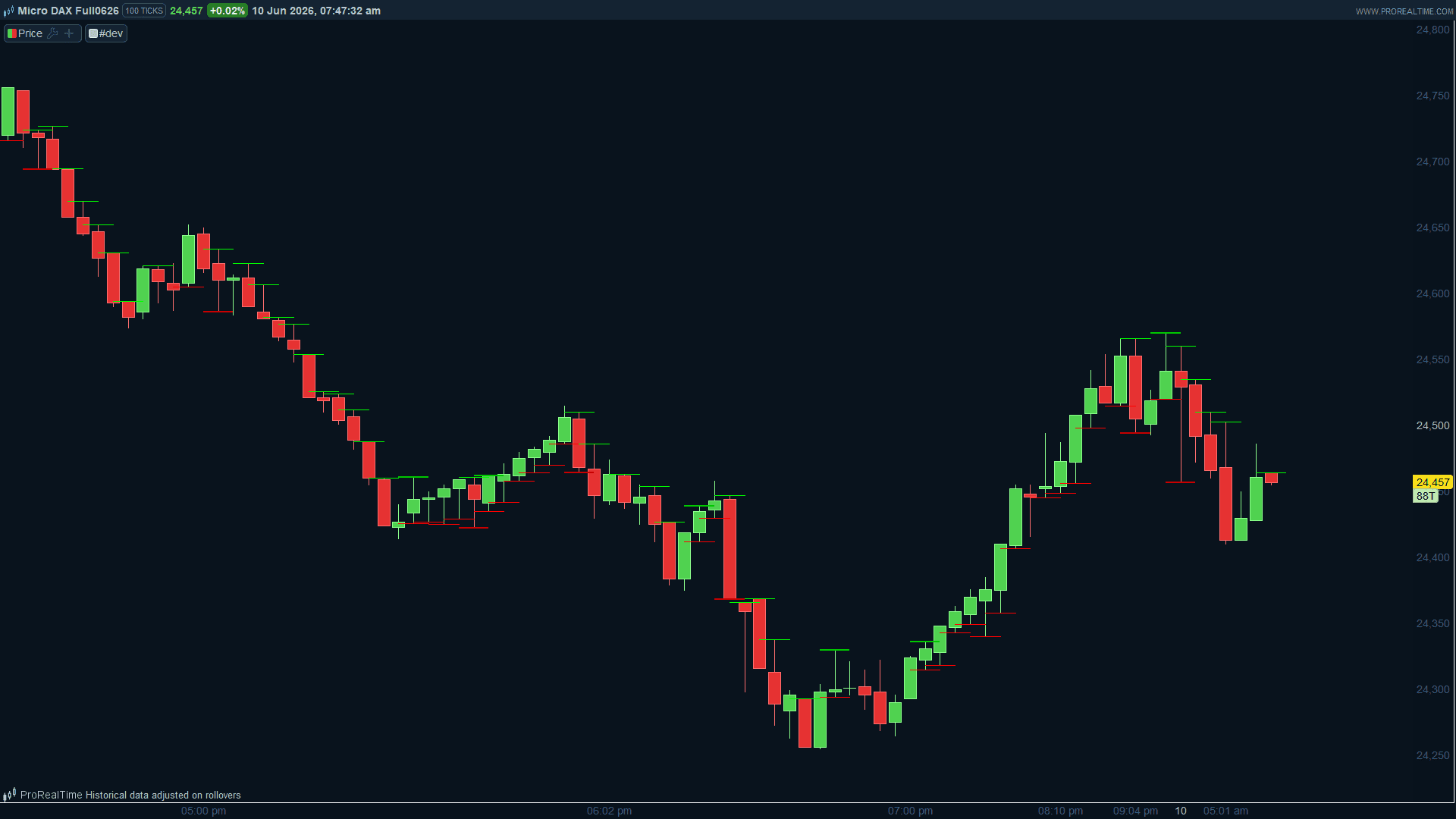
    1-si sar 0.07/0.7 vert ( sous la bougie) et bougie verte alors sell sur le plus bas de la bougie ( trait rouge)

    2-si sar rouge ( donc au dessus de la bougie et bougie rouge alors signal buy (trait vert) sur le plus haut de la bougie.

    3- si premier changement de sar

    sar vert bougie verte alors buy sur le plus haut de la bougie et inversement.


    cet indic ne donne pas tous les signaux correctement. Merci bien


    //@version=2//@version=2
    // Code pour ProRealTime v12
    // Trace un trait rouge sur le plus bas d'une bougie verte si SAR vert
    // Trace un trait vert sur le plus haut d'une bougie rouge si SAR rouge
     
    // Paramètres du SAR
    SARStep = 0.07
    SARMax = 0.7
     
    // Calcul du SAR
    SARValue = sar[SARStep, SARStep, SARMax]
     
    // Définition des conditions
    isBullishSAR = close > SARValue // SAR vert (hausse)
    isBearishSAR = close < SARValue // SAR rouge (baisse)
     
    // Trait rouge sur le plus bas d'une bougie verte si SAR vert
    if isBullishSAR and close > open then
    drawSegment(barindex[1], low[1], barindex + 2, low[1]) coloured(255, 0, 0)style(line,1)
    endif
     
    // Trait vert sur le plus haut d'une bougie rouge si SAR rouge
    if isBearishSAR and close < open then
    drawSegment(barindex[1], high[1], barindex + 2, high[1]) coloured(0, 255, 0)style(line,1)
    endif
    return
    
    #261856 quote
    NicolasNicolas
    Keymaster
    Legend

    La condition 3 (premier changement de SAR) était absente : elle est maintenant détectée avec SARFlipToBull et SARFlipToBear via la comparaison avec la barre précédente [1].

    Les traits du flip (condition 3) sont légèrement plus épais (size 2) pour les distinguer des signaux normaux.

    // Paramètres du SAR
    SARStep = 0.07
    SARMax = 0.7
    
    // Calcul du SAR
    SARValue = SAR[SARStep, SARStep, SARMax]
    
    // SAR vert (sous le prix) = haussier, SAR rouge (au-dessus) = baissier
    isBullishSAR = close > SARValue
    isBearishSAR = close < SARValue
    
    // Détection du premier changement de SAR (flip)
    SARFlipToBull = isBullishSAR AND NOT isBullishSAR[1]
    SARFlipToBear = isBearishSAR AND NOT isBearishSAR[1]
    
    // Condition 1 : SAR vert + bougie verte => trait rouge sur le plus bas (signal SELL)
    if isBullishSAR AND close > open then
       DRAWSEGMENT(barindex - 1, low, barindex + 1, low) COLOURED(255, 0, 0) STYLE(line, 1)
    endif
    
    // Condition 2 : SAR rouge + bougie rouge => trait vert sur le plus haut (signal BUY)
    if isBearishSAR AND close < open then
       DRAWSEGMENT(barindex - 1, high, barindex + 1, high) COLOURED(0, 255, 0) STYLE(line, 1)
    endif
    
    // Condition 3a : Flip SAR -> haussier + bougie verte => trait vert épais sur le plus haut (BUY)
    if SARFlipToBull AND close > open then
       DRAWSEGMENT(barindex - 1, high, barindex + 1, high) COLOURED(0, 200, 0) STYLE(line, 2)
    endif
    
    // Condition 3b : Flip SAR -> baissier + bougie rouge => trait rouge épais sur le plus bas (SELL)
    if SARFlipToBear AND close < open then
       DRAWSEGMENT(barindex - 1, low, barindex + 1, low) COLOURED(200, 0, 0) STYLE(line, 2)
    endif
    
    RETURN


    Iván González thanked this post
    DXSXXXX-100-ticks.png DXSXXXX-100-ticks.png
    #261870 quote
    Géraud LaveissiereGéraud Laveissiere
    Participant
    Senior

    merci bien Nicolas, le seul probleme est l affichhge . Dans la version que jai indiquée, le trait commence au niveau de la bougie(ou de sa meche) et s’etend à droite. la version que tu as envoyée , le trait s’affiche au milieu de la meche ( de part et d’autre) et le grahique est moins lisible. Comment le modifier? Merci.

    #261873 quote
    robertogozzirobertogozzi
    Moderator
    Legend

    Essayez cette version si elle fonctionne :

    // Paramètres du SAR
    SARStep = 0.07
    SARMax = 0.7
    
    
    // Calcul du SAR
    SARValue = SAR[SARStep, SARStep, SARMax]
    
    
    // SAR vert (sous le prix) = haussier, SAR rouge (au-dessus) = baissier
    isBullishSAR = close > SARValue
    isBearishSAR = close < SARValue
    
    
    // Détection du premier changement de SAR (flip)
    SARFlipToBull = isBullishSAR AND NOT isBullishSAR[1]
    SARFlipToBear = isBearishSAR AND NOT isBearishSAR[1]
    
    
    // Condition 1 : SAR vert + bougie verte => trait rouge sur le plus bas (signal SELL)
    if isBullishSAR AND close > open then
    DRAWSEGMENT(barindex - 1, low[1], barindex + 2, low[1]) COLOURED(255, 0, 0) STYLE(line, 1)
    endif
    
    
    // Condition 2 : SAR rouge + bougie rouge => trait vert sur le plus haut (signal BUY)
    if isBearishSAR AND close < open then
    DRAWSEGMENT(barindex - 1, high[1], barindex + 2, high[1]) COLOURED(0, 255, 0) STYLE(line, 1)
    endif
    
    
    // Condition 3a : Flip SAR -> haussier + bougie verte => trait vert épais sur le plus haut (BUY)
    if SARFlipToBull AND close > open then
    DRAWSEGMENT(barindex - 1, high[1], barindex + 2, high[1]) COLOURED(0, 200, 0) STYLE(line, 2)
    endif
    
    
    // Condition 3b : Flip SAR -> baissier + bougie rouge => trait rouge épais sur le plus bas (SELL)
    if SARFlipToBear AND close < open then
    DRAWSEGMENT(barindex - 1, low[1], barindex + 2, low[1]) COLOURED(200, 0, 0) STYLE(line, 2)
    endif
    
    
    RETURN
    
    #261941 quote
    Géraud LaveissiereGéraud Laveissiere
    Participant
    Senior

    Super merci bien

Viewing 5 posts - 1 through 5 (of 5 total)
  • You must be logged in to reply to this topic.

ProRealAI ProRealAI New

Stuck on this ProBuilder code?

Describe what this topic is trying to build, in plain English, and ProRealAI writes the ProRealTime™ indicator, screener or system for you.

Available in 7 languages
Try ProRealAI

amleiorer cet indic James Bond


ProBuilder : Indicateurs & Outils Personnalisés

New Reply
Summary

This topic contains 4 replies,
has 3 voices, and was last updated by Géraud LaveissiereGéraud Laveissiere
3 months, 2 weeks ago.

Topic Details
Forum: ProBuilder : Indicateurs & Outils Personnalisés
Language: French
Started: 06/09/2026
Status: Active
Attachments: 1 files
ProRealCode ProRealCode
Loading...