ALMA-Indicator with additional bands!

Viewing 5 posts - 1 through 5 (of 5 total)
  • Author
    Posts
  • #86070 quote
    micha2012micha2012
    Participant
    Average

    Dear All,

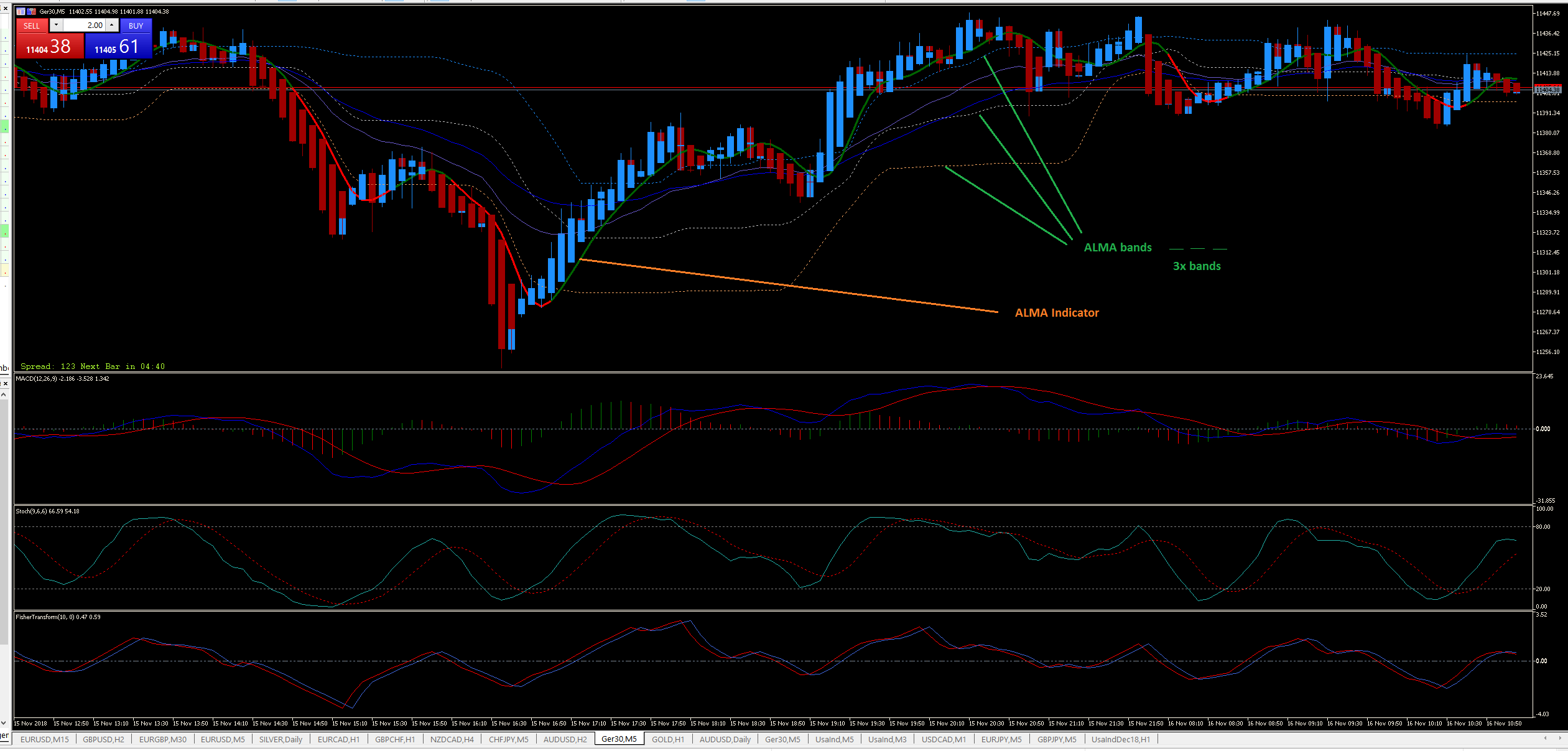
    I frequently use ALMA-indicator for signals; It is very relyable for me. BUT, I would like to “improve” by adding 3x lines (bands) to the original ALMA-indicator (see photos attached).
    MY idea:LONG
    – when [close] cross over ALMA –> open 1x position (+1)
    – when [close] cross over “middle” band –> add 1x position (+2)
    – if [close] cross over “highest” band –> close 1x position (+1)
    – when [close] cross under ALMA –> close all positions (+/- 0)

    Please, who could help my coding these bands? I attached the code from MT5; hopefully it will be helpful!
    Thank you very much in advance.
    Micha

    ALMA_new.png ALMA_new.png Alma_1_3.ex5 Alma_1_3.mq5
    #86089 quote
    NicolasNicolas
    Keymaster
    Legend

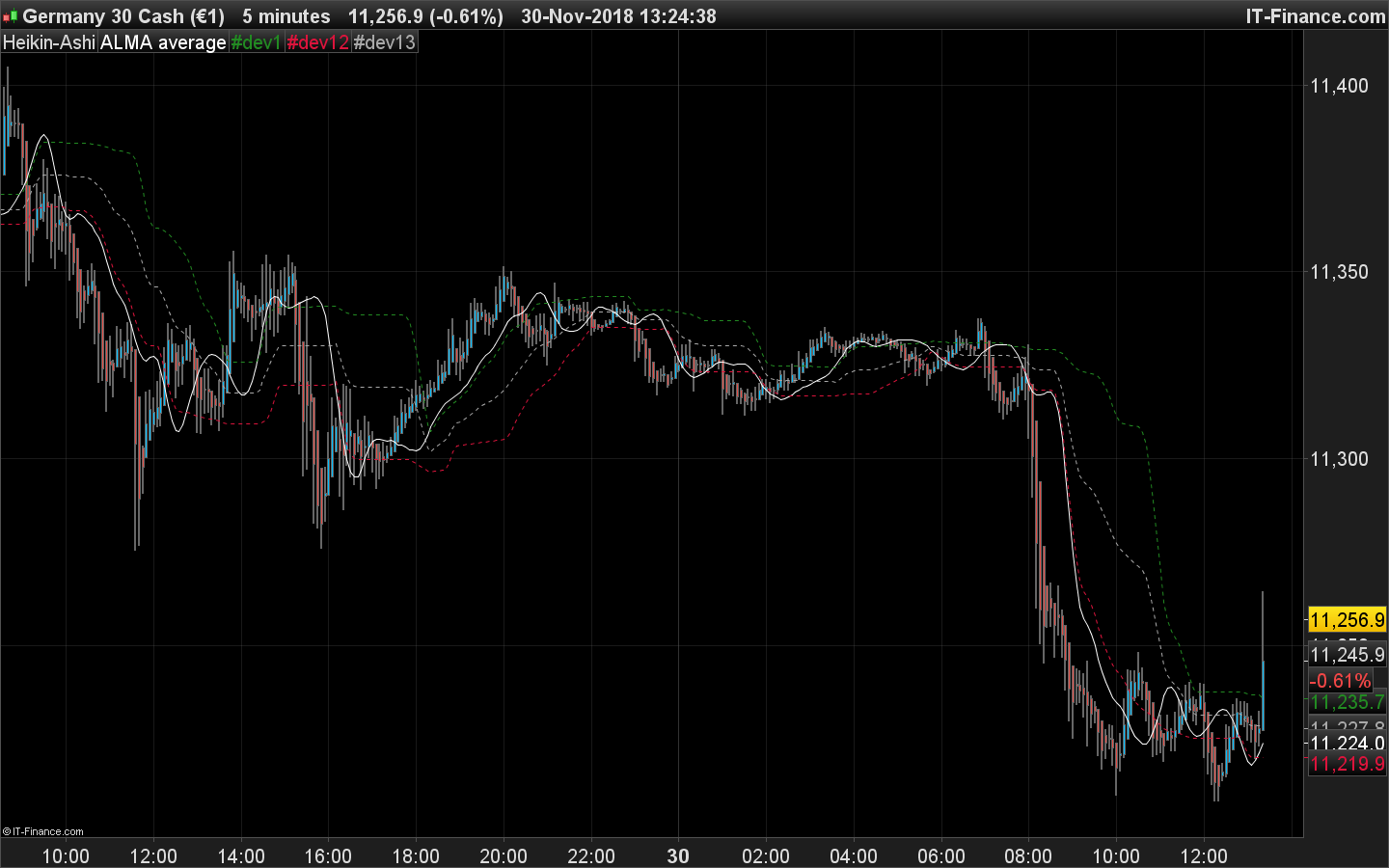
    That’s an ALMA average with floating levels made of last X periods Highs/Lows of the ALMA. Let me look at this..

    #86091 quote
    NicolasNicolas
    Keymaster
    Legend

    Here we go:

    Window = 14
    Sigma = 6
    Offset = 0.25
    flPeriod  = 25 // Floating levels look back period
    flLevelUp   = 90 // Floating levels up level %
    flLevelDown = 10 // Floating levels down level %
    
    Price = customclose
    m = (Offset * (Window - 1))
    s = Window/Sigma
    
    WtdSum = 0
    CumWt  = 0
    
    for k = 0 to Window - 1 do
    Wtd = Exp(-((k-m)*(k-m))/(2*s*s))
    WtdSum = WtdSum + Wtd * Price[Window - 1 - k]
    CumWt = CumWt + Wtd
    next
    
    val = WtdSum / CumWt
    
    imin = lowest[FlPeriod](val)
    imax = highest[FlPeriod](val)
    rrange = imax-imin
    flup = imin+FlLevelUp  *rrange/100.0
    fldn = imin+FlLevelDown*rrange/100.0
    flmi = imin+50            *rrange/100.0
    
    return val as "ALMA average", flup coloured(34,139,34) style(dottedline), fldn coloured(220,20,60) style(dottedline), flmi coloured(169,169,169) style(dottedline)

    There are different ways to color the ALMA (that I did not code), depending of its position compared to the bands or by its own slope, do you use one of them?

    ALMA-average-with-bands.png ALMA-average-with-bands.png
    #86100 quote
    micha2012micha2012
    Participant
    Average

    Dear Nicolas,
    thank you very much for your support. Please find below my ALMA-indicator..

    The change of the ALMA-colour is very important; could you please code with the original colour change?

    Merci beaucoup.

    Micha

    // parameters
    DEFPARAM CalculateOnLastBars = 1000
    Window = 10
    Sigma = 6
    Offset = 0.55
     
    Price = Close
     
    m = (Offset * (Window - 1))
    s = Window/Sigma
     
    WtdSum = 0
    CumWt  = 0
     
    for k = 0 to Window - 1 do
    Wtd = Exp(-((k-m)*(k-m))/(2*s*s))
    WtdSum = WtdSum + Wtd * Price[Window - 1 - k]
    CumWt = CumWt + Wtd
    next
     
    ALAverage = WtdSum / CumWt
     
    RETURN ALAverage
    
    #86102 quote
    micha2012micha2012
    Participant
    Average

    Hello Nicolas,

    I was able to add ALMA-colour myself:

    Window = 10
    Sigma = 6
    Offset = 0.55
    flPeriod  = 25 // Floating levels look back period
    flLevelUp   = 90 // Floating levels up level %
    flLevelDown = 10 // Floating levels down level %
     
    Price = customclose
    m = (Offset * (Window - 1))
    s = Window/Sigma
     
    WtdSum = 0
    CumWt  = 0
     
    for k = 0 to Window - 1 do
    Wtd = Exp(-((k-m)*(k-m))/(2*s*s))
    WtdSum = WtdSum + Wtd * Price[Window - 1 - k]
    CumWt = CumWt + Wtd
    next
     
    ALAverage = WtdSum / CumWt
     
    imin = lowest[FlPeriod](ALAverage)
    imax = highest[FlPeriod](ALAverage)
    rrange = imax-imin
    flup = imin+FlLevelUp  *rrange/100.0
    fldn = imin+FlLevelDown*rrange/100.0
    flmi = imin+50            *rrange/100.0
     
    return ALAverage as "ALMA average", flup coloured(34,139,34) style(dottedline), fldn coloured(220,20,60) style(dottedline), flmi coloured(169,169,169) style(dottedline)
    

    Thank you very much.

    All the best,

    Micha

Viewing 5 posts - 1 through 5 (of 5 total)

  • You must be logged in to reply to this topic.

ProRealAI ProRealAI New

Stuck on this ProBuilder code?

Describe what this topic is trying to build, in plain English, and ProRealAI writes the ProRealTime™ indicator, screener or system for you.

Available in 7 languages
Try ProRealAI

ALMA-Indicator with additional bands!


ProBuilder: Indicators & Custom Tools

New Reply
Author
author-avatar
micha2012 @micha2012 Participant
Summary

This topic contains 4 replies,
has 2 voices, and was last updated by micha2012micha2012
7 years, 10 months ago.

Topic Details
Forum: ProBuilder: Indicators & Custom Tools
Language: English
Started: 11/30/2018
Status: Active
Attachments: 4 files
ProRealCode ProRealCode
Loading...