


Aide: Prix projetee sur l’axe_X

Viewing 2 posts - 1 through 2 (of 2 total)

  • Author
    Posts
  • #170424 quote
    RicLgRicLg
    Participant
    Senior

    Bonjour
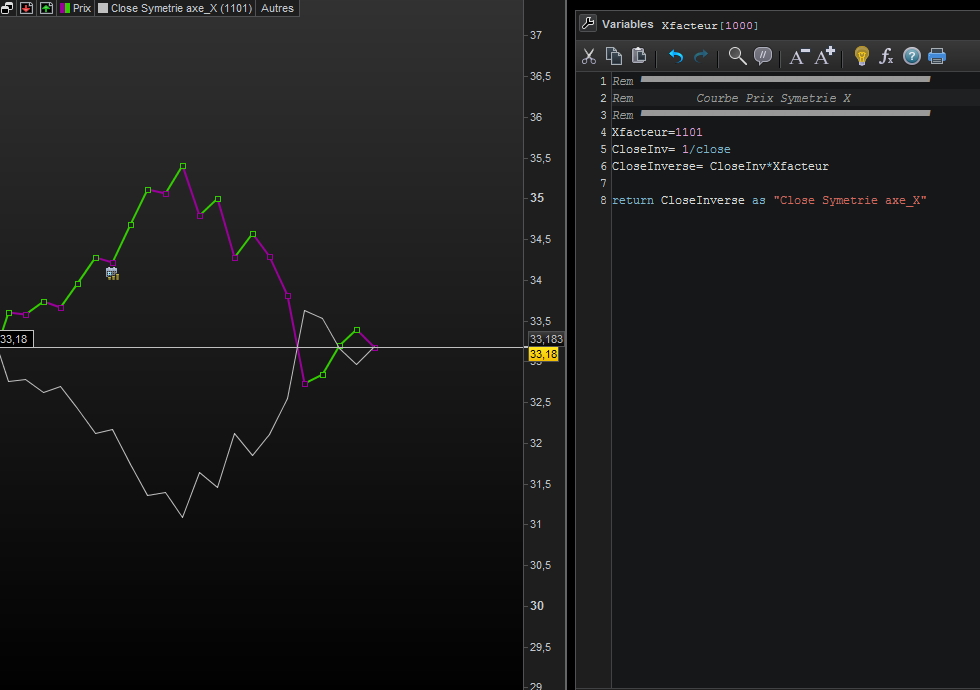
    Je souhaiterai représenter la courbe de prix projetée sur l’axe_X.
    Sur mon code , J’ai saisi la valeur de Xfacteur=1101 manuellement.
    Comment automatiser le calcul de Xfacteur?
    Merci pour votre aide
    Bien à Vous


    Rem ▀▀▀▀▀▀▀▀▀▀▀▀▀▀▀▀▀▀▀▀▀▀▀▀
    Rem         Courbe Prix Symetrie X
    Rem ▀▀▀▀▀▀▀▀▀▀▀▀▀▀▀▀▀▀▀▀▀▀▀▀
    Xfacteur=1101
    CloseInv= 1/close
    CloseInverse= CloseInv*Xfacteur
    
    return CloseInverse as "Close Symetrie axe_X"
    Courbe-Prix-Symetrie-axe_X.png Courbe-Prix-Symetrie-axe_X.png
    #171506 quote
    CholiverCholiver
    Participant
    Veteran

    Bonsoir,
    J’avoue être intéressé par la suite.
    Représenter les cours d’une autre manière mérite d’être étudié à mon sens.
    A suivre donc… 🙂

Viewing 2 posts - 1 through 2 (of 2 total)
  • You must be logged in to reply to this topic.

ProRealAI ProRealAI New

Stuck on this ProBuilder code?

Describe what this topic is trying to build, in plain English, and ProRealAI writes the ProRealTime™ indicator, screener or system for you.

Available in 7 languages
Try ProRealAI

Aide: Prix projetee sur l’axe_X


ProBuilder : Indicateurs & Outils Personnalisés

New Reply
Author
author-avatar
RicLg @riclg Participant
Summary

This topic contains 1 reply,
has 2 voices, and was last updated by CholiverCholiver

5 years, 3 months ago.

Topic Details
Forum: ProBuilder : Indicateurs & Outils Personnalisés
Language: French
Started: 05/26/2021
Status: Active
Attachments: 1 files
ProRealCode ProRealCode
Loading...

